Loving v3 of Plexamp and can’t wait for Chromecast and Android Auto support on my phone, but on my computer I’ve been having a bit of an issue:
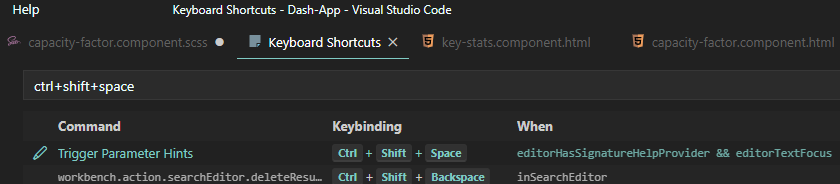
Are the keybindings in the same place? Ctrl+Shift+Space ruins VSCode’s Trigger Parameter Hints function which is super useful
Thanks for the reply! Maybe as a quick fix until that’s ready could you add some way to just turn off all keyboard shortcuts (except media keys) for us programmers who are the only ones who seem to use random-ass key-presses 200 times a day?
Agreed. Very annoying that the keyboard hijacks can’t be configured in any way, or at least just turned off. I’d rather not have them, than being able to configure them.
Please prioritize a way to handle this very soon.
It would make more sense to get the core app working properly aka not having it hijack keyboard shortcuts system wide before adding new features like casting. I personally have no use for casting. Casting uses lossy compression and it’s never made sense to me to ruin the quality of my music when playing it on a high end system.
fair for your own priorities, but bear in mind the number of people asking for casting vs the number of people having issues with keybindings was quite large.
fwiw, your view of casting is a bit unfairly biased as well; chromecast e.g. can direct play FLAC directly from the source. it’s unlike AirPlay/BlueTooth.
Can you at least remove the default bindings, if you don’t have time to implement robust keyboard shortcut customization system? Like ctrl+shift+space. It’s impossible to use Visual Studio while Plexamp is running…
Yes, just being able to simply remove those default bindings would be great. For me, it’s even worse than not being able to use Plexamp together with some other app. I can’t use Plexamp at all, because I use Cmd+Shift+Space to change keyboard layout, this combo has been engrained in my muscle memory for years and years.
We are not asking for a new feature but fixing a bug in the software. The keybinding bug is interfering with the normal operation of people’s systems. Why wasn’t this caught during UX testing?