That’s fine - just figured it might answer the issue about why I was seeing slightly odd things. 
I have it working now (since I re-added the share in the UI) so all good. Thank you
That’s fine - just figured it might answer the issue about why I was seeing slightly odd things.
I have it working now (since I re-added the share in the UI) so all good. Thank you
Understood . I will be watching for that.
It was my intent to respect anything the admin did create which allows the flexibility you need / want during normal operations.
While there is that UI oddity, you have the functionality intended & needed after you recreated yourself.
I have the same problem. The could see no volume for the folder created by the script, and keep getting the error after creating the folder myself. I’m not an advanced used, so difficult to me to troubleshoot… thanks.
I am not understanding why creating a share named PlexData on the default volume or where PMS is installed is such a problem.
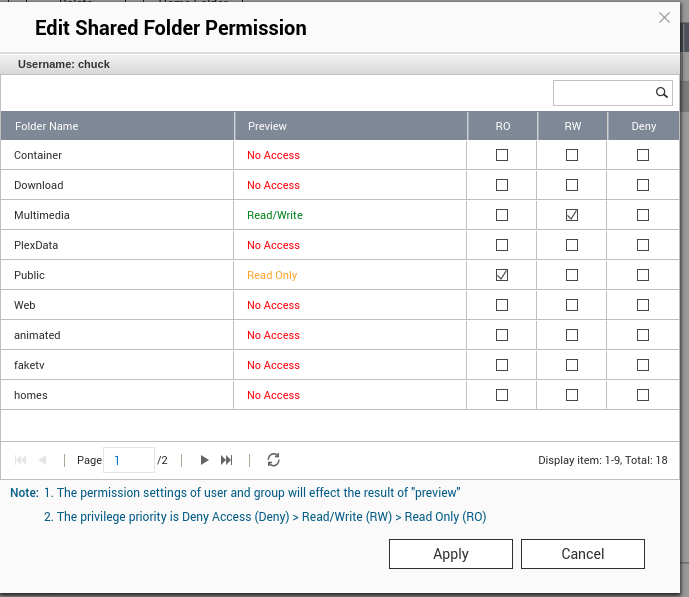
In this screenshot snippet, it can be seen where I cannot reproduce the issue with DataVol2 ( CACHEDEV2_DATA ) via the script or via the Shared Folders interfaces.
Equally,
Why the command
addshare PlexData /path/to/PlexData -uw:admin
is probematic. Either QTS works or it doesn’t.
I can foresee where QTS might not let you sign in as another user and see where the PlexData share is (making the displayed value APPEAR blank) if you don’t have permission to access it.
EDIT: I’ve checked futher. Administrators group user chuck can see the values but, per the creation options, cannot access it.
From the other system here:
Hi, Have the same problem:
ERROR: Could not create PlexData share. Further assistance is available in our Support Forums. Continuing without.
Will try to do the manual steps provided then i will post the result.
Another great diagnostic step is to invoke plex.sh start manually at the shell prompt then copy/paste the output here. It will show what it didn’t like.
Ok… here it is:
[/share/CACHEDEV1_DATA/.qpkg/PlexMediaServer] # ./plex.sh start
ERROR: Could not create PlexData share. Further assistance is available in our Support Forums. Continuing without.
Starting Plex Media Server…
[/share/CACHEDEV1_DATA/.qpkg/PlexMediaServer] # Error: Unable to set up server: listen: Address already in use (N5boost10wrapexceptINS_6system12system_errorEEE)
PMS was restarted too quickly (the “address already in use” error – harmless).
Please do the following from the shell prompt
# cd /share
# echo Plex*
# ls -la | grep PlexData
Well, I think i found the problem, the result for your shell prompt give nothing:
[/] # cd /share
[/share] # echo Plex*
Plex*
[/share] # ls -la | grep PlexData
[/share] #
But… i look for that folder and find it in here:
[/] # cd PlexData
[/PlexData] # ls
Plex Media Server@
with ls -la:
lrwxrwxrwx 1 admin administrators 26 2020-07-22 14:19 Plex Media Server -> /Library/Plex Media Server
I have seen that on several systems but cannot figure out why PlexData is being created in the root.
PMS is installed in some /share/CACHEDEV*_DATA/.qpkg/PlexMediaServer.
I use that Install_Path and use the /share/CACHEDEV*_DATA/ part only.
Which volume naming do you have ? CACHEDEV? MDX? Something else?
Where is PMS installed?
There is no reason PlexData should be in the root unless QPKG is failing me but this is where I’m at a loss to explain .
The remedy here is to remove the PlexData share definition and create one manually but I would prefer to first find out why it is occurring so I can prevent it from ever happening again.
QUESTION: Do you have your media being shared out for CIFS or NFS (mappable / mountable by a computer)?
I am restarting QNAP right now to start it clean.
Yes i have it mappable/mountable by a computer
Wow. That makes no sense to me whatsoever.
You did not previously have any shares which started with the name Plex ?
I have a TS-453a
Nope, i never created a share that started with Plex
Let’s see what happens if:
PlexData, delete it.PlexData share.Wait…
Now after restart i have an output for you.
[~] # cd /share
[/share] # echo Plex*
PlexData
[/share] # ls -la | grep PlexData
lrwxrwxrwx 1 admin administrators 23 2020-07-22 18:59 PlexData -> CACHEDEV1_DATA/PlexData/
So it was QTS faulting. Not pretty.
Which QTS firmware version are you using?
There was a major bug in older firmware which failed to populate /share and /etc/exports for NFS volumes until rebooted.
Yes, i think i have that bug because this appends to me often. But i have the new firmware, i think is that the bug could be migrated from the old firmware and stay in the new one.
Right now i have the latest that is 4.4.3 1354
Yes. that bug would migrate across firmware.
The only way to remedy it permanently was to remove the export then export it again.
Once you removed the export and then re-added, it was OK and persisted.
Also be aware, NFS exports do not like the source directory being a symbolic link in these newer QTS versions. They are actually looking for a directory instead of simple inode existence.
I am not sure if i understand what to do. How can i remove the export and add it again?
I also notice that i have rclone and it works well until i do the mount to a shared folder, when i do that sometimes the QTS fails and i have to restart to fix the things.
I can’t help with rclone (insufficient internet bandwidth here)
Regarding fixing the export / re-export
Unshare it and APPLY
Now Share it (Access Right) box and APPLY again**