PlexKodiConnect: Kodi Plex Integration Done Right

@kesm said:
Hello,

I’m using Kodi 18 with plexconnect on a Mi Box (android tv) and it seems that recommandation on home screen doesn’t work (they work well with ‘classic’ kodi)

Is there a limitation with the plugin? Is it possible to have the recommandation working as it’s not really kodi db?

I checked on the github and this discussion but I can’t find any post on this. Let me know if you need more information.

What do you mean with “recommendation”? And how exactly does it not work?

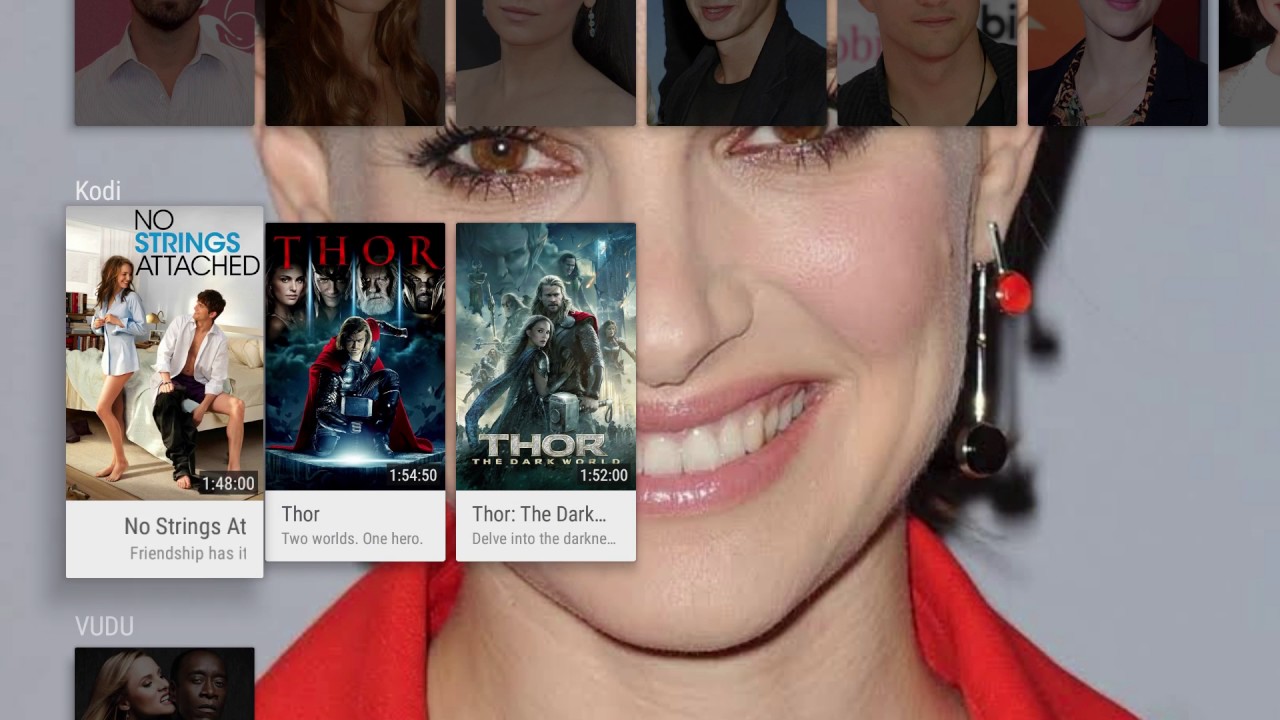
Sorry I wasn’t explicit. Recommandations are a feature of android tv and it’s a feature used by kodi 18
It looks like this :

Here is a detailed video about this feature for kodi

If I use Kodi with classic media management I have recommandations displayed on the home of my android tv, if I use Kodi with plexconnect, nothing is displayed on my home.

But as it’s a new feature I have no idea of how it works :confused:

@kesm

Well, as you said that’s a new Kodi 18 feature. No idea what I’d need to change to support it from the PKC side. As Kodi is still in Alpha development state, a lot is still going to change. Thus I won’t put any effort in this right now, sorry

I guess you did try Direct Paths, correct? Might help here…

No problem I understand, I will wait until kodi 18 is out, and I will check direct paths when I come back home.

Thanks

@kesm said:
Hello,

I’m using Kodi 18 with plexconnect on a Mi Box (android tv) and it seems that recommandation on home screen doesn’t work (they work well with ‘classic’ kodi)

Is there a limitation with the plugin? Is it possible to have the recommandation working as it’s not really kodi db?

I checked on the github and this discussion but I can’t find any post on this. Let me know if you need more information.

The Android TV recommendations “should” work with Kodi 18 and PKC. Sometimes it takes time after you sideload Kodi and run it for the first few times for it to populate. You also want to make sure that Kodi is selected in the Android settings under the Homescreen items. Again, sometime it takes a bit for it to show up in that menu. Also check within the Kodi settings under Services that your web server is turned on and is on port 8080 as thats the only port recommendations works on atm.

Ok a few questions regarding Audio=
Im running Plex server on a Synology/ HP micro server.

I “cast” audio to my Kodi box(raspberry pi with Allo boss DAC) and using the PKC plugin https://github.com/croneter/PlexKodiConnect/wiki/PKC-settings#sync-options

Is my audio stream being throttled or limited in anyway?

Ive moved over from Roon audio and and don’t want to loose sound quality.

Any thoughts? Is this stream “bit” perfect?

@mrfunks
PKC doesn’t transcode music. So Kodi will serve you with whatever you’ll have in Plex, bit-perfectly

@mrfunks said:
Ok a few questions regarding Audio=
Im running Plex server on a Synology/ HP micro server.

I “cast” audio to my Kodi box(raspberry pi with Allo boss DAC) and using the PKC plugin PKC settings · croneter/PlexKodiConnect Wiki · GitHub

Is my audio stream being throttled or limited in anyway?

Ive moved over from Roon audio and and don’t want to loose sound quality.

Any thoughts? Is this stream “bit” perfect?

when the movie is playing, go to the server via a webrowser, click the Status icon (top rightish of screen) - you should see the movie you are playing listed - hover over the screenshot and it will tell you if the audio and/or video is being transcoded.

Edit: what exactly do you mean by ‘cast’? What are you casting from?

@croneter said:

Changelog

version 1.8.7 (beta only):

  • Some fixes to playstate reporting, thanks @RickDB
  • Add Kodi info screen for episodes in context menu
  • Fix PKC asking for trailers not working
  • Fix PKC not automatically updating

I am not able to get trailers to work. It will ask to play them, but they do not play. Trailers play fine with the default plex app.
On a shield

Playback mode is addon (default). For customize paths, I’ve tried with both ‘replace plex unc paths’ checked and unchecked.

Also, the play state still seems off. If I start a movie, play it for a few seconds and then back out. Upon trying to play again, the resume option is all over the place - resume from 5 minutes, resume from 30 minutes, etc. Would log files help? If so, kodi one or plex server ones?

@foghat

Trailers:

  • I take it you are using a Plex Pass account? Otherwise no trailers
  • Do you have the BETA version of PKC installed? Otherwise the fixes won’t work yet :wink:
  • do trailers work if you deactivate the “ask for trailers”?
  • how many trailers are set in the PKC Settings to be played?
  • PKC debug logs from kodi side would help, see the wiki

Playstate is a known Kodi issue. Kodi screws up telling time in seconds or micro seconds at the very beginning of a video. Nothing that can be done here from PKC side

@croneter said:
@foghat

Trailers:

  • I take it you are using a Plex Pass account? Otherwise no trailers
  • Do you have the BETA version of PKC installed? Otherwise the fixes won’t work yet :wink:
  • do trailers work if you deactivate the “ask for trailers”?
  • how many trailers are set in the PKC Settings to be played?
  • PKC debug logs from kodi side would help, see the wiki

Playstate is a known Kodi issue. Kodi screws up telling time in seconds or micro seconds at the very beginning of a video. Nothing that can be done here from PKC side

Yes I am plex pass, yes have 1.8.7 installed. No it does not work if I deactivate ‘ask to play trailers’. I have it set to play 2 trailers. I also have pre-roll setup. Trailers play fine on the default shield plex app and on my ios app.

Something is definitely flaky. I have two shields, both setup the same way. On both of them trailers do not play.

This morning I started a movie on one shield, no trailers and no sound once movie starts playing (not PKC related - no sound happens to me once in a blue moon), I reboot shield as this always fixes my sound issue. I start the movie again. This time I have trailers. Though it only plays one (even though I have it set for 2) and then plays my pre-roll and then the movie (sound and all).

So I am thinking great!, the reboot and relaunch of kodi fixed something (and maybe it only played one trailer because it is thinking the pre-roll is the second trailer?).

After the movie, I come upstairs and reboot my other shield. Still does not play trailers.

Go downstairs to the shield that played one trailer and start another movie - no trailers play.

At this point I have not idea what is going on. I am not sure if PKC debug logs are different than the kodi log? I have attached the kodi log after trailers do not play. If PKC debug log is something else, can you tell me where to find it?

Edit: and I should add, I only have plex set up to ‘include cinema trailers from new and upcoming movies in theaters’

I also tried turning on 'include trailers from movies in my library. That did not change the behavior.

EDIT 2: I am noticing the ‘information’ item still is not showing if I select the info button while viewing a tv episode from an ‘on deck’ widget. Still just shows play/resume and mark watched/unwatched. And selecting the episode still causes it to play instead of going the to detail/info screen (i have changed the default action from ‘play’ to ‘show information’)

Is it possible the updates did not actually get published to 1.8.7? As it seems the 1.8.7 functionality does not seem to be working. At least for me.

@foghat
Just double checked - everything seems fine with PKC version 1.8.7.

  • Are trailers specifically enabled in the PKC settings under playback? Just checking :wink:
  • Remember that trailers will only be played before
    1. Movies and not TV shows
    2. “Fresh” movies, so movies without a resume point
    3. Is your Kodi “current playlist” EMPTY when you start a movie? (nothing queued up) Otherwise no trailers will be played
  • If it’s still an issue, please activate PKC debug logging in the PKC settings as well and open an issue on Github, How to Report A Bug · croneter/PlexKodiConnect Wiki · GitHub, and repost your log when you try to get players working
    • Please also share you PMS server log from the same attempt

Regarding the “Movie Information” or “Episode Information” screen: do you get one if you navigate to Videos → Addons → PlexKodiConnect → Plex library → On Deck?

@croneter said:
@foghat
Just double checked - everything seems fine with PKC version 1.8.7.

  • Are trailers specifically enabled in the PKC settings under playback? Just checking :wink:
  • Remember that trailers will only be played before
    1. Movies and not TV shows
    2. “Fresh” movies, so movies without a resume point
    3. Is your Kodi “current playlist” EMPTY when you start a movie? (nothing queued up) Otherwise no trailers will be played
  • If it’s still an issue, please activate PKC debug logging in the PKC settings as well and open an issue on Github, How to Report A Bug · croneter/PlexKodiConnect Wiki · GitHub, and repost your log when you try to get players working
    • Please also share you PMS server log from the same attempt

Regarding the “Movie Information” or “Episode Information” screen: do you get one if you navigate to Videos → Addons → PlexKodiConnect → Plex library → On Deck?

Okay,

I’ve figured some things out:

  1. If I play a movie from a home screen widget based on a plex item, for example ‘recently added’ movies or a collection, the trailers do not play. However, even though the movie started playing without trailers or pre-roll, stopping the movie and looking at the current playlist shows two trailers, my pre-roll and then the selected movie.

I does not matter how I add the plex item to the widget, both paths below yield same results in that trailers do not play:

  • video library → Movies (with plex icon) → Recently added
  • Video Add-on → PlexKodiConnect → Movies → Recently added
  1. If I go into ‘all movies’ and select a movie from there, the trailers do play.

  2. Regarding ‘information’, if I manually navigate to video addon → plexkodiconnect → ~~movies ~~TV Shows → recently added, then I do get the ‘information’ dialog when bringing up the menu. However if I add to a widget via this path, ‘information’ still does not display.

And, I suspect this is related, when I select an episode from the widget, it starts to play right away instead of showing the ‘info/detail’ screen. I have changed the default action from ‘play’ set to ‘show information’. If I select an episode from ‘all tv shows’ it does show the information screen.

I’d say it seems something is a little off in the widget path implementation - as that seems to be the root of both issues?

Edit: do you still want a log. Or does above give you enough info to reproduce?

Changing gears a bit, not sure if this is a PKC thing or not - another issue I am seeing is that for TV shows, once you get down to the episode information screen, the cast images do not appear.

This is happening with all skins, so not a skin issue. TV Cast does show up when using the plex for kodi add-on, so it looks like tv show cast should be available.

Actors for movies, show as expected.

@foghat said:
Changing gears a bit, not sure if this is a PKC thing or not - another issue I am seeing is that for TV shows, once you get down to the episode information screen, the cast images do not appear.

This is happening with all skins, so not a skin issue. TV Cast does show up when using the plex for kodi add-on, so it looks like tv show cast should be available.

Actors for movies, show as expected.

Seems like a PKC issue, many thanks! Please open a new issue on github.com :wink:

@croneter said:

@foghat said:
Changing gears a bit, not sure if this is a PKC thing or not - another issue I am seeing is that for TV shows, once you get down to the episode information screen, the cast images do not appear.

This is happening with all skins, so not a skin issue. TV Cast does show up when using the plex for kodi add-on, so it looks like tv show cast should be available.

Actors for movies, show as expected.

Seems like a PKC issue, many thanks! Please open a new issue on github.com :wink:

Done. :slight_smile:

Along the same lines as above, something else I can’t believe I didn’t notice before:

If I try play a tv show from a submenu item with a path such as:

video library --> TV Shows (with plex icon) --> On Deck

the info screen does not show and it does not play.

If I try play a tv show from a submenu item with a path such as:

Video Add-on --> PlexKodiConnect --> Movies --> Recently added

the ‘view’ once clicking the on deck submenu item is all messed up, but the tv show will play. However, it still does not show the info screen.

If I use the Skin Helper Service Widgets - such as ‘Next episodes’ episode widget, clicking on the widget episode does bring up the info screen, but the item will not play. Sometimes I get a playback error, sometimes it just seems as the screen refreshes back to the tv home screen.

I’ve attached a log file for when I try to play from:

  1. Widget: Skin Helper recently added episode (shows information screen, does not play)
  2. Widget: video library --> TV Shows (with plex icon) --> On Deck (no information screen, does DOES play)
  3. Widget: Video Add-on --> PlexKodiConnect --> Movies --> Recently added ( no information screen DOES play)
  4. Submenu: video library --> TV Shows (with plex icon) --> On Deck (no information screen, does not play)
  5. Submenu: Video Add-on --> PlexKodiConnect --> Movies --> Recently added ( no information screen DOES play, list view is messed up)

Also, please note my edit 4 posts above to point 3 - the issue with ‘information’ not showing in the context menu only applies to tv shows. It seems to be working fine for all the movie items I have tried.

@foghat said:
Okay,

I’ve figured some things out:

  1. If I play a movie from a home screen widget based on a plex item, for example ‘recently added’ movies or a collection, the trailers do not play. However, even though the movie started playing without trailers or pre-roll, stopping the movie and looking at the current playlist shows two trailers, my pre-roll and then the selected movie.

I does not matter how I add the plex item to the widget, both paths below yield same results in that trailers do not play:

  • video library → Movies (with plex icon) → Recently added
  • Video Add-on → PlexKodiConnect → Movies → Recently added
  1. If I go into ‘all movies’ and select a movie from there, the trailers do play.

  2. Regarding ‘information’, if I manually navigate to video addon → plexkodiconnect → ~~movies ~~TV Shows → recently added, then I do get the ‘information’ dialog when bringing up the menu. However if I add to a widget via this path, ‘information’ still does not display.

And, I suspect this is related, when I select an episode from the widget, it starts to play right away instead of showing the ‘info/detail’ screen. I have changed the default action from ‘play’ set to ‘show information’. If I select an episode from ‘all tv shows’ it does show the information screen.

I’d say it seems something is a little off in the widget path implementation - as that seems to be the root of both issues?

Edit: do you still want a log. Or does above give you enough info to reproduce?

Widgets are the devil. They just don’t work reliably even with a native Kodi install. Ive taken to just not using them at all.

@hstamas said:

Widgets are the devil. They just don’t work reliably even with a native Kodi install. Ive taken to just not using them at all.

heh. I can’t comment on how well they do or do not work when using kodi without plex. The trailer issue aside, I will say the movie widgets all seem to be functioning as expected - unlike the TV ones.

Changelog

version 1.8.8

  • Fix playback not starting in some circumstances
  • Fix first artist “missing” tag (Reset your DB!)
  • Update Czech translation
