This is a Kodi thing. Theoretically, PKC could provide this feature, but it should be implemented on the Kodi side of things
Are you sure you synced content to the Kodi database? Did you pick several TV show libraries to sync (pkc settings, snyc, first entry)?
On the Kodi side, there is ONE “category” for TV shows. Usually you need to customize the skin to point to only one single Plex library
Sorry, that’s up to Kodi itself entirely. Again: are you sure you did sync libraries to the Kodi database?
Back when I was trying out PKC, I missed this feature as well so here’s a plugin I wrote that’ll add these options to the contextual menu. Just unzip and drop in your addons dir:
context.browse.to.show.zip (8.1 KB)
This would be a useful thing to add to PKC IMHO but at least with the above you can add it on your own.
Hi Croneter,
i have an issue with PKC (latest version): it seems stuck on syncing some recent movies i just added in plex.
Here is what i see on the screen (it still comes back after kodi restart)
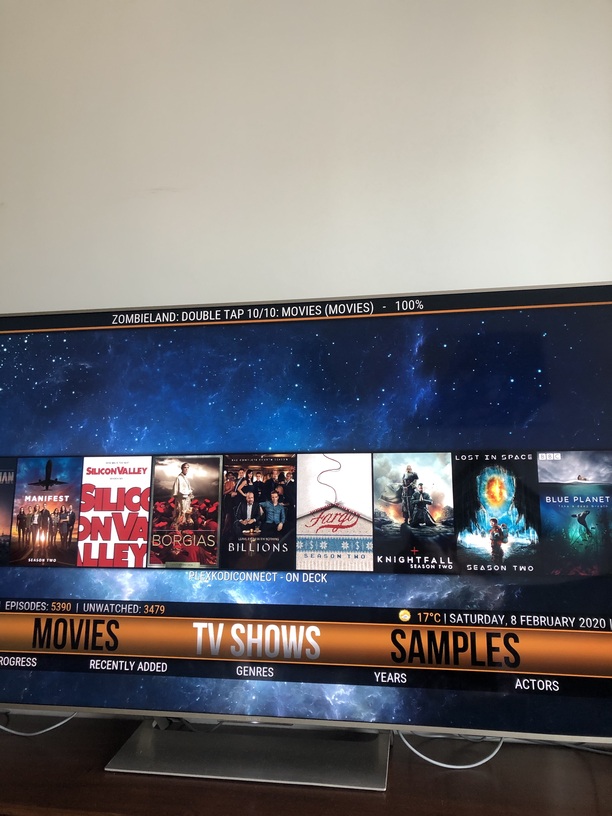
There are no error in kodi log, only this:
2020-02-08 13:50:45.653 T:3079476032  NOTICE: PLEX.movies: UPDATE movie plex_id: 25405 - Only God Forgives
2020-02-08 13:50:45.663 T:3079476032  NOTICE: PLEX.movies: UPDATE movie plex_id: 25403 - The Hole
2020-02-08 13:50:45.672 T:3079476032  NOTICE: PLEX.movies: UPDATE movie plex_id: 25404 - Drive
2020-02-08 13:50:45.682 T:3079476032  NOTICE: PLEX.movies: UPDATE movie plex_id: 18972 - Harry Potter and the Half-Blood Prince
2020-02-08 13:50:45.711 T:3079476032  NOTICE: PLEX.movies: UPDATE movie plex_id: 17564 - Zombieland: Double Tap
The thing is if I browse my library in kodi, it will simply freeze the screen completely… and I have no other choice than restarting kodi.
Thank you
Can someone please recommend a Kodi skin that would have all of the features of openpht? I have come to rely on recently added and on deck too much to not have those. I was trying eminence and it was beautiful but the lack of multiple widgets for the libraries made it a nonstarter.
Also is there a way to setup the libraries in the home screen other than via the Kodi interface? I have quite a lot of libraries and i don’t mind editing files manually. The method for adding them is very tedious as is.
Pick virtually ANY skin that lets you customize the home screen.i use this one: Arctic: Zephyr 2
Then pick the PlexKodiConnect widgets when customizing your home screen
Thanks. I actually tried Arctic Zephyr 2 last night and did not see multiple widgets. This one looks very similar to OpenPHT though so I will try it out. I need to do something to keep my ecosystem running.
Embuary is also quite good for what you want to do.
Arctic Zephyr 2 is pretty much exactly what I was looking for so thanks for that croneter. I have one small question, if I wanted to add my libraries to the main screen should I link it from “Add-On > Video Add-On > PlexKodiConnect > [Library] > [Library] | [Recently Added] | [On Deck]” or would it be better to use the “Video Library > [Library] > [Library] | [Recently Added] | [On Deck]”? I tried to find the answer online but am coming up empty. It looks like they both link to the same location just with a little difference in the string formatting.
Should be identical
Thanks. It looks like just on deck is drastically different but not a problem. Will be a lot faster to set up going the video library route. Am currently using smb and considering using nfs because I have some stuff with : in the directory name. Maybe I will just fix the : because it really shouldnt be in a file name.
Can you please explain how this is done? I have tried many clean installs. I cannot get the sorting to work. it is always greyed out.
Try resetting the Kodi database: go to the PlexKodiConnect settings, Advanced, then “Reset the Kodi database” in red. Hit YES, then NO.
Is there a way to collapse Recently Added to group by show/season?
NVM on the NFS thing, I just mounted it at the OS level.
Big one!
Changelog
version 2.10.10 (beta only):
- Fix rare but annoying bug where PKC becomes unresponsive during sync
- Fix PKC background sync not working in some cases
You can added Recently Added and On Deck to any Kodi skin…
Aura and Artic Zeph 2 spring to mind.
Finally an update for everyone!
Changelog
version 2.10.12:
- versions 2.10.5-11 for everyone
I’m trying to figure out Direct Play. I THINK it’s currently using Direct Streaming, but I’m really not sure!
I’ve tried to follow the guide, but I’m just still not sure.
I built an UNRAID server about 4 months ago, and completely redid my plex library.
I’m trying to figure out the best folder structure for my Media, and to be able to do Direct Play. I’m still trying to exactly understand the different options, but there are 3.
- Direct Streaming - Slowest to start, but always works.
- Direct Play - Faster to start then Direct Streaming.
- Direct Path - Very fastest to start, but doesn’t actually talk to Plex Server to be able to watch trailers etc.
I want to do #2, Direct Play.
I’m trying to figure out the best way to organize my folders to make this work. Below is my current folder structure. One main folder named Media, then the other folders.
- Media
- Movies
- Ski Movies
- Documentaries
- TV Shows
- Pictures
- Music
I currently have multiple libraries set up for the individual media folders. It seems that for PlexKodiConnect and Direct Play, I might need to reorganize to make it work. But…I’m not sure!
I’m thinking I might need to change it to something like the below
- Media
- Movies
- Cinema Films
- Ski Movies
- Documentary Movies
- TV Shows
- TV Shows
- Kids TV Shows
- Documentaries
- Pictures
- Music
- Movies
Additionally…
I’m not even totally sure if I’m using Direct Play currently or not? When I play a video from Kodi, the Plex Dashboard says I am using “Direct Play”
My Kodi logs show something like the following.
2020-02-19 14:50:38.566 T:11200 NOTICE: PLEX.playback_decision: The playurl for DirectPlay is: https://192-168-1-40.54d77bd6d19442a58a7fa5a00ee05ec6.plex.direct:32400/library/parts/43232/1444507189/file.mkv?Accept-Language=en&X-Plex-Platform=Generic&Connection=keep-alive&X-Plex-Device-Name=KodiUPSTAIRS&X-Plex-Provides=client%2Ccontroller%2Cplayer%2Cpubsub-player&X-Plex-Token=xxxxxxxxxxxxxxxxxxxx-Plex-Model=10&X-Plex-Platform-Version=1.0.0&X-Plex-Client-Identifier=6536006f-f831-432d-a991-7f052d1e0d18&Accept=*%2F*&X-Plex-Device=Windows&X-Plex-Product=PlexKodiConnect&Content-Type=application%2Fx-www-form-urlencoded&X-Plex-Version=2.10.12
2020-02-19 14:50:38.567 T:11200 NOTICE: PLEX.api: Found external subs:
2020-02-19 14:50:38.583 T:6440 NOTICE: PLEX.MOVIES: PKC add-on for movies stopped
2020-02-19 14:50:38.598 T:18516 NOTICE: VideoPlayer::OpenFile: plugin://plugin.video.plexkodiconnect.movies/?plex_id=29026&plex_type=movie&mode=play&filename=Where the Trail Ends (2012) - [WEBDL-1080P][AC3 5.1][H264].mkv
2020-02-19 14:50:38.607 T:17972 NOTICE: Creating InputStream
I don’t know if it is using Direct Play or not!!
