Noticed read ahead factor is set to 4 and not “adaptive” as the default. I’ve never touched it but the recommended is adaptive so might need to get reset.
I have been using PM4k on a coreelec/am6b+ box for several months now and I am very happy with the user experience. The only features I miss from the official Plex app on my Shield relate to adding/editing Ratings (i.e., my user ratings). After I watch a new movie, I like to add my own rating at my TV using the Plex App. Would appreciate seeing the functionality to add and edit user ratings within PM4k (assuming it is not there already and I can’t find it).
Also, perhaps it is a bug, but currently user ratings do not show half stars. So a rating of 4.5 shows only four filled stars, and one empty star (i.e., PM4K shows the rating as 4 stars rather than 4.5 stars). Also, if half stars are added to the user ratings, perhaps the empty star symbol could be made more empty looking (i.e., less like the current whole star symbol or future half stars).
1 Like
The default is 4, yes, and adaptive is recommended. If I were to change that, PM4K would change a global setting of Kodi, which I can’t do by default (I could, but chances are, we’d never be accepted into the official Kodi repository).
I’ll add it to my list, thank you!
Same here as well (will add it to the list).
4 Likes
This is not new behaviour, but a minor issue that I’ve accepted as the status quo for so long that I figured it must be a known problem, but now I’m curious.
I’m using an Nvidia Shield, and the issue is this: where a video has sound right from the start, the first second or so of the audio is slightly glitchy. It’s like the video starts first, then the audio starts slightly late and has to catch up. There’s a short silence and then the audio that should have been heard from the start plays back at an accelerated speed to catch up – so the result is audio that sounds overlapping/garbled.
Seeking back to the beginning sometimes results in correct playback, but it can take several attempts.
This doesn’t cause any sync issues – playback is normal after this initial glitch.
This has been happening for as long as I can remember, across a wide range of formats/codecs, and the same thing happens to my family using PM4K on an Nvidia Shield, so it’s not specific to my set-up. The glitch doesn’t happen on the official Plex app.
I haven’t been able to find this issue mentioned anywhere, so now I’m wondering if it’s not as common as I assumed.
Has anyone else experienced this?
1 Like
did you try to lower the buffer size ?
also check if you enabled the audio settings to keep it alive, can’t remember the correct name for it
1 Like
Turn off “Transcode audio to AC3” in PM4K if that is checked
1 Like
I’ve tried buffer sizes of 16 MB, 20 MB and 48 MB, but that doesn’t solve the issue. I’ve also tried Kodi Cache Readfactor at the default setting of 4 and the recommended setting of adaptive.
“Keep audio device alive” is set to 1 minute, but that doesn’t make a difference. I’ve got GUI sounds on, so that would wake up the device when navigating to a video in any case.
That’s already set to “never”, so that’s not the culprit, unfortunately.
check kodi passthrough settings, sounds like something is being transcoded on device
1 Like
Thank you – that’s it! Once I turned on “Allow passthrough” and set the passthrough output device to “AudioTrack (IEC), Kodi IEC packer (recommended)”, the problem went away.
2 Likes
CoreELEC v21.0 (stable branch) | Ugoos AM6B+ | 0.7.9-beta18 user here:
Seen a few instances where PM4K fails to resume so I don’t think it’s completely fixed. It’s random on when the bug appears. When it happens, it skips to the post-play screen. Don’t have any logs yet.
Yes, I tested it with panni until we were able to resolve the resumption, now it is resolved, soon he will release the corrected beta.
We are having a really cool experience now on coreelec, several bugs with resuming, changing audio, returning from sleep, congratulations on the support! @panni
what? the update should include the fixes if I’m reading it right and I’m not seeing it fixed on beta18. it doesn’t happen very often but it does still happen.
I’ve had another run at the fixes with @evertonmdz, it’s not publicly available yet. Probably tomorrow.
They’re not great and definitely a workaround for an issue that should be fixed by coreelec and not us. This next iteration should be stable for most devices, at least the Ugoos.
Edit: stuff
2 Likes
ah, that’s wasn’t clear before, cheers!
1 Like
Is there a way to skip the post play auto screen entirely? I’ve tried different settings, but none looked like it would do what I wanted. Even if I want to watch the next episode, I delete the one I watched first, then move on, but I have to back up, go back to previous episode, then delete it, then move back to current. Personally, I’d like it to just go back to the episode screen just as if I had watched a movie.
Attention! The old Kodi issue on the SHIELD still exists, losing its passthrough capability after waking from sleep. There have been attempted fixes in the past, but in my testing they didn’t fix the issue. The best way forward is to set PM4K to exit Kodi on sleep.
Not yet, added to my list. Won’t make it into 0.7.9, though.
1 Like
When path mapping is on, it is linked to Windows, when I download a subtitle the subtitle goes to the file folder, I left this option on in Kodi, “save with the video”, but it seems that when the subtitles change, they are changing to another language in the list, but not the language you select itself.
In short, the subtitle selector is bugged, because it added more downloaded subtitles, so I don’t know if it’s just in CoreElec, or global.
When using PM4K, subtitle handling via Kodi is not advised. You can temporarily download a better one with Kodi’s default subtitle download settings during playback. The subtitle will be placed in kodi’s data folder and be selectable during that playback session, via kodi’s subtitle window (Plex doesn’t know about that subtitle)
For everything else, use PMS subtitle management (via Bazarr for example).
I understand, thanks for the tips, but what is strange is that the subtitle is downloaded and stays in the folder on the PC, so Plex identifies the subtitle, and I can enable the subtitle even after closing PM4K, but the only bug is that the list becomes “random”. Just for having downloaded it through kodi. If I had put it directly in the folder without having used kodi there wouldn’t be this bug.
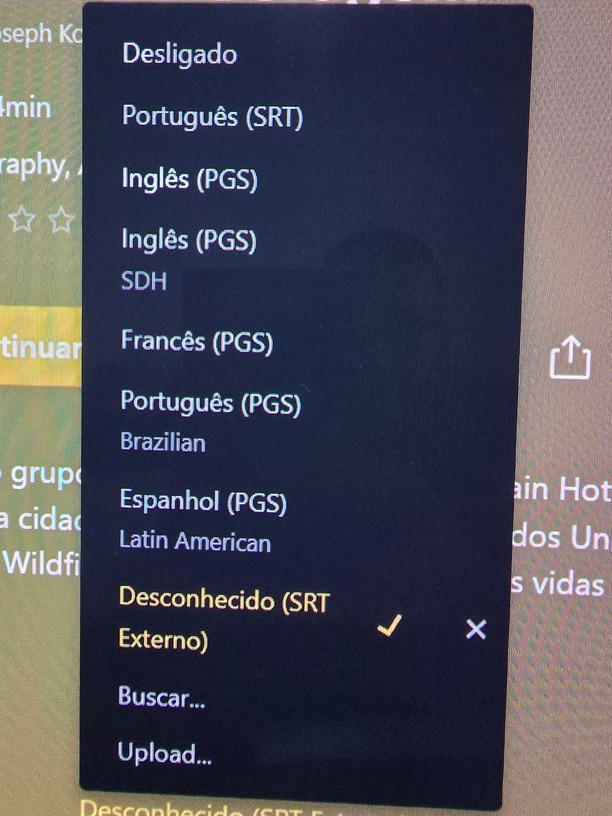

But as you said, I was using Plex on my phone to download the subtitles via PMS, so they are saved when I open PM4K too! I think I’ll keep it that way. I found it interesting that the SMB path mapping saves the subtitles along with the video, that’s why I was testing it.
