Same here - I’m just waiting for the next stable release then turning off updates  Love it!
Oh no, don’t leave me 
I would stay on beta if I could disable the auto check for updates and just do it manually. I hate interruptions and popups lol
Well you can. Set the updater to stable (and skip the downgrade) and switch it back to beta once you feel like it
Edit: I admit, the updater logic could be a little more fine grained, including changelogs.
Edit 2: imagine the olden days where you’d have to live through me doing the same thing every other day with you having to update manually all the time 
4 Likes
Oh cool, I didn’t know you could skip the downgrade. Perfect!
1 Like
I am seeing a file playback with subtitles even though subtitles aren’t selected. If I play it back in another plex client, they aren’t showing.
Server version: 1.41.4.9463
PM4K version: 0.8.0-beta10.2
Device used: Ugoos AM6B+ running CoreELEC
Kodi Preferred audio language is set to Media Default.
Kodi Preferred subtitle language is set to Original language.
I tried rolling back the server version to 1.41.3.9314 but it’s still happening there too. Any ideas?
the subtitles of the file look like this:
Text #1
ID                                       : 4
Format                                   : PGS
Codec ID                                 : S_HDMV/PGS
Codec ID/Info                            : Picture based subtitle format used on BDs/HD-DVDs
Duration                                 : 1 h 51 min
Bit rate                                 : 38.0 kb/s
Frame rate                               : 0.623 FPS
Count of elements                        : 4158
Stream size                              : 30.2 MiB (0%)
Language                                 : English
Default                                  : No
Forced                                   : No

Text #2
ID                                       : 5
Format                                   : UTF-8
Codec ID                                 : S_TEXT/UTF8
Codec ID/Info                            : UTF-8 Plain Text
Duration                                 : 1 h 44 min
Bit rate                                 : 71 b/s
Frame rate                               : 0.291 FPS
Count of elements                        : 1822
Stream size                              : 54.6 KiB (0%)
Language                                 : English
Default                                  : No
Forced                                   : No

Text #3
ID                                       : 6
Format                                   : UTF-8
Codec ID                                 : S_TEXT/UTF8
Codec ID/Info                            : UTF-8 Plain Text
Duration                                 : 1 h 51 min
Bit rate                                 : 79 b/s
Frame rate                               : 0.312 FPS
Count of elements                        : 2083
Stream size                              : 64.9 KiB (0%)
Title                                    : SDH
Language                                 : English
Default                                  : No
Forced                                   : No

Text #4
ID                                       : 7
Format                                   : PGS
Codec ID                                 : S_HDMV/PGS
Codec ID/Info                            : Picture based subtitle format used on BDs/HD-DVDs
Duration                                 : 1 h 45 min
Bit rate                                 : 38.3 kb/s
Frame rate                               : 0.666 FPS
Count of elements                        : 4226
Stream size                              : 28.9 MiB (0%)
Language                                 : French
Default                                  : No
Forced                                   : No

Text #5
ID                                       : 8
Format                                   : UTF-8
Codec ID                                 : S_TEXT/UTF8
Codec ID/Info                            : UTF-8 Plain Text
Duration                                 : 1 h 50 min
Bit rate                                 : 55 b/s
Frame rate                               : 0.233 FPS
Count of elements                        : 1545
Stream size                              : 45.2 KiB (0%)
Title                                    : Latin American
Language                                 : Spanish (Latin America)
Default                                  : No
Forced                                   : No
Seems to work ok when I set Preferred subtitle language is set to Forced only.
Are you using path mapping in PM4K?
Please send a log via DM.
Edit: What’s your Plex account setting for language/subtitles set to?
Edit 2: And which subtitle is Kodi displaying?
Edit 3: Wait. You’re definitely using path mapping and Kodi sees that path, it’s contained subtitles, and applies its own subtitle settings. You’ll need to sort that out on Kodi’s end. We’re not setting that subtitle.
I’m not using path mapping, confirmed in the system settings, but I am connecting to PMS locally via the Connection 1: IP option…
Allow Insecure Connections: On Same Network
Smart LAN/local server discovery: 
Prefer LAN/local server over security:
Server Discovery (GDM):
What’s your Plex account setting for language/subtitles set to?

And which subtitle is Kodi displaying?
A: I think the PGS although I am not sure because it’s showing None in the UI…
I think it’s an intermittent bug because sometimes it doesn’t happen.
Also found a new bug, go to the settings, scroll down to About and then press the right key and you then lose control like there’s an unselectable menu there. You have to back out to regain control.
Yeah this is a known issue.
Could you send me your debug logs via DM? I’ll need to take a look at your setup. (With “Dump Config” if possible)
Edit: Also, why do you not have a primary audio language set in Plex?
Can try the next time I see the issue happen.
I don’t have a language set because there’s no option to pick “original language” and I don’t want dubbed audio track in english if a native+forced eng subs is available.
A few notes here:
-
You haven’t defined a preferred language for audio, and Plex does not respect the “default” flag for audio/subtitle tracks.
-
The “Prefer forced subtitles” preference you have set is only for the Plex subtitle download feature. It does not effect track selection from built-in subs. That’s why the setting is labeled “searches”.
-
Forced subtitles are subs for audio or on-screen text that is not in the selected audio language. For example, in a German-language movie the Forced subs would only translate an English language newspaper headline shown on screen. It’s a subtitle track meant to display with an audio track of the same language.
Is there a way to force plex to always pick the “original language” for audio then?
I didn’t mean just forced subs but native lang + eng subs.
No. Plex does not know what the native language is for a video.
There are two ways that could be accomplished:
- Plex’s metadata agent gets the info from a source like IMDB. (New Feature request. Ask it now and maybe it will come in 5 years!)
- There is actually an “original language” flag in MKV, but whoever made the file would need to set that on the correct track, and Plex does not currently support it anyway. (also a new feature request). I’m not aware of any video player that actually can read it now, and they would have to add a preference to use the Original Language for playback.
For right now, Plex’s software doesn’t even recognize that people actually enjoy media in more than one language properly. (ha-ha) You can set your account language prefs to the language you want, but you can only choose one language. Then you set the subtitles to “always on” and the preferred language – and you’ll get full dialog subs with that picked language and forced subs when you use English if there is a Forced track.
But subs are always going to be on. So if the program audio is only available in English and there is no Forced subs track, you get the full dialog (Closed Captions) of the English audio and have to turn it off. Thankfully Plex remembers your choice and uses it next time you watch that movie.
This is why the feature of being able to set special audio/subtitle selections for a TV show is so nice. But it would be better if there was such a setting for a whole library, so you could just add a new German TV show to that library and it would use those settings by default without you having to change your language preference for everything.
I know we are a bit off topic here, but Plex doesn’t work this way for me.
90% of my files are remux disc rips. I always make sure forced subs are marked as forced in MakeMKV. Plex reliably displays the forced subs for me when they are there and no subs when they are not. It’s very rare I have to adjust settings on a movie by movie basis.
1 Like
This will depend on your audio languagea and how you set Plex’s prefs. Plex does not properly follow MKV spec to begin with. Forced subs are meant to be shown with an audio track of the same language.
There is no Matroska flag that tells the player what tracks to play. Forced and Default are to tell the player what tracks are eligible for automatic selection per the viewer’s player preferences. For audio Default would signal to the player which is the main program audio and not a commentary track or isolated score track, for example. So if I request Italian audio it doesn’t play the wrong one of multiple available.
In subs Default helps differentiate a regular sub track from SDH or subs for a commentary audio track (although there are dedicated flags for those, too).
In correct flagging you would have one audio track flagged Default for every audio language in the file. It does not mean “this is the default language to play”. That’s just pirates with skill issues.
1 Like
Thank you! You have explained both what the various mkv flags are for, and how plex handles languages and subtitle tracks better than anything else I’ve found online. I’ve found all other explanations of the various flags a bit confusing and unclear.
Thank you! I’ll be much more confident in my use of MKVToolnix to set flags now! (Even if plex ignores several of those flags for now, at least I’ll know they are set correctly for possible future use!)
For audio Plex will select the first non-mono track in the file that matches your audio language preference, if you set one. If you did not set a preference I can see Plex doing one of two things:
-
Trying to infer which language you want based on your UI language setting.
-
Playing the first non-mono track, regardless of language.
I’ve somewhat addressed that in PM4K, for subtitles:
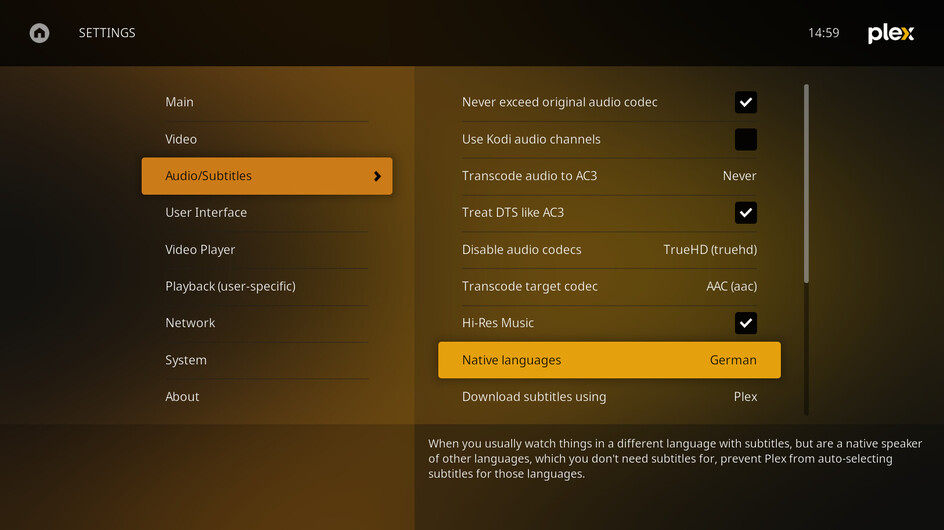
So Kodi itself doesn’t show a subtitle selected? Are you sure it isn’t burned-in?
Otherwise I’m really at a loss here. No idea what’s happening, I’d need logs.
Hi. Can we get a refresh button on the TV Shows screen? Right now to refresh that screen I have to exit to the Home Screen and go back into the TV shows screen. Sure, I can remember that, but it’s not obvious, and my wife doesn’t remember that. A small refresh button (lots of icons can be used for this to keep the icon small) on the TV Shows screen would be very helpful. Thanks.
Alternatively, have this screen refresh when coming to it using the back button as well as from the Home Screen. Effectively an auto-refresh. I would prefer this.
