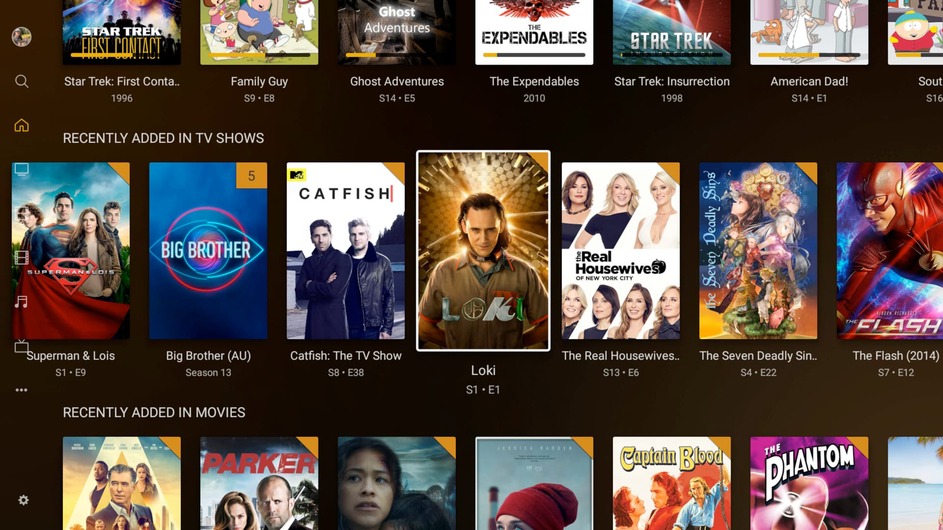
Home/Hubs: Use season thumbnail for episodes if possible
Settings: Add setting to enable season thumbnails/posters for episodes in hubs (default: On)
Episodes: Use season art as background if available
Home: Fix wrong background loaded in certain circumstances after boot or section change (sort hubs by index internally to fetch the first correct background of the first visible item)
PSA: If and only if you’ve been running the latest Plex Pass PMS (Plex Server) betas: There’s been a bug in one of the previous betas, which fills up (likely has filled up) your library.db with garbage bandwidth statistics data if the transcode endpoint is used.
PM4K uses that endpoint to determine playback modes, so if used in conjunction with that beta, you might see a pretty large Plug-in Support\Databases\com.plexapp.plugins.library.db. You can either wait for the next release, which will fix that, or you can fix it on your own (you’ll have to use Plex SQLite manually, though).
In my example that amounted to a 50 GB DB file (it’s normally ~480 MB) and frequent crashes when it tried its DB optimization run.
note UpperDir (usually something like /var/lib/docker/overlay2/xxxxxxxxxxxxxxxxxxxxxxxxxxxxxxxxxxxxxxxxxxxxx/diff, then use: /var/lib/docker/overlay2/xxxxxxxxxxxxxxxxxxxxxxxxxxxxxxxxxxxxxxxxxxxxx/diff/usr/lib/plexmediaserver/Plex\ SQLite on the host machine. You can also enter the docker container and use it there.
Yeah. It’s not that straight forward, though. It’s essentially a kind of “library” living on a distant server. Not easy to include this without being massively hacky.
Lmao, I found out about that when I received a notification from my syno that my SSD was full. The file was 108GB. Needless to say I just immediately set up a backup because cleaning the database with the DS920 would have taken… a very long time… And I updated to the new beta.
Edit: off course the SSD was getting full because of the two other 100GB+ autogenerated backups xD
Strange, it works pretty well for me, including the Watch feature. Only thing I had to remove recently was the watchlist sync, but from what I read it comes from new Trakt API limitations.
request for anyone using this - could you make a short video showing the latest version and its features? there have been so many updates and new things added, it would be nice to see as.
also perhaps some thoughts on using this vs plexkodiconnect, which I know imports items into Kodi and enables a different way to use them. but it would be nice to hear from people who’ve used both. I’m asking because I don’t have a working Plex server anymore but still follow all this with interest
@panni Curious to what your thoughts are long term in terms of transitioning the Home UI to something similar to the current iteration of the Android TV app?
The Plex for Android TV app is likely to change to the “Plex Experience Preview” at some point soon, it would be nice if PM4K could fill that void that will be left in its wake. I know it would be a lot of work but I’m sure most would appreciate it a lot!
@panni just installed PM4K last night, and it’s great! My last minor issue to get it to match my Nvidia Shield experience - is there any way to reduce the size of the subtitles?
I looked everywhere, and couldn’t find it. I might just be blind too. Anyway, thank you for your work!
Subtitle size is controlled by Kodi settings. Just adjust it there. (I think you might be able to do it from the PM4K-Kodi settings during playback as well)
Edit: Thank you!
Soon™
That’ll be the main goal of 0.8.1, if it’s feasible (or even possible)
I’m an idiot. Thanks for your guidance! I didn’t realize you could change the “views” of settings in Kodi (you need to change it to the Expert view) in the Subtitles section for the subtitle size to show up.

 thank you.