I’m installing 5.1.8 on our lab right now.
There is a lot of funkiness in there when their own NVIDIA_GPU_DRV will not install.
I’m installing 5.1.8 on our lab right now.
There is a lot of funkiness in there when their own NVIDIA_GPU_DRV will not install.
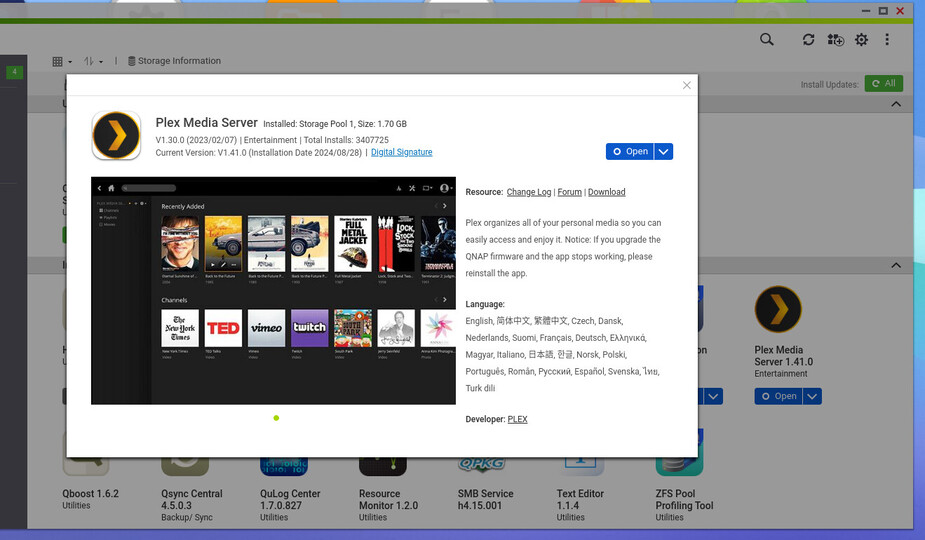
After updating Plex to the newest version PMS did not show as installed I the app center.
I just downgraded to QTS 5.1.8.
When it powered up
Also be advised, this is QuTS (hero)
Hero now wants ZFS5_DATA , which is a symlink to ZFS530_DATA.
NO idea what they’re doing but it’s not working.
When I edit it to ZFS530, everything works
Corrected, it looks like this:
[PlexMediaServer]
Name = PlexMediaServer
Class = null
Status = complete
Build = 20240826
Display_Name = Plex Media Server
Version = 1.41.0
Author = Plex Build Team
QPKG_File = PlexMediaServer.qpkg
Date = 2024-08-28
Shell = /share/ZFS530_DATA/.qpkg/PlexMediaServer/plex.sh
Volume_Select = 3
Install_Path = /share/ZFS530_DATA/.qpkg/PlexMediaServer
WebUI = /web
Web_Port = 32400
RC_Number = 300
Timeout = 10,30
Enable = TRUE
FW_Ver_Min = 4.3.0
Can you open an incognito window (using LAN IP only) to the qnap and see if it wants to be claimed ?
Well getting it to work on hero is positive.
I’ll see what I can do from work. I know it kept wanting me to claim it as a new server but I really have no desire to setup everything from scratch again an lose all that effort and what not I’ve put into my current server
even if you claim it… you skip out of that at the next step.
You’ll arrive at the dashboard.
All your things are still there – as long as you didn’t Uninstall.
I didn’t uninstall. I went to 192.168.15.150:32400 with an incognito tab and I got a xml file that shows up
I can get to the dashboard and it wants to setup a new server
It was giving me the option to try to connect to my server I’ve setup but I can’t seem to see that anymore but I’m using teamviewer to get in my desktop from my phone so not ideal…
just wait until you’re on the same subnet. PMS security is a PITA
Ok I’ll check when I get home. I can let you remote in at some point if there’s a benefit to do so
I didn’t see this before installing this version on my Qnap  this is how I got my PMS back up and running will minimal lose of watch history.
Once the new version was installed the app disappeared from the App Center even though it said it was successfully installed and my PMS was unreachable. I installed version v.1.40.5.8921-836b34c27 from August 23, 2024 and I was able to open the local web app but all my media wasn’t seen. Once I did a restore of the DB from a scheduled task backup I was back in action with just the last two days of watch history gone.
This is the first time in the last ~4yrs running my PMS on a Qnap that an update caused issues for me. I’m just glad to know my way around my server to be able to recover from something like that.
I have a Qnap TVS-682 running QTS 5.2.0.2860 and I’ve got a P2000 installed so NVIDIA GPU Driver V5.1.0.0822 and NvKernelDriver V5.2.0.2860 are installed. LMK if you need anything else.
What I’ve found is a formatting error in the /etc/config/qpkg.conf
Not sure which apps, but some write out the qpkg.conf WITHOUT writing the extra NEWLINE at the end of the block.
It makes for a mess in the config.
Methods I’ve been able to use so far:
QuTS -
QTS
I’ve not been able to definitively determine if QTS or QPKG.
I know what has to be done but I’m not yet figured out how.

I need to insert a newline before and after the selected block.
This is the command
grep NVIDIA_GPU_DRV /etc/config/qpkg.conf 1>/dev/null 2>/dev/null && \
    sed -i '/\[PlexMediaServer\]/,/FW_Ver_Min[^$]*$/{H;d};$g' /etc/config/qpkg.conf
I need to select the block, copy then cut the block, go to eof, insert newline, paste the buffer, append newline.
I am running QTS 5.2.0.2851 and I have had zero luck getting my server back online. I’ve rolled back to older software and it still shows up as offline I’ve restored from an snap shot and still nothing. In incognito mode it doesn’t give me the option to pick my server that I want just the new one that it discovered…
Let’s make time (arrange) with AnyDesk and phone.
We’ll chat and I’ll help fix your machine.
I found out what it is.
Let’s say I’m not happy with QNAP right now … 
I am off tomorrow and am located on the west coast so let me know what time frame works for you.
Cool. east roast here (it’s damn hot these past few days… lol)
today, I helped a guy in greece.
manually fixed his machine which gave me a huge clue as to the problem.
I’m angry at qnap.
I know what to do but not how to do it with automation in the installer.
@ChuckPa
The guy in Greece  is also available for you, if you need to test anything, after 17:30 GMT + 2 today.
Thanks for all the help
Interesting, after installing the beta Plex update and it going missing from the App Center and having to reverse back to the public Plex version as I described in my last post. I then reading what @ChuckPa posted about the line in qpkg.conf becoming incorrect several times and decided to make a copy of that file while PMS is working as well as the latest backup files of my PMS DB to try and install the beta Plex update again to see if I could fix the qpkg.conf file afterwards and reboot to see if it would return to the App Center and work again.
But this time after installing Plex 1.41.0 from a newly downloaded installer file via the link within PMS settings, PMS was still in the App Center and working. I even rebooted my Qnap to make sure my PMS still worked with the newer beta version and it did.