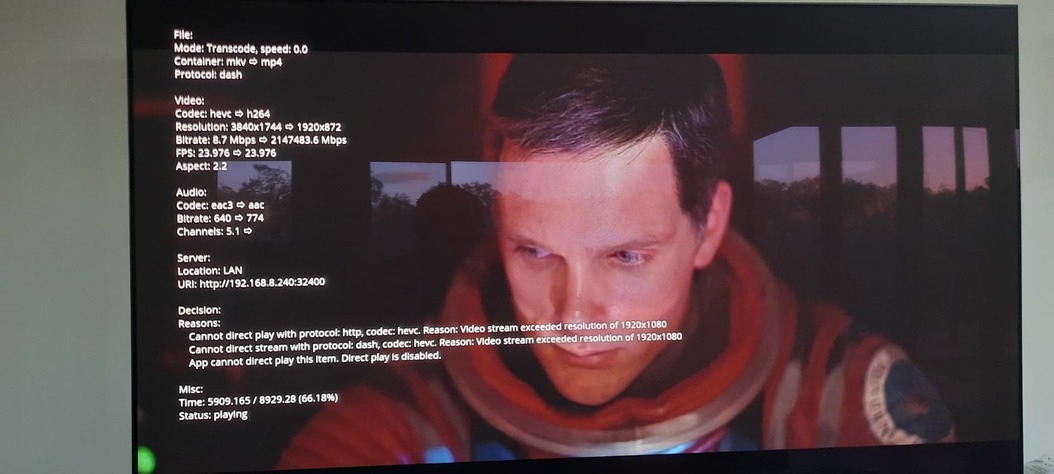
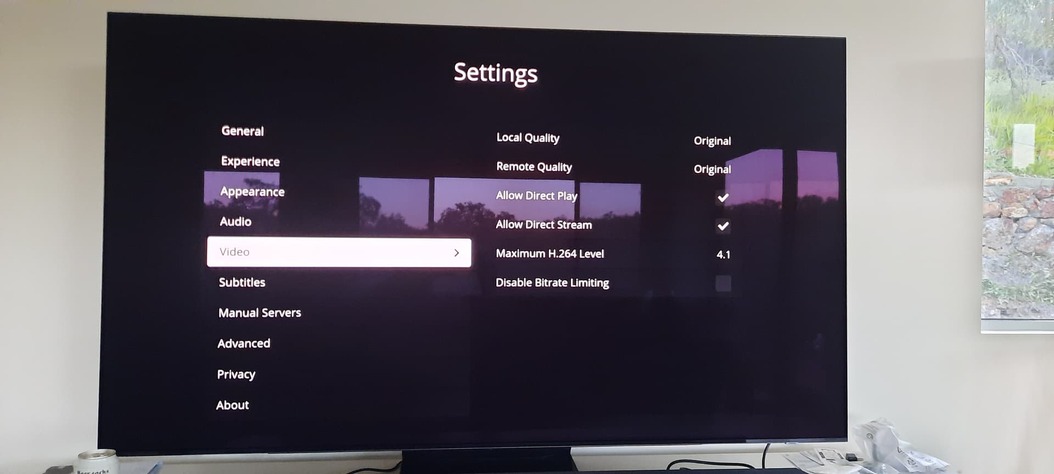
Gigabit ethernet from PC to router, 802.11AC wifi to TV.
On the TV Plex app, I have selected original quality for video and sound. Direct play and direct stream enabled.
No matter what I change, I can’t stop the video being transcoded down to 1080p.
4k DoVi/HDR10 (HVEC Main 10) > 1080P (H264) - Transcode
Even using an AC3 5.1 or Stereo Audio track instead of the DTS:HD MA 5.1 will transcode the audio to AAC.
Not sure what else to try before I go buy a Nvidia Shield..
Not sure why it says direct play is disabled. It’s enabled (as well as direct stream) on the TV settings. Crazy transcoded bit rate too. Possibly because I was disabled bit rate limiting?
Interestingly if I disable “Allow direct play”, playback info will say ‘User disabled direct play’, as well as the ‘App cannot direct play’ line.
I found the issue. Somehow the version reverted to 5.32 from 5.47. This meant maximum H.264 level was stuck at 4.2, which is limited to 1080p.
Managed to reinstall to the latest version, straight away problem was fixed. Took a while to get the latest version. The app store on Samsung says the latest version available is 5.32.1. See Apps not updating - Samsung Community - 2380568
How did you get it to update? I’m running into this same issue and this would explain it. I did manage to get a short video clip to play in HDR, but I think that was encoded at level 4.1, which works (probably 1080p or something).
I’m contemplating just getting a Roku (would prefer a Shield but no HDR10+ on that - ugh).
An update from me. I was able to fix this by going into the app menu, and under the Plex app there was a reinstall option. That updated it. No idea what is going on with the updates otherwise, but I can now stream HDR content fine (assuming it is in a supported codec).