chat tomorrow!
Chiming in a bit late here, but relating to Metadata loss. I don’t see the issue with re populating your database. Plex has come a long way with agents and metadata collection. It’s quicker and more accurate.
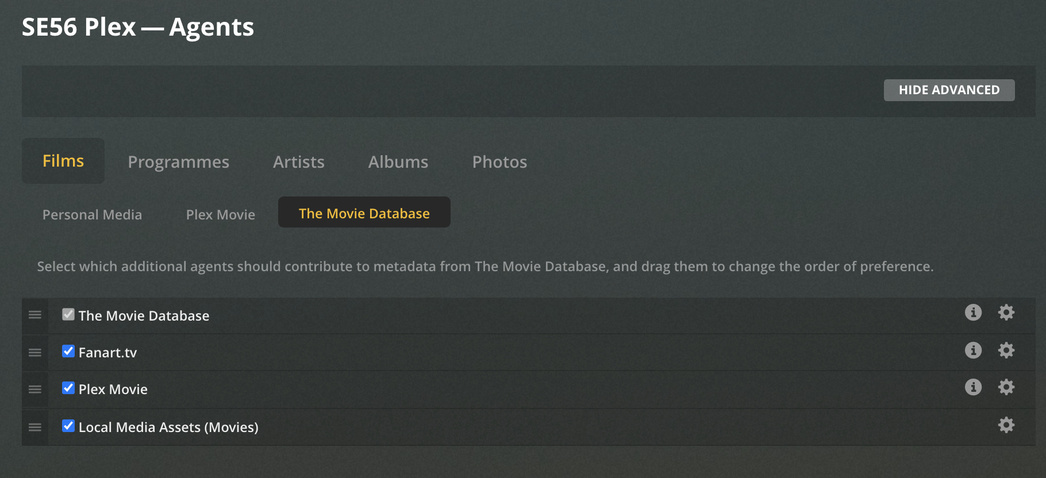
If you don’t use a lot of local metadata, I would just start again. Firstly make sure that Local Media assets agent is active and demoted to the bottom of the stack. Secondly, have you named and structured your Storage directories correctly, not close but exactly.
I would suggest using the latest Server version available and make sure you have allowed NAS/ Network Volumes for Plex access via Security and Privacy Preference pane
https://support.plex.tv/articles/naming-and-organizing-your-tv-show-files/
https://support.plex.tv/articles/naming-and-organizing-your-movie-media-files/
Screenshots of agent setup.



Victory !!! 
It took about 9-10 hours of running a ~/Library/Application Support/Plex Media Server/ Chronosync restore to the new 2020 MacMini, of an original recent Chronosync backup of PMS captured from the old 2011 MacMini.
I rebooted the 2020 MacMini, closed my eyes and clicked on the Plex App. 
It came alive and the PMS server opened up and ran fine! 
All my content was there and synchronized to exactly where I had left off watching. The wife and I watched the new Hanks movie “Greyhound” running on it last night. By the way, a great movie if you get a chance to see it.
The problem?
I think many of you focused in on it quickly. I suspect the Time Machine backup I used to move the PMS database to the new 2020 MacMini was corrupted at some point, perhaps by executing a TM backup while the PMS server was running with the database open.
Although, it’s interesting because I’m sure the PMS has always been open and running when Chronosync does it separate backup outside of Time Machine. Maybe it’s just a more sophisticated and better backup product? I have to say, I’ve used it for years but never had to perform a mammoth restore of anything on this level, so it certainly paid for itself with just this one time.
In no particular order, I have to thank these members for their time and help, or I’m sure I’d still be chasing my tail wondering what was wrong.
jchhenderson 
SE56
TeknoJunky
Thanks guys … this really old retired veteran really appreciated your help.
Regards,
Doug
ps: Plex is an awesome performer on this new 2020 MacMini CPU.
Model Name: Mac mini
Model Identifier: Macmini8,1
Processor Name: 6-Core Intel Core i7
Processor Speed: 3.2 GHz
Number of Processors: 1
Total Number of Cores: 6
L2 Cache (per Core): 256 KB
L3 Cache: 12 MB
Hyper-Threading Technology: Enabled
Memory: 16 GB
glad you got it sorted!! 
…but I am surprised that the straight-forward copy of the directory didn’t work.
Actually, that may have worked as well, but I never got that far.
Chronosync finished first and after it proved successful, I didn’t finish trying a direct copy from one machine to the other.
It may have worked too.
Thanks again…
