PMS mac will not start with non-default home directory

Hi everyone,

I’m trying to install PMS on my computer (installation works fine) but when I try to start the program to set it up and so on, the icon in the menu bar drop down is stuck on “Server is starting” with a wheel spinning around. After a while it opens a webpage in the browser but just says “A problem has been detected with a core component of Plex Media Server”.
I have changed my user accounts’ home directory to a secondary drive and I had a feeling that this might be causing the issue. So I created another account on my computer and installed PMS again and sure enough it fires straight up with no problem confirming this is the root cause.
Is there a way to somehow fix this? Ideally the devs would implement a fix, but just as a temporary measure is there anything I can do? I’ve had a look around online and can’t find anybody experiencing this issue. I’ve also tried to create a symbolic link to my home directory but that has no effect.

Thanks!

OS: mac OS High Sierra 10.13.6
Server Version: 1.13.9.5456

could be permissions

Most common issues would be permission / ownership issue for these directories

~/Library/Logs
~/Library/Caches

Could you launch Plex Media Server in terminal and see what errors get returned

cd /Applications
./Plex\ Media\ Server.app/Contents/MacOS/Plex\ Media\ Server 

The two folders you listed both have PMS folders within them so it looks like it isn’t permissions, unless I’m mistaken.
The only error reported when starting from terminal is:

IOError: [Errno 2] No such file or directory: ‘~/Library/Application Support/Plex Media Server/Plug-in Support/Data/com.plexapp.system/._StoredValues’

which sure enough, doesn’t exist when I check through Finder. It prints the error ever few minutes while open.

Do they contain Plex Media Server files eg Logs below?
~/Library/Logs/Plex Media Server

Does the parent directory exist ?
~/Library/Application Support/Plex Media Server/Plug-in Support/
or
~/Library/Application Support/Plex Media Server/

If you find logs - do zip and attach

They do. I’ve attached what I found.
I noticed there are some renaming errors in the DNLA logs, don’t know if that is any help.

Neither of those folders exist.

~/Library/Logs/Plex Media Server.zip (130.6 KB)

Is this directory path
~/Library/Application Support/
going to this path
/Volumes/Data/Users/Tom/Library/Application Support/ ?

Can you get the output from this command in terminal
ls -al /Volumes/Data/Users/Tom/Library/Application\ Support

That is correct, yes.

Ok, this is what was printed:

drwxrwxrwx 1 tom staff 131072 8 Nov 01:45 .
drwxrwxrwx@ 1 tom staff 131072 8 Nov 01:45 …
-rwxrwxrwx 1 tom staff 4096 9 Nov 23:02 ._Mozilla
drwxrwxrwx 1 tom staff 131072 8 Nov 01:45 AddressBook
drwxrwxrwx 1 tom staff 131072 8 Nov 02:10 App Store
drwxrwxrwx 1 tom staff 131072 10 Nov 16:32 Apple
drwxrwxrwx 1 tom staff 131072 10 Nov 02:18 CEF
drwxrwxrwx 1 tom staff 131072 8 Nov 01:45 CallHistoryDB
drwxrwxrwx 1 tom staff 131072 8 Nov 01:45 CallHistoryTransactions
drwxrwxrwx 1 tom staff 131072 8 Nov 01:45 CloudDocs
drwxrwxrwx 1 tom staff 131072 8 Nov 01:45 CrashReporter
drwxrwxrwx 1 tom staff 131072 8 Nov 01:51 DiskImages
drwxrwxrwx 1 tom staff 131072 8 Nov 01:45 Dock
drwxrwxrwx 1 tom staff 131072 9 Nov 23:03 Firefox
drwxrwxrwx 1 tom staff 131072 8 Nov 01:51 Flux
drwxrwxrwx 1 tom staff 131072 5 Nov 15:23 Google
drwxrwxrwx 1 tom staff 131072 8 Nov 01:45 Knowledge
drwxrwxrwx 1 tom staff 131072 8 Nov 01:51 Logitech
drwxrwxrwx 1 tom staff 131072 10 Nov 01:16 Microsoft AU Daemon
drwxrwxrwx 1 tom staff 131072 10 Nov 01:16 Microsoft AutoUpdate
drwxrwxrwx@ 1 tom staff 131072 9 Nov 23:02 Mozilla
drwxrwxrwx 1 tom staff 131072 16 Nov 23:31 Plex Media Server
drwxrwxrwx 1 tom staff 131072 8 Nov 01:45 Quick Look
drwxrwxrwx 1 tom staff 131072 8 Nov 14:50 Resilio Sync
drwxrwxrwx 1 tom staff 131072 9 Nov 02:17 Steam
drwxrwxrwx 1 tom staff 131072 8 Nov 01:45 TeamViewer
drwxrwxrwx 1 tom staff 131072 8 Nov 01:51 accountsd
drwxrwxrwx 1 tom staff 131072 8 Nov 01:45 com.apple.ProtectedCloudStorage
drwxrwxrwx 1 tom staff 131072 8 Nov 01:45 com.apple.TCC
drwxrwxrwx 1 tom staff 131072 8 Nov 01:45 com.apple.backgroundtaskmanagementagent
drwxrwxrwx 1 tom staff 131072 8 Nov 01:45 com.apple.sharedfilelist
drwxrwxrwx 1 tom staff 131072 8 Nov 01:45 com.apple.spotlight
-rwxrwxrwx 1 tom staff 5859 17 Nov 18:27 com.apple.spotlight.Shortcuts
drwxrwxrwx 1 tom staff 131072 8 Nov 01:45 com.apple.touristd
drwxrwxrwx 1 tom staff 131072 8 Nov 01:51 iCloud
drwxrwxrwx 1 tom staff 131072 8 Nov 01:45 icdd
drwxrwxrwx 1 tom staff 131072 8 Nov 01:51 org.videolan.vlc
drwxrwxrwx 1 tom staff 131072 8 Nov 01:45 videosubscriptionsd

Depends on how you checked. The directories are hidden. You can get to them through

Using the Finder’s Go menu, select Go To Folder… then enter the following in the dialog box that pops up:

~/Library/Logs/Plex Media Server/

I think that looks ok with read, write, execute for owner, for group and for others

Are you able to cd to it?

Also try this to see what has been created
ls -al ~/Library/Application\ Support/Plex\ Media\ Server

Looking at the logs - there is some evidence of multiple instances of Plex Media Server app running at the same time - make sure it does not show in Activity Monitor before relaunching

Nov 16, 2018 23:34:56.853 [0x7000099d9000] ERROR - HttpServer: Error binding acceptor: Address already in use
Nov 16, 2018 23:34:56.853 [0x7000099d9000] ERROR - Error: Unable to set up server: listen: Address already in use (N5boost16exception_detail10clone_implINS0_19error_info_injectorINS_6system12system_errorEEEEE)

Another example here - server exited but it took a while to shutdown

Nov 17, 2018 01:16:34.506 [0x7fffafbb6380] DEBUG - Shutting down with signal 0
Nov 17, 2018 01:16:34.506 [0x7fffafbb6380] DEBUG - Ordered to stop server.

It was still running 5 seconds later

Nov 17, 2018 01:16:39.507 [0x7fffafbb6380] WARN - Timed out waiting for server to finish.

Yet - you started a new instance of Plex Media Server.app at 01:16:36

Nov 17, 2018 01:16:36.005 [0x7000045e5000] INFO - Plex Media Server v1.13.9.5456-ecd600442 - Apple Mac  - build: darwin-x86_64 macosx - GMT 00:00
Nov 17, 2018 01:16:36.005 [0x7000045e5000] INFO - MacOSX version: 10.13.6, language: en-GB
Nov 17, 2018 01:16:36.005 [0x7000045e5000] INFO - Processor Intel(R) Core(TM) i7-4790K CPU @ 4.00GHz
Nov 17, 2018 01:16:36.006 [0x7000045e5000] INFO - ./Plex Media Server.app/Contents/MacOS/Plex Media Server

and resulting in failure because two instances were running

Nov 17, 2018 01:16:36.148 [0x7000048f7000] ERROR - HttpServer: Error binding acceptor: Address already in use
Nov 17, 2018 01:16:36.149 [0x7000048f7000] ERROR - Error: Unable to set up server: listen: Address already in use (N5boost16exception_detail10clone_implINS0_19error_info_injectorINS_6system12system_errorEEEEE)

So double check activity monitor - kill off any stuck processes before launching again

Even on next launch - it looks like some python processes were still running from earlier attempt to run the server
launched at 01:16:41

Nov 17, 2018 01:16:41.223 [0x70000c4b2000] INFO - Plex Media Server v1.13.9.5456-ecd600442 - Apple Mac  - build: darwin-x86_64 macosx - GMT 00:00
Nov 17, 2018 01:16:41.223 [0x70000c4b2000] INFO - MacOSX version: 10.13.6, language: en-GB
Nov 17, 2018 01:16:41.223 [0x70000c4b2000] INFO - Processor Intel(R) Core(TM) i7-4790K CPU @ 4.00GHz
Nov 17, 2018 01:16:41.223 [0x70000c4b2000] INFO - ./Plex Media Server.app/Contents/MacOS/Plex Media Server

but it found some residual process from earlier

Nov 17, 2018 01:16:41.365 [0x70000c7c4000] INFO - Killing process: Plex Plug-in [com.plexapp.system] (pid: 531)

This lurking process (PID = 531) was still there from an earlier launch at this time

Nov 17, 2018 01:16:29.271 [0x7000053d3000] DEBUG - Starting plug-in /Applications/Plex Media Server.app/Contents/Resources/Plug-ins-ecd600442/System.bundle.
Nov 17, 2018 01:16:29.272 [0x7000053d3000] DEBUG - [com.plexapp.system] Setting plug-in to always running (daemon mode).
Nov 17, 2018 01:16:29.272 [0x7000053d3000] DEBUG - Starting file watcher for com.plexapp.system
Nov 17, 2018 01:16:29.273 [0x7000053d3000] DEBUG - Plugin: not setting user token for plugin
Nov 17, 2018 01:16:29.274 [0x7000053d3000] DEBUG - Spawned plug-in com.plexapp.system with PID 531

These errors indicate it was failing to create or access this path
"/Volumes/Data/Users/Tom/Library/Application Support/Plex Media Server/Plug-ins"

First attempt to access (or create it if it does not exist)

Nov 16, 2018 23:36:12.932 [0x70000dbe1000] WARN - Warning: ex: boost::filesystem::last_write_time: No such file or directory: "/Volumes/Data/Users/Tom/Library/Application Support/Plex Media Server/Plug-ins", couldn't check file: "/Volumes/Data/Users/Tom/Library/Application Support/Plex Media Server/Plug-ins"

After this it should be there
But still not there or not accessible

Nov 17, 2018 01:16:29.267 [0x7000053d3000] WARN - Warning: ex: boost::filesystem::last_write_time: No such file or directory: "/Volumes/Data/Users/Tom/Library/Application Support/Plex Media Server/Plug-ins", couldn't check file: "/Volumes/Data/Users/Tom/Library/Application Support/Plex Media Server/Plug-ins"

and again after this

Nov 17, 2018 01:16:41.369 [0x70000cbdc000] WARN - Warning: ex: boost::filesystem::last_write_time: No such file or directory: "/Volumes/Data/Users/Tom/Library/Application Support/Plex Media Server/Plug-ins", couldn't check file: "/Volumes/Data/Users/Tom/Library/Application Support/Plex Media Server/Plug-ins"

May be that individual directory has wrong permissions / ownership

See if this shows anything
ls -al ~/Library/Application\ Support/Plex\ Media\ Server/Plug-ins

The Plex DLNA Server logs show similar issues with directories
/Volumes/Data/Users/Tom/Library/Application Support/Plex Media Server/Plug-in Support/Databases/
or
``/Volumes/Data/Users/Tom/Library/Application Support/Plex Media Server/Plug-in Support/`

Nov 16, 2018 22:40:29.317 [0x7fffa902a380] ERROR - Couldn't rename file "/Volumes/Data/Users/Tom/Library/Application Support/Plex Media Server/Plug-in Support/Databases/com.plexapp.dlna-new.db-shm" to "/Volumes/Data/Users/Tom/Library/Application Support/Plex Media Server/Plug-in Support/Databases/com.plexapp.dlna.db-shm": No such file or directory
Nov 16, 2018 22:40:29.317 [0x7fffa902a380] ERROR - Couldn't rename file "/Volumes/Data/Users/Tom/Library/Application Support/Plex Media Server/Plug-in Support/Databases/com.plexapp.dlna-new.db-wal" to "/Volumes/Data/Users/Tom/Library/Application Support/Plex Media Server/Plug-in Support/Databases/com.plexapp.dlna.db-wal": No such file or directory

and same later on

Nov 16, 2018 23:39:13.021 [0x7fff9fa54380] ERROR - Couldn't rename file "/Volumes/Data/Users/Tom/Library/Application Support/Plex Media Server/Plug-in Support/Databases/com.plexapp.dlna-new.db-shm" to "/Volumes/Data/Users/Tom/Library/Application Support/Plex Media Server/Plug-in Support/Databases/com.plexapp.dlna.db-shm": No such file or directory

Nov 16, 2018 23:39:13.021 [0x7fff9fa54380] ERROR - Couldn't rename file "/Volumes/Data/Users/Tom/Library/Application Support/Plex Media Server/Plug-in Support/Databases/com.plexapp.dlna-new.db-wal" to "/Volumes/Data/Users/Tom/Library/Application Support/Plex Media Server/Plug-in Support/Databases/com.plexapp.dlna.db-wal": No such file or directory

Could you get screenshot of activity monitor to show which user account the Plex Media Server and other plex processes are running in

This must be what is causing the problems
I presume you have already checked the steps you followed
There is step by step guide here - for example

and another here

There is nothing obvious from the logs - all pointing to permissions type of issue

That is what I already tried. They don’t exist.

Yes I am able to cd in to all the folders that have been mentioned.

Based on my Windows machine PMS, not all the folders that should be are present, only these:

total 1536
drwxrwxrwx 1 tom staff 131072 16 Nov 23:31 .
drwxrwxrwx 1 tom staff 131072 8 Nov 01:45 ..
drwxrwxrwx 1 tom staff 131072 16 Nov 23:30 Codecs
drwxrwxrwx 1 tom staff 131072 16 Nov 23:31 Crash Reports
drwxrwxrwx 1 tom staff 131072 16 Nov 23:31 Plug-in Support
drwxrwxrwx 1 tom staff 131072 16 Nov 23:39 Thumbnails

I checked Activity Monitor for any instances of Plex, or any related processes, and found nothing. After opening the PMS again, the same issue again; “Server is starting”, Two processes appear initially in Activity Monitor: “Plex Media Server” and “Plex Plug-in [com.plexapp.system]”. After a while some other Plex processes appeared, “Plex Tuner Service” and “Plex DLNA Service”. To double check that there isn’t another PMS instance running unseen by everything, I quit PMS from the menu bar and refreshed the webpage 127.0.0.1:32400 but the page was unavailable so there is no evidence, other than the logs, that two instances are running so far as I can tell.

Thought I’d try seeing if manually creating that folder would help, but nope, no change.

Running that before I manually created the plug-ins folder, unsurprisingly, returned an error saying the folder not been found. After I created it, the command returned this:

total 512
drwxrwxrwx 1 tom staff 131072 18 Nov 00:24 .
drwxrwxrwx 1 tom staff 131072 16 Nov 23:31 ..

The Plex processes are all running under my user account

I thought it might be. Here I was hoping it would all be so easy… :sweat_smile:
That Lifewire tutorial is the very one I followed originally. Yes I double checked myself. No other program has given be any bother whatsoever for what it’s worth.
Assuming that this is caused by permissions, haven’t all the permissions been set to allow all user groups full read, write and, execute access? Do I need to go through “chmod 777”-ing every Plex related folder despite them already being set?

So you created this folder
~/Library/Application Support/Plex Media Server/Plug-ins
which is also
/Volumes/Data/Users/Tom/Library/Application Support/Plex Media Server/Plug-ins
What do the logs now show when attempting to access this directory?

Have any files been written to it?

There is still contradictory answers to some questions
So they do or do not exist ?
We know this exists because you did a list directory for it
"~/Library/Application Support/Plex Media Server/"

Lets drill down below some of these directories

drwxrwxrwx 1 tom staff 131072 16 Nov 23:31 .
drwxrwxrwx 1 tom staff 131072 8 Nov 01:45 …
drwxrwxrwx 1 tom staff 131072 16 Nov 23:30 Codecs
drwxrwxrwx 1 tom staff 131072 16 Nov 23:31 Crash Reports
drwxrwxrwx 1 tom staff 131072 16 Nov 23:31 Plug-in Support
drwxrwxrwx 1 tom staff 131072 16 Nov 23:39 Thumbnails

so cd as follows
cd /Volumes/Data/Users/Tom/Library/Application\ Support/Plex\ Media\ Server/Plug-in\ Support
and do an ls -al
and if there are directories, drill down with another cd and do an ls

When doing these, you are logged into the same account ? tom

(I might to get someone who is familair to Macs to help -
Will see where we get to first)
~/Library/Application Support/Plex Media Server/Plug-ins

Correct.

No files or folders are created in the plug-ins folder.
Logs attached.
~/Library/Logs/Plex Media Server.zip (186.3 KB)

Sorry for the confusion, I’m usually a Windows person.

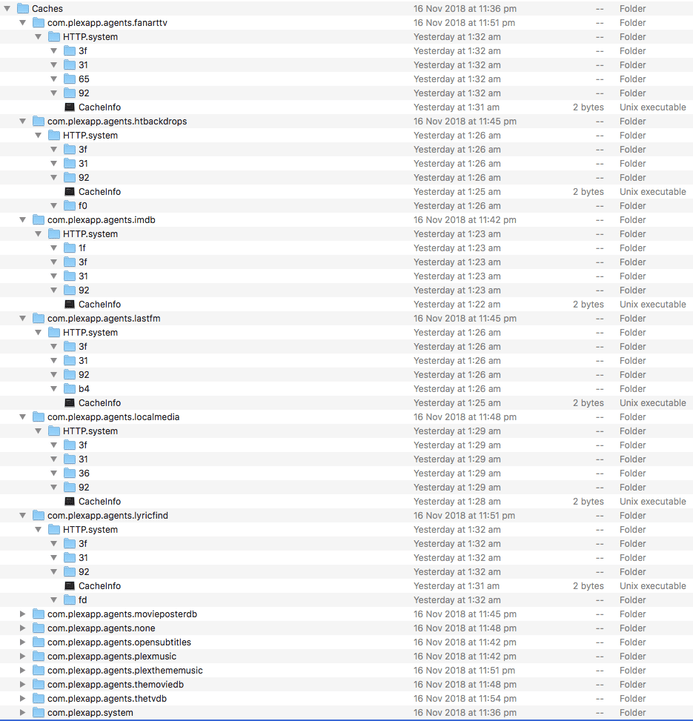
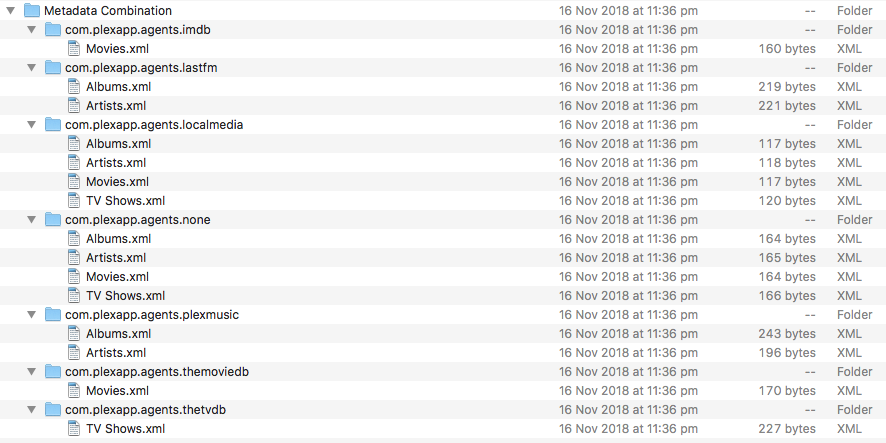
This is the result of following your instructions for the first folder, all others follow the same pattern. I’ve attached images of looking at the same folders in Finder for ease of reading.

Cygnus:Plug-in Support tom$ cd /Volumes/Data/Users/Tom/Library/Application\ Support/Plex\ Media\ Server/Plug-in\ Support
Cygnus:Plug-in Support tom$ ls -al
total 1536
drwxrwxrwx 1 tom staff 131072 16 Nov 23:31 .
drwxrwxrwx 1 tom staff 131072 16 Nov 23:31 ..
drwxrwxrwx 1 tom staff 131072 16 Nov 23:36 Caches
drwxrwxrwx 1 tom staff 131072 16 Nov 23:36 Data
drwxrwxrwx 1 tom staff 131072 16 Nov 23:30 Databases
drwxrwxrwx 1 tom staff 131072 16 Nov 23:36 Metadata Combination
Cygnus:Plug-in Support tom$ cd caches
Cygnus:caches tom$ ls -al
total 4096
drwxrwxrwx 1 tom staff 131072 16 Nov 23:36 .
drwxrwxrwx 1 tom staff 131072 16 Nov 23:31 ..
drwxrwxrwx 1 tom staff 131072 16 Nov 23:51 com.plexapp.agents.fanarttv
drwxrwxrwx 1 tom staff 131072 16 Nov 23:45 com.plexapp.agents.htbackdrops
drwxrwxrwx 1 tom staff 131072 16 Nov 23:42 com.plexapp.agents.imdb
drwxrwxrwx 1 tom staff 131072 16 Nov 23:45 com.plexapp.agents.lastfm
drwxrwxrwx 1 tom staff 131072 16 Nov 23:48 com.plexapp.agents.localmedia
drwxrwxrwx 1 tom staff 131072 16 Nov 23:51 com.plexapp.agents.lyricfind
drwxrwxrwx 1 tom staff 131072 16 Nov 23:45 com.plexapp.agents.movieposterdb
drwxrwxrwx 1 tom staff 131072 16 Nov 23:48 com.plexapp.agents.none
drwxrwxrwx 1 tom staff 131072 16 Nov 23:42 com.plexapp.agents.opensubtitles
drwxrwxrwx 1 tom staff 131072 16 Nov 23:42 com.plexapp.agents.plexmusic
drwxrwxrwx 1 tom staff 131072 16 Nov 23:51 com.plexapp.agents.plexthememusic
drwxrwxrwx 1 tom staff 131072 16 Nov 23:48 com.plexapp.agents.themoviedb
drwxrwxrwx 1 tom staff 131072 16 Nov 23:54 com.plexapp.agents.thetvdb
drwxrwxrwx 1 tom staff 131072 16 Nov 23:36 com.plexapp.system
Cygnus:caches tom$ cd com.plexapp.agents.fanarttv
Cygnus:HTTP.system tom$ ls -al
total 1792
drwxrwxrwx 1 tom staff 131072 17 Nov 01:32 .
drwxrwxrwx 1 tom staff 131072 16 Nov 23:51 ..
drwxrwxrwx 1 tom staff 131072 17 Nov 01:32 31
drwxrwxrwx 1 tom staff 131072 17 Nov 01:32 3f
drwxrwxrwx 1 tom staff 131072 17 Nov 01:32 65
drwxrwxrwx 1 tom staff 131072 17 Nov 01:32 92
-rwxrwxrwx 1 tom staff 2 17 Nov 01:31 CacheInfo
Cygnus:HTTP.system tom$ cd 31
Cygnus:31 tom$ ls -al
total 512
drwxrwxrwx 1 tom staff 131072 17 Nov 01:32 .
drwxrwxrwx 1 tom staff 131072 17 Nov 01:32 ..

All of this is done under the ‘tom’ account. That is the only account on the computer. The other user account I mentioned in my first post I have since deleted.

Thank you for your help, it is really appreciated.

Thank you

you did the ls -al for the directories below Caches but not the ones below data

The error is now just this

2018-11-18 01:25:14,015 (7fff9a764380) :  CRITICAL (storage:89) - Exception writing to /Volumes/Data/Users/Tom/Library/Application Support/Plex Media Server/Plug-in Support/Data/com.plexapp.system/StoredValues (most recent call last):
  File "/Applications/Plex Media Server.app/Contents/Resources/Plug-ins-ecd600442/Framework.bundle/Contents/Resources/Versions/2/Python/Framework/components/storage.py", line 86, in save
    shutil.move(tempfile, filename)
  File "/Applications/Plex Media Server.app/Contents/Resources/Python/lib/python2.7/shutil.py", line 302, in move
    copy2(src, real_dst)
  File "/Applications/Plex Media Server.app/Contents/Resources/Python/lib/python2.7/shutil.py", line 130, in copy2
    copyfile(src, dst)
  File "/Applications/Plex Media Server.app/Contents/Resources/Python/lib/python2.7/shutil.py", line 82, in copyfile
    with open(src, 'rb') as fsrc:
IOError: [Errno 2] No such file or directory: '/Volumes/Data/Users/Tom/Library/Application Support/Plex Media Server/Plug-in Support/Data/com.plexapp.system/._StoredValues'

so cd '/Volumes/Data/Users/Tom/Library/Application\ Support/Plex\ Media\ Server/Plug-in\ Support/Data/'
and ls -al

and then
cd com.plexapp.system
and ls -al

Cygnus:Plug-in Support tom$ cd data
Cygnus:data tom$ ls -al
total 4096
drwxrwxrwx 1 tom staff 131072 16 Nov 23:36 .
drwxrwxrwx 1 tom staff 131072 16 Nov 23:31 …
drwxrwxrwx 1 tom staff 131072 16 Nov 23:51 com.plexapp.agents.fanarttv
drwxrwxrwx 1 tom staff 131072 16 Nov 23:45 com.plexapp.agents.htbackdrops
drwxrwxrwx 1 tom staff 131072 16 Nov 23:42 com.plexapp.agents.imdb
drwxrwxrwx 1 tom staff 131072 16 Nov 23:45 com.plexapp.agents.lastfm
drwxrwxrwx 1 tom staff 131072 16 Nov 23:48 com.plexapp.agents.localmedia
drwxrwxrwx 1 tom staff 131072 16 Nov 23:51 com.plexapp.agents.lyricfind
drwxrwxrwx 1 tom staff 131072 16 Nov 23:45 com.plexapp.agents.movieposterdb
drwxrwxrwx 1 tom staff 131072 16 Nov 23:48 com.plexapp.agents.none
drwxrwxrwx 1 tom staff 131072 16 Nov 23:42 com.plexapp.agents.opensubtitles
drwxrwxrwx 1 tom staff 131072 16 Nov 23:42 com.plexapp.agents.plexmusic
drwxrwxrwx 1 tom staff 131072 16 Nov 23:51 com.plexapp.agents.plexthememusic
drwxrwxrwx 1 tom staff 131072 16 Nov 23:48 com.plexapp.agents.themoviedb
drwxrwxrwx 1 tom staff 131072 16 Nov 23:54 com.plexapp.agents.thetvdb
drwxrwxrwx 1 tom staff 131072 16 Nov 23:36 com.plexapp.system

Cygnus:data tom$ cd com.plexapp.system/
Cygnus:com.plexapp.system tom$ ls -al
total 1024
drwxrwxrwx 1 tom staff 131072 16 Nov 23:36 .
drwxrwxrwx 1 tom staff 131072 16 Nov 23:36 …
drwxrwxrwx 1 tom staff 131072 16 Nov 23:36 DataItems
-rwxrwxrwx 1 tom staff 114 18 Nov 01:25 HTTPCookies

I understand that the ._filename files get created by MacOS

So ._StoredValues system created folder is not being created after moving the Home Directory and the com.plexapp.system process is failing when accessing it

We need to establish what creates ._StoredValues

I’ve done a little experimenting and it appears that shortly after starting PMS, a file called StoredValues is created, not ._StoredValues however. The file is only present for a second though, if that, so I can’t open it. Never seen a file called ._StoredValues at any point.
I then tried manually creating a file called ._StoredValues as an empty file but upon saving it says files that start with a . are reserved for the system, and the file never appears even when showing hidden files.

Could you compare with a test run on another account with defaulted home directory and see what gets created in this directory

I will need to look at the logs again later tonight to see what this error is leading to

I found Plex Media Server python code that appears to create the ._StoredValues file as a tempfile and write data to it, close it and then move the file to StoredValues and we are failing on this move - with error that ._StoredValues does not exist

If the user an admin account - wondering if that is a factor here

Using a new user account with the default home directory, PMS started up straight away no problem. In the com.plexapp.system folder there were three files: Dict, HTTPCookies and, StoredValues as well as a folder DataItems.
I copying over both Dict and StoredValues into the tom user account then launching PMS again (It was closed on the new account at this point). This time it opened straight away and showed the interface for creating a new server in the browser. However, it never finds the server as before, but unlike before, it doesn’t say “Server is starting” under the menu bar icon anymore. I’ve attached the logs from the semi-successful run if you want to have a look at those as well:
Data/Tom/…/Plex Media Server.zip (203.5 KB)

The StoredValues file is removed shortly after starting the PMS though, and are back to square one again unless it is manually copied in again.

I’ve also uploaded the logs from the PMS on the new, unaltered account incase you want to look at those as well.
Default home dir/Plex Media Server.zip (82.4 KB)

All accounts on this computer are admin accounts.

Does this exist

Using the Finder’s “Go” menu, select Go To Folder… then enter the following in the dialog box that pops up:

~/Library/Preferences/com.plexapp.plexmediaserver.plist

and could you zip it and send me by PM