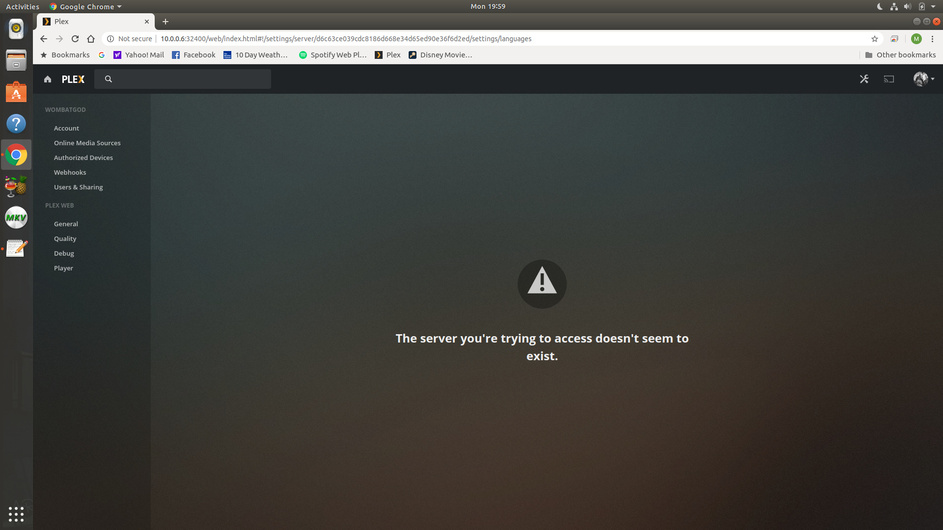
Last night, Plex Server was perfect. This morning, I can’t access PMS either on localhost/ip address or plex web/player. My OS is Ubuntu 18.04.4 LTS. No updates were made to the OS or system libraries. I manually updated PMS hoping it would resolve any files having lost permissions or been randomly borked/corrupted.
Update:
Tried to login to localhost again. Error reads that server doesn’t seem to exist.
From what I can tell so far, it’s the TLS/SSL Security Certificate. I think this is most likely a symptom, not a root cause. I have no server settings options when I log-in on localhost, so I can’t verify “secure connections” is off.
Plex Media Player for android 7.30.1 is able to connect to my Server. A magical new development. All other devices, however, not so lucky. I did remove all TV and web browser devices as part of my troubleshooting before starting this thread. Devices include Roku, lg smart tv, Plex for android, and PC.
Server is recognized, but timing out when trying to claim the server.
I had this problem a few months ago and did a complete reinstall. I went so far as to remove the preferences.xml and allowed it to be recreated.
I can’t remember what it took to claim the server, but I do remember having to “break” my DNS settings by trying to change my DNS and undoing that in order to get remote access.
What’s the IP address of your modem/router Gateway?
In the IP adapter settings for enp7s0, make sure the DNS and Gateway are the IP address of the modem/router . Would that be 10.0.0.1 or is that just a router which goes to another device ?
10.0.0.1 is my router. I set PMS network interface to enp7s0 instead of any. Didn’t work. Reset the setting. Didn’t work. I manually set my DNS to Google instead of my ISP for the router and Ubuntu Network Settings. Now everything is working.