Server Version#: 1.20.1.3252
Player Version#: Plex Web Version 4.34.4
I’ve run into a problem with getting HW transcoding to work on a Debian 10 server.
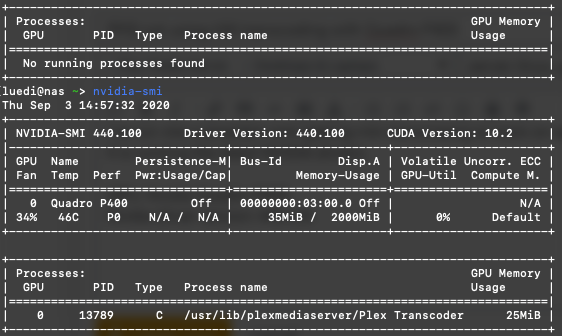
GPU: Nvidia Quadro P400
Nvidia driver version: 440.100
HW acceleration is enabled in PMS settings.
When running a 1080p to 240p transcode (for testing), both Nvidia-smi and nvtop pick up the transcode, but let the CPU do all the work (328%, 4 core).
Same with 4K to 1080p but with 100% CPU load (400%) and choppy playback.
I’ve looked into dependencies for Debian (HardwareVideoAcceleration - Debian Wiki)
According to this, two packages are necessary:
libnvcuvid1
libnvidia-encode1
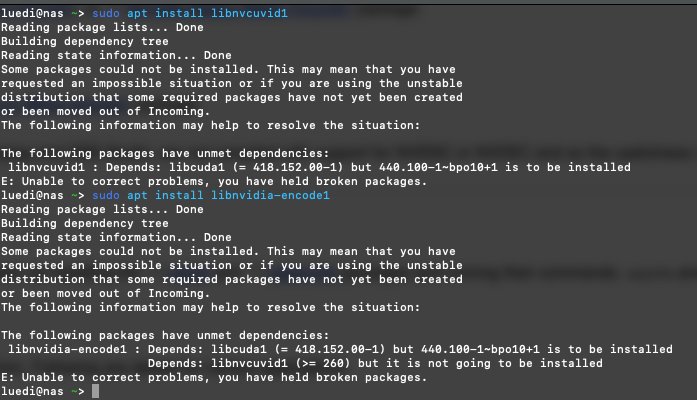
I can’t install them because they conflict with the latest Nvidia driver (screenshot).
Hi TeknoJunky,
Thanks for the advice. I will upgrade the driver asap. Plex is (now) running directly under Debian to support GPU HW…
Previously, docker portainer did not agree with passing the Nvidia runtime to the container.
I will report…
Hi again,
I’ve managed to install the .run package from NVIDIA and HW transcoding just works, no extra packages/dependencies to install.
However it took quite a while to completely remove all NVIDIA package manager packages and disable nouveau. For others doing the same I did this (in Debian 10).
sudo apt-get autoremove nvidia-driver
sudo apt-get autoremove --purge nvidia-driver
sudo apt-get purge nvidia.
The “.” is important = wildcard