Server Version#: 1.41.6.9685
If I point some library to an APFS encrypted volume, Plex doesn’t detect files on it, een though it can browse the folder structure.
If I change the same volume to APFS (not-encrypted), the same files can be detected without issues.
Proper permissions are provided for each case. Is this a product limitation?
SE56
April 26, 2025, 8:27am
2
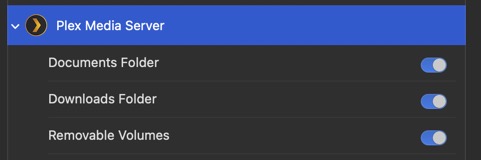
Go to System Settings/ Privacy & Security/ Files & Folders/ Plex Media Server/ Select all Sliders
Restart your Computer
@pshanew any idea?
Everything is checked. As I said before, I can access external volumes, the problem is only with encrypted volumes.
The volume is unlocked and mounted and Plex can browse the folder tree. Just can’t add the files to the library.
SE56
April 26, 2025, 10:06am
4
Have you tried booting up in safe mode and Run First Aid on APFS drive?
SE56:
(Me) any idea?
Unfortunately not off the top of my head. I just created an encrypted APFS volume (external USB), added a test movie to it, and added it as a folder for my movies library. Plex saw it after I granted it permission to removable volumes, and added the test movie to the library. I tested with my OS volume as well, which also worked.
I’ll noodle on it a bit and see if I can think of something.
macOS 15.4.1
PMS 1.41.7.9717
1 Like
Interesting. I wonder whether I should consider wiping in and encrypting it again.
SE56
April 26, 2025, 11:02am
7
If it mounting it should work, it maybe corrupted that is why I mentioned First Aid via Safe mode.
Another idea would be is using a different USB port and boot up using that port
I already erased it without encryption and it works now. I will let it encrypt again without erasing overnight and see what happens.
1 Like
This time it worked without any issues. The entire disk is encrypted and Plex can read everything. Thanks to everyone for their help.
system
July 27, 2025, 8:54am
10
This topic was automatically closed 90 days after the last reply. New replies are no longer allowed.