Server Version#: Plex Pass, 1.31.1.6733 on Ubuntu 22
Player Version#: iOS AppleTV Latest Version/Latest Plex
This is a super beefy server with fast media, fast procs and 128GB RAM.
Everything has been fine just up until recently. In one of the most recent updates, I’m not sure which, with the addition of the credit scanning, the PMS process is CONSISTENTLY eating 200-300% CPU non stop. Restarting it makes no difference. It’s in a perpetual state of scanning intros and credits. While this is happening, most show’s and movie’s video start stuttering horribly while the audio continues to work fine. Stopping and restarting the playback fixes the issue for a while. Pausing/unpausing makes no difference, it still stutters. Currently watching a movie and I have to do this every 5-10 min. Restarting the ATV Plex App and/or the AppleTV itself makes no difference. It does this on multiple devices through out the home so it seems related to the recent updates to PMS. These are from the current movie I’m trying to watch.

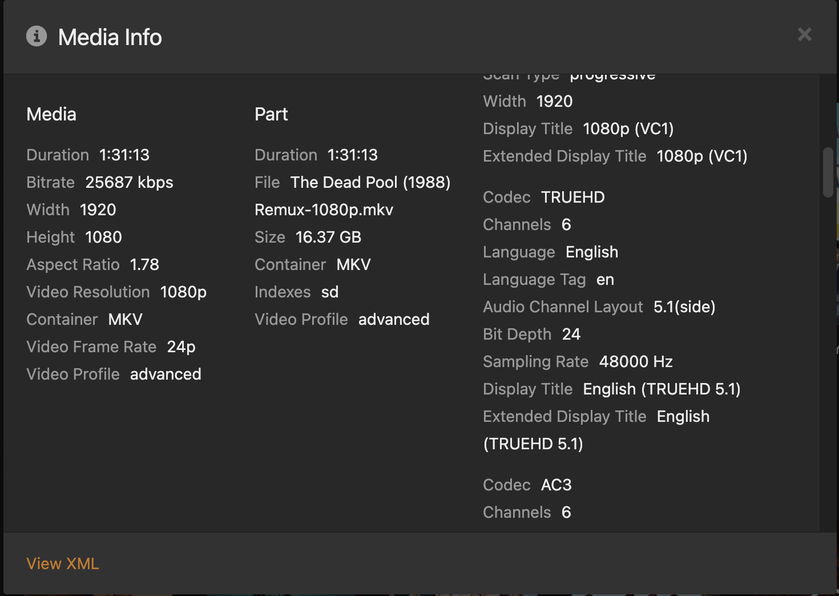

There is no transcoding going on.

Suggestions?
