Server Version#: PlexMediaServer-1.41.1.9057-af5eaea7a-x86_64_DSM7.spk
I have been experiencing a very unstable Plex in recent weeks running the above (and I think other recent previous) versions of PMS.
In this respect Resource Manager of my xPenology Plex server (Kaby Lake Intel(R) Xeon(R) CPU E3-1245 v6 @ 3.70GHz has been showing CPU fluctuations ranging from 0 to over 40%, minute by minute when PMS is running on the server, even if nothing is being played from the server at the time.
I uninstalled the PMS and reinstalled 1.40.4.8840-70008840. This seemed to fix the problem, but only for a very short time until PMS started to exhibit the same issues again (obviously once the older version had had enough time to analyse the media libraries and identify problem media.
The problems seem to be related to some DVR recordings made from my HDHomeRun device that has been ‘flaky’, at best. I would not have any issues with Plex deleting any such recordings if that would end the issue. I certainly do not wish Plex to start deleting other media content, such as for TV shows, movies, etc.
I am now about to reinstall the latest version of PMS (PlexMediaServer-1.41.1.9057-af5eaea7a-x86_64_DSM7.spk), pending resolution of this issue.
The CPU usage can be caused by Plex running Intro and Credit detection and any number of other operations.
It all depends on the settings you use and whether or not you want those features.
This should not effect playback of any media though. Plex will throttle those operations and give priority to playback if needed.
Personally, I don’t use any of those features, I prefer to edit my videos and cut out what I don’t want (Intros or Credits) using Avidemux.
I only allow Audio fingerprinting and my servers barely raise a sweat, except during maintenance.
Thanks for your response @trumpy81.
I’m not sure what setting I have that are causing these issues. I’m having difficulties actually identifying what media is causing the problem: if I could easily identify particular recordings I’d delete them to solve(?) the issue.
Would you please advise what settings I need look for that I should disable to eliminate this problem.
You will find most of the settings in Plex Settings > Server > Library.
Here is an example:
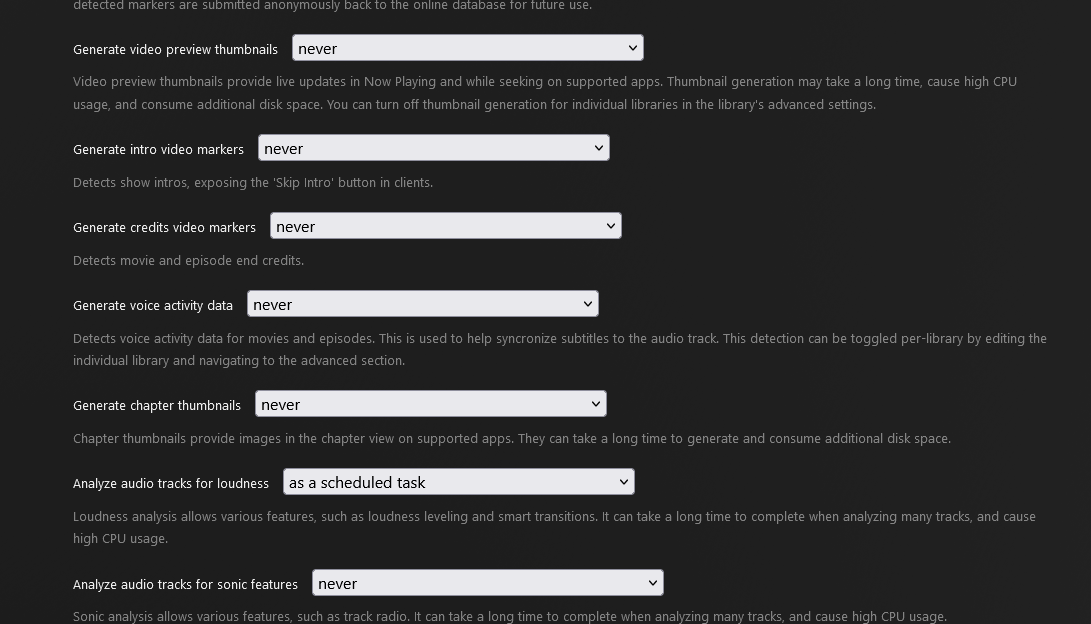
If you want to use any of these features, then try setting them to as a scheduled task.
Those tasks will not be performed until Plex runs maintenance on your libraries.
Just remember though, depending on the size of your libraries, it may take some time for these operations to actually be performed, which means they wont be available until after they have been run during maintenance.
If that is an issue, you can extend the maintenance hours to give Plex more time to run the tasks for you.
To add to Trumpy,
All the background tasks will use CPU resources.
Although your CPU does have QSV capability, it will not be used.
( Engineering has deemed ‘background tasks → CPU’ and ‘foreground tasks, aka streaming, → GPU’ )
Thanks for the advice. My PMS does not have a GPU, only the iGPU of the e3-1245v6
Therefore, all processes are handled by the CPU (with iGPU).
I was simply trying to determine how I can resolve those recurring issues causing the system ramping up from negligible CPU to 40% CPU every minute or less. @trumpy81’s advice for the Plex Settings > Server > Library seems to have resolved that issue and it seems to be operating normally again.
I’m not sure when these settings were changed from default. I don’t recall ever changing them.
Sorry if I wasn’t clear.
The “QSV” capability is commonly referred to in PMS as “iGPU”. (internal GPU)
This makes “GPU” references work for both ‘iGPU’ and ‘discrete GPU’ easier to describe / document.
I have an E5-2690 v4. I also got those spikes until I pushed all the processing to Scheduled Tasks.
As to where they got set; When you create a library section, PMS asserts them enabled as the default . If you want to delay that processing until maintenance, that is the “your decision” part.
They can sometimes be reset when you update Plex or when you update DSM. While that does not occur every time you update, once in a while it does.
If you have never set them, then they will be in their default configuration, which means most of them will be enabled.
Plex want you to use these features because they have invested a lot of time and money into making these features available for everyone and I’m sure they would hate it if no one used them … lol
I hope they don’t hate me … lol
Thanks @trumpy81; I’m glad for your advice: until now I wasn’t aware of this issue. I’ve now turned the options off; this has resolved my issue.
I tend to just update my PMS to latest version: I guess that’s why the setting were giving me that grief 
You may close this case now, thanks
You are most welcome.
If you have any other issues, just holler, someone will be here to help you if they can.
Happy Plexing! 
This topic was automatically closed 90 days after the last reply. New replies are no longer allowed.
