PMS Phantom Sessions and Locking Up

Server Version#: 1.40.2.8395
Player Version#: 4.125.1

I’m noticing strange behavior –

1- Active sessions that are not showing up on the dashboard. I can see the bandwidth being used, but no active user session.

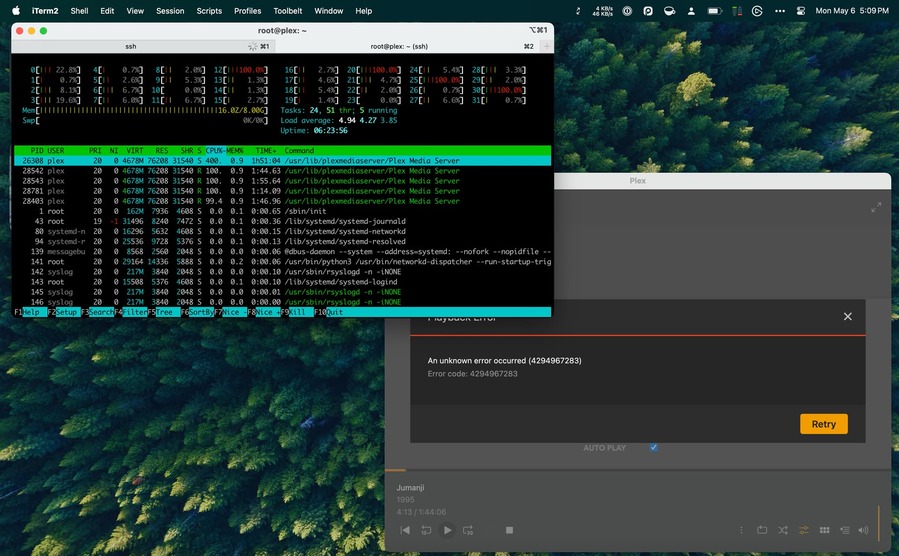
2- The server becomes unresponsive. I leave it for some time and it returns, but it goes down for 5 to 10 minutes at a time. CPU on the Proxmox LXC is very high during this time.

Attached logs, hoping for some insight.

Plex Media Server Logs_2024-05-05_13-30-10.zip (4.5 MB)

someone / something on your LAN is downloading the files which are requiring transcode.

IP address I’m seeing is: 10.66.0.80

What further compounds this is the download is being stopped (disconnect by peer)

Were it my network I’d want to know who’s doing it AFTER I shutdown the access.

That is my static LAN IP for my laptop, running Plex Mac client I was testing with. I was not downloading, but requesting a stream. Why is the transcode locking the PMS?

@ChuckPa - I’ve done some extensive testing today and would like your input.

My Setup:
Proxmox 8.2.2
Ubuntu 22.04 LXC
Ryzen Threadripper 1950X
NVidia Quadro P5000

I did a CLEAN install of Proxmox. Then, because their installer did not allow to choose, I installed the 6.5 kernel, and set that to default.

Then I followed these instructions, which have been my go-to for some time to set up GPU passthrough to a LXC: Plex GPU transcoding in Docker on LXC on Proxmox – jocke. (I ignore the docker part). I’m using 535.171.04 for my driver.

I configured it on a new LXC with a new Plex Server. I manually chose my GPU in the Transcoder settings. Tone mapping is ON.

My findings:

  • Using Plex Mac client, smaller videos will transcode on first try most times. Other times, I’ll get a few seconds of video, then quits. A second time, and the transcoding will run. I’m forcing the transcode not immediately – I’ll play which will direct stream, then change the quality to something lower than the source. nvidia-smi will show the process on the host machine.
  • Using the Web client on Safari, the same smaller videos will not play when set to transcode. Black screen
  • Using the Mac client, a large movie (40+GB) will only direct stream. “An unknown error occurred (4294967283). Error code: 4294967283”
  • After some transcoding failures, I’ll have a lingering transcode process that will consume massive amounts of CPU cycles, and sometimes lock up the PMS. Nothing “crashes”, and my proxmox host machine is still operable, but the PMS stops responding. Note: I have a Ryzen Threadripper 1950X.

Any thoughts or suggestions on what to try next?

Do you have the DEBUG logs handy?

Those are important to me (from the server perspective)

When I create LXC myself, I add the nvidia client-side runtime into the container
(it’s an easy option in LXD). The main drivers (e.g.535) are installed on the host OS.
As part of this, I’m passing the P2200 as a “Physical” device and not an SR-IOV device node. (big difference)

If you wouldn’t mind one more recreation of that hanging process…

  1. Shutdown Plex and clear any hung pids
  2. Start Plex
  3. Recreate this same exact failure.
  4. Download the logs zip
  5. Stop Plex
  6. ps -ef | grep -i plex (so I can get pid & other info) of the hung process
  7. Attach the ZIP and copy paste using the “Preformatted text” button (put the text in that block so the forum doesn’t try to eat it)

@ChuckPa -

I did this twice. The first time, I did it on the clean plex server with brand new library. The second time, I did it on my legacy library/database. The results of the transcoding were the same, but I was not able to get the new library to “hang”. I could try again tomorrow. I wonder if this indicates my database is a contributor to the hang.

I could not get the plex logs downloaded prior to the hung process. Once the server is hung, I cannot access the settings to download the logs. I restarted the server, and downloaded the logs. Let me know if it has what you need.

Note: I was surprised to see that despite PMS being hung, the process did not remain after shutting down the server.

Here’s the sequence of events:

  • 9:33pm ET - “Arcadian” on Plex Web (Safari). Started Direct Stream. Moved to 720p transcode. Success!
    9:35pm ET - “Rebel Moon” on Plex Web (Safari). Started Direct Stream. Moved to 480p transcode. Black Screen.
  • 9:36pm ET - My wife started playing something which I had not planned for.
  • 9:37pm ET - Jumanji on Plex Web (Safari). Black Screen
  • 9:39pm ET - Server locked up.
  • 9:39 - 9:42 - Trying to stop the Plex via systemctl. see my console log
root@plex:/var/lib/plexmediaserver/Library/Application Support# ps -ef | grep -i plex
plex       55285       1  0 21:32 ?        00:13:55 /usr/lib/plexmediaserver/Plex Media Server
plex       55326   55285  0 21:32 ?        00:00:02 Plex Plug-in [com.plexapp.system] /usr/lib/plexmediaserver/Resources/Plug-ins-c67dce28e/Framework.bundle/Contents/Resources/Versions/2/Python/bootstrap.py --server-version 1.40.2.8395-c67dce28e /usr/lib/plexmediaserver/Resources/Plug-ins-c67dce28e/System.bundle
plex       55374   55285  0 21:32 ?        00:00:00 /usr/lib/plexmediaserver/Plex Tuner Service /usr/lib/plexmediaserver/Resources/Tuner/Private /usr/lib/plexmediaserver/Resources/Tuner/Shared 1.40.2.8395-c67dce28e 32600
plex       55395   55285  0 21:32 ?        00:00:01 Plex Plug-in [com.plexapp.agents.imdb] /usr/lib/plexmediaserver/Resources/Plug-ins-c67dce28e/Framework.bundle/Contents/Resources/Versions/2/Python/bootstrap.py --server-version 1.40.2.8395-c67dce28e /usr/lib/plexmediaserver/Resources/Plug-ins-c67dce28e/PlexMovie.bundle
plex       55447   55285  0 21:33 ?        00:00:09 Plex EAE Service
plex       56119   55285  0 21:37 ?        00:00:06 /usr/lib/plexmediaserver/Plex Transcoder -codec:0 hevc -hwaccel:0 nvdec -hwaccel_fallback_threshold:0 10 -threads:0 1 -hwaccel_output_format:0 cuda -hwaccel_device:0 cuda -codec:1 eac3_eae -eae_prefix:1 74B97A57-49F8-4EC9-9D14-8479D20C846C_ -ss 120 -analyzeduration 20000000 -probesize 20000000 -i /mnt/nas/tv_shows/Fellow Travelers (2023)/Fellow Travelers (2023) - S01E05 - Promise You Won't Write [PMTP WEBDL-2160p][HDR10Plus][EAC3 5.1][h265]-NTb.mkv -filter_complex [0:0]hwupload[0];[0]scale_cuda=w=1920:h=1080:format=p010[1];[1]tonemap_cuda=mobius:nv12[2] -map [2] -codec:0 h264_nvenc -b:0 5434k -maxrate:0 7246k -bufsize:0 14492k -forced-idr:0 1 -r:0 23.975999999999999 -force_key_frames:0 expr:gte(t,n_forced*3) -filter_complex [0:1] aresample=async=1:ochl='stereo':rematrix_maxval=0.000000dB:osr=48000[3] -map [3] -metadata:s:1 language=eng -codec:1 aac -b:1 107k -segment_format mp4 -f ssegment -individual_header_trailer 0 -flags +global_header -segment_header_filename header -segment_time 3 -segment_start_number 40 -segment_copyts 1 -segment_time_delta 0.0625 -segment_list http://127.0.0.1:32400/video/:/transcode/session/74B97A57-49F8-4EC9-9D14-8479D20C846C/4c1cfd55-8666-4b5a-bf3c-2e5a384cda78/manifest?X-Plex-Http-Pipeline=infinite -segment_list_type csv -segment_list_size 5 -segment_list_separate_stream_times 1 -segment_list_unfinished 1 -segment_format_options movflags=frag_custom+dash+delay_moov+frag_discont:fragment_index=41:output_ts_offset=10 -max_delay 5000000 -avoid_negative_ts disabled -map_metadata -1 -map_chapters -1 media-%05d.ts -start_at_zero -copyts -init_hw_device cuda=cuda:pci:0000:42:00.0 -filter_hw_device cuda -y -nostats -loglevel quiet -loglevel_plex error -progressurl http://127.0.0.1:32400/video/:/transcode/session/74B97A57-49F8-4EC9-9D14-8479D20C846C/4c1cfd55-8666-4b5a-bf3c-2e5a384cda78/progress
root       57431   28301  0 21:40 pts/3    00:00:00 grep --color=auto -i plex
root@plex:/var/lib/plexmediaserver/Library/Application Support# systemctl stop plexmediaserver.service
root@plex:/var/lib/plexmediaserver/Library/Application Support# ps -ef | grep -i plex
root       57440   28301  0 21:42 pts/3    00:00:00 grep --color=auto -i plex

When I create LXC myself, I add the nvidia client-side runtime into the container
(it’s an easy option in LXD). The main drivers (e.g.535) are installed on the host OS.
As part of this, I’m passing the P2200 as a “Physical” device and not an SR-IOV device node. (big difference)

is this different from what I’m doing? I install the Nvidia driver on the LXC using the --no-kernal-module option. The driver is only compiled on the host proxmox. I pass the GPU to the LXC via the cgroup in the LXC config. I’ve checked the group numbers, and it’s mapped correctly.

Forgot to attach the logs.

Plex Media Server Logs_2024-05-06_21-43-54.zip (2.9 MB)

You installing the Nvidia drivers again in the container with the --no-kernel-modules is the equivalent of what I do. You get only the runtime modules. The host has the kernel modules (which is correct). The container relies on the host to share(provide) them since it shares the kernel with the main installation of the host OS.

This one is a remux / audio conversion

May 06, 2024 21:33:38.442 [125130520972088] DEBUG - [Req#71d/Transcode] Starting a transcode session kuuxhwvzkjiv4rkv8jns4fkc at offset -1.0 (state=3)
May 06, 2024 21:33:38.442 [125130520972088] DEBUG - [Req#71d/Transcode] TPU: hardware transcoding: enabled, but no hardware decode accelerator found
May 06, 2024 21:33:38.442 [125130520972088] INFO - [Req#71d/Transcode] CodecManager: starting EAE at "/tmp/pms-4bb5a8b0-a0f0-4755-bde1-f1ef1d938f44/EasyAudioEncoder"
May 06, 2024 21:33:38.443 [125130520972088] DEBUG - [Req#71d/Transcode/JobRunner] Job running: "/var/lib/plexmediaserver/Library/Application Support/Plex Media Server/Codecs/EasyAudioEncoder-1978-linux-x86_64/EasyAudioEncoder/EasyAudioEncoder"
May 06, 2024 21:33:38.443 [125130520972088] DEBUG - [Req#71d/Transcode/JobRunner] In directory: "/tmp/pms-4bb5a8b0-a0f0-4755-bde1-f1ef1d938f44/EasyAudioEncoder"
May 06, 2024 21:33:38.443 [125130520972088] DEBUG - [Req#71d/Transcode/JobRunner] Jobs: Starting child process with pid 55447
May 06, 2024 21:33:38.443 [125130520972088] DEBUG - [Req#71d/Transcode] [Universal] Using local file path instead of URL: /mnt/nas/movies/Arcadian (2024)/Arcadian (2024) {imdb-tt22939186} [AMZN][WEBDL-1080p][EAC3 5.1][h264]-FLUX.mkv
May 06, 2024 21:33:38.443 [125130520972088] DEBUG - [Req#71d/Transcode] TPU: hardware transcoding: final decoder: , final encoder: 
May 06, 2024 21:33:38.444 [125130520972088] DEBUG - [Req#71d/Transcode/JobRunner] Job running: EAE_ROOT=/tmp/pms-4bb5a8b0-a0f0-4755-bde1-f1ef1d938f44/EasyAudioEncoder FFMPEG_EXTERNAL_LIBS='/var/lib/plexmediaserver/Library/Application\ Support/Plex\ Media\ Server/Codecs/ad47460-4673-linux-x86_64/' X_PLEX_TOKEN=xxxxxxxxxxxxxxxxxxxxxxxxxxxxxxxxxxxxxxxxxx "/usr/lib/plexmediaserver/Plex Transcoder" -codec:0 h264 -codec:1 eac3_eae -eae_prefix:1 kuuxhwvzkjiv4rkv8jns4fkc_ -ss 0 -noaccurate_seek -analyzeduration 20000000 -probesize 20000000 -i "/mnt/nas/movies/Arcadian (2024)/Arcadian (2024) {imdb-tt22939186} [AMZN][WEBDL-1080p][EAC3 5.1][h264]-FLUX.mkv" -map 0:0 -metadata:s:0 language=eng -codec:0 copy -filter_complex "[0:1] aresample=async=1:ochl='stereo':rematrix_maxval=0.000000dB:osr=48000[0]" -map "[0]" -metadata:s:1 language=eng -codec:1 aac -b:1 256k -f dash -seg_duration 5 -dash_segment_type mp4 -init_seg_name 'init-stream$RepresentationID$.m4s' -media_seg_name 'chunk-stream$RepresentationID$-$Number%05d$.m4s' -window_size 5 -delete_removed false -skip_to_segment 1 -time_delta 0.0625 -manifest_name "http://127.0.0.1:32400/video/:/transcode/session/kuuxhwvzkjiv4rkv8jns4fkc/c2202fb6-6e77-485b-a098-0c62d37d5a56/manifest?X-Plex-Http-Pipeline=infinite" -avoid_negative_ts disabled -map_metadata -1 -map_chapters -1 dash -start_at_zero -copyts -vsync cfr -y -nostats -loglevel quiet -loglevel_plex error -progressurl http://127.0.0.1:32400/video/:/transcode/session/kuuxhwvzkjiv4rkv8jns4fkc/c2202fb6-6e77-485b-a098-0c62d37d5a56/progress
May 06, 2024 21:33:38.444 [125130520972088] DEBUG - [Req#71d/Transcode/JobRunner] In directory: "/var/lib/plexmediaserver/Library/Application Support/Plex Media Server/Cache/Transcode/Sessions/plex-transcode-kuuxhwvzkjiv4rkv8jns4fkc-c2202fb6-6e77-485b-a098-0c62d37d5a56"

This is a full transcode:

May 06, 2024 21:34:01.552 [125130535770936] DEBUG - [Req#843/Transcode] TPU: hardware transcoding: using hardware decode accelerator nvdec
May 06, 2024 21:34:01.552 [125130535770936] DEBUG - [Req#843/Transcode] TPU: hardware transcoding: zero-copy support present
May 06, 2024 21:34:01.552 [125130535770936] DEBUG - [Req#843/Transcode] TPU: hardware transcoding: using zero-copy transcoding
May 06, 2024 21:34:01.552 [125130535770936] DEBUG - [Req#843/Transcode] [Universal] Using local file path instead of URL: /mnt/nas/movies/Arcadian (2024)/Arcadian (2024) {imdb-tt22939186} [AMZN][WEBDL-1080p][EAC3 5.1][h264]-FLUX.mkv
May 06, 2024 21:34:01.552 [125130535770936] DEBUG - [Req#843/Transcode] TPU: hardware transcoding: final decoder: nvdec, final encoder: nvenc
May 06, 2024 21:34:01.552 [125130535770936] DEBUG - [Req#843/Transcode/JobRunner] Job running: CUDA_CACHE_PATH="/var/lib/plexmediaserver/Library/Application Support/Plex Media Server/Cache/Shaders/CUDA" EAE_ROOT=/tmp/pms-4bb5a8b0-a0f0-4755-bde1-f1ef1d938f44/EasyAudioEncoder FFMPEG_EXTERNAL_LIBS='/var/lib/plexmediaserver/Library/Application\ Support/Plex\ Media\ Server/Codecs/ad47460-4673-linux-x86_64/' X_PLEX_TOKEN=xxxxxxxxxxxxxxxxxxxxxxxxxxxxxxxxxxxxxxxxxx "/usr/lib/plexmediaserver/Plex Transcoder" -codec:0 h264 -hwaccel:0 nvdec -hwaccel_fallback_threshold:0 10 -threads:0 1 -hwaccel_output_format:0 cuda -hwaccel_device:0 cuda -codec:1 eac3_eae -eae_prefix:1 4iln2shqzte3gbnct8vy2uya_ -analyzeduration 20000000 -probesize 20000000 -i "/mnt/nas/movies/Arcadian (2024)/Arcadian (2024) {imdb-tt22939186} [AMZN][WEBDL-1080p][EAC3 5.1][h264]-FLUX.mkv" -filter_complex "[0:0]hwupload[0];[0]scale_cuda=w=1278:h=544:format=nv12[1]" -map "[1]" -metadata:s:0 language=eng -codec:0 h264_nvenc -b:0 2046k -maxrate:0 2728k -bufsize:0 5456k -forced-idr:0 1 -r:0 23.975999999999999 -force_key_frames:0 "expr:gte(t,n_forced*5)" -filter_complex "[0:1] aresample=async=1:ochl='stereo':rematrix_maxval=0.000000dB:osr=48000[2]" -map "[2]" -metadata:s:1 language=eng -codec:1 aac -b:1 117k -f dash -seg_duration 5 -dash_segment_type mp4 -init_seg_name 'init-stream$RepresentationID$.m4s' -media_seg_name 'chunk-stream$RepresentationID$-$Number%05d$.m4s' -window_size 5 -delete_removed false -skip_to_segment 1 -time_delta 0.0625 -manifest_name "http://127.0.0.1:32400/video/:/transcode/session/4iln2shqzte3gbnct8vy2uya/10f70ee8-0702-403f-a11c-051d71b310e3/manifest?X-Plex-Http-Pipeline=infinite" -avoid_negative_ts disabled -map_metadata -1 -map_chapters -1 dash -start_at_zero -copyts -vsync cfr -init_hw_device cuda=cuda:pci:0000:42:00.0 -filter_hw_device cuda -y -nostats -loglevel quiet -loglevel_plex error -progressurl http://127.0.0.1:32400/video/:/transcode/session/4iln2shqzte3gbnct8vy2uya/10f70ee8-0702-403f-a11c-051d71b310e3/progress
May 06, 2024 21:34:01.552 [125130535770936] DEBUG - [Req#843/Transcode/JobRunner] In directory: "/var/lib/plexmediaserver/Library/Application Support/Plex Media Server/Cache/Transcode/Sessions/plex-transcode-4iln2shqzte3gbnct8vy2uya-10f70ee8-0702-403f-a11c-051d71b310e3"

This is an issue.

  1. You’re on different subnets so you’re “Remote”
  2. It will be https
  3. The cert isn’t connecting.
May 06, 2024 21:34:11.439 [125130651360056] DEBUG - CERT: incomplete TLS handshake from 10.66.0.80:61057: sslv3 alert certificate unknown (SSL routines)

The alarm is raised again here.

May 06, 2024 21:34:32.983 [125130653469496] WARN - [CERT] TLS connection from 10.66.0.80:51856 came in with unrecognized plex.direct SNI name '10-66-6-2.a94e756dc19441a9b31881b0c0c6b439.plex.direct'; using installed plex.direct cert
May 06, 2024 21:34:32.983 [125130651360056] WARN - [CERT] TLS connection from 10.66.0.80:51855 came in with unrecognized plex.direct SNI name '10-66-6-2.4f7d3af3c19c481fa49fd397eef3e95d.plex.direct'; using installed plex.direct cert
May 06, 2024 21:34:32.996 [125130653469496] DEBUG - CERT: incomplete TLS handshake from 10.66.0.80:51855: stream truncated
May 06, 2024 21:34:33.000 [125130651360056] DEBUG - CERT: incomplete TLS handshake from 10.66.0.80:51856: stream truncated

This tells me the player is looking for the old plex-issued certificate
The solution is a Control+F5 to force refresh of the server’s certificate from Plex.tv

We can see it got to the 40th block of transcoded output for playback then got terminated.

May 06, 2024 21:34:48.897 [125130651360056] DEBUG - Completed: [10.66.0.80:51791] 200 GET /video/:/transcode/universal/session/4iln2shqzte3gbnct8vy2uya/1/27.m4s (10 live) #9b0 TLS GZIP 0ms 76157 bytes (pipelined: 64)
May 06, 2024 21:34:48.945 [125130520972088] DEBUG - [Req#9a5/Transcode/4iln2shqzte3gbnct8vy2uya/10f70ee8-0702-403f-a11c-051d71b310e3] Transcoder segment range: 0 - 39 (39)
May 06, 2024 21:34:49.182 [125130535770936] DEBUG - [Req#9b4/Transcode/4iln2shqzte3gbnct8vy2uya/10f70ee8-0702-403f-a11c-051d71b310e3] Transcoder segment range: 0 - 40 (40)
May 06, 2024 21:34:49.251 [125130541783864] DEBUG - [Req#9b2/Transcode/4iln2shqzte3gbnct8vy2uya/10f70ee8-0702-403f-a11c-051d71b310e3] Session 4iln2shqzte3gbnct8vy2uya (4) is throttling
May 06, 2024 21:34:49.251 [125130544024376] DEBUG - [Req#9b8/Transcode/4iln2shqzte3gbnct8vy2uya/10f70ee8-0702-403f-a11c-051d71b310e3] Throttle - Going into sloth mode.
May 06, 2024 21:34:53.002 [125130651360056] WARN - [CERT] TLS connection from 10.66.0.80:51857 came in with unrecognized plex.direct SNI name '10-66-6-2.4f7d3af3c19c481fa49fd397eef3e95d.plex.direct'; using installed plex.direct cert
May 06, 2024 21:34:53.002 [125130653469496] WARN - [CERT] TLS connection from 10.66.0.80:51858 came in with unrecognized plex.direct SNI name '10-66-6-2.a94e756dc19441a9b31881b0c0c6b439.plex.direct'; using installed plex.direct cert
May 06, 2024 21:34:53.017 [125130651360056] DEBUG - CERT: incomplete TLS handshake from 10.66.0.80:51857: stream truncated
May 06, 2024 21:34:53.021 [125130653469496] DEBUG - CERT: incomplete TLS handshake from 10.66.0.80:51858: stream truncated
May 06, 2024 21:34:53.596 [125130541783864] DEBUG - Request: [10.66.0.80:51791 (Allowed Network (WAN))] GET /:/timeline

Do you define 10.66.x.x to be ‘allowed without auth’ on 10.60.x.x or are you simply running a /8 netmask ?

Notice the (pipelined: 243) count??

There are 243 requests queued at this point. It’s going to not respond at some point here very shortly until the backlog clears.

What else is hitting on the host?
@ChuckPa thanks for your help debugging. I have been stable for a few days, here’s what I found:

  • The mention of “remote” in the logs seems to be not considering that I added the other subnet to my LAN networks setting. The plex dashboard shows LAN when watching from my other subnet. But, to confirm this wasn’t an issue, I moved my testing to the same subnet as the plex server.
  • I did remove the “IP addresses without auth” setting, which along with a refresh, got rid of the TLS issues. This setting wasn’t really needed anyways.
  • Clearing these issues made the logs less noisy, but didn’t resolve my issue.
  • I believe my root cause was that my database was corrupt. The PRAGMA integrity_check; was reporting fine, but using your PlexDB repair script to export and reload the database made a noticeable difference in performance (following path “D” in your README). The locking up stopped.

However:

  • Part of my problem was that I was using Plex Web and Plex for Mac as my testing clients. They were just the easiest as I was working on the problem using my Mac. Plex for Mac transcoding seems significantly broken. Several movies that will not transcode on Plex for Mac work fine on Web or other clients. I believe this added a lot of extra time to my debugging as I thought the transcoding was completely broken when it wasn’t.
  • It could be me, but I swear my Nvidia Quadro P5000 could handle 4k HDR → 4k SDR tone mapping before all these problems arose, which coincided with upgrading proxmox host to 8.2. Maybe I never could, but I thought the GPU could handle it. Now it maxes out at about .8x. Anyway I dont care much that this particular transcode combination isn’t working, but it does sometimes default to this when a client is set to “Convert Automatically”.

Thanks again.

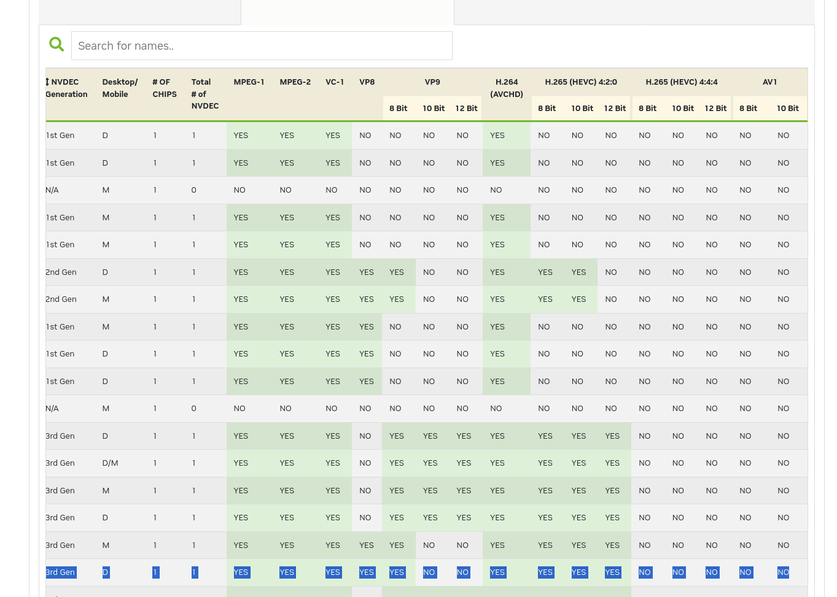
The P5000 has the same capabilities as my P2200 so care must be taken with the HEVC you’re feeding it. 4:2:0 is fine but not 4:4:4 nor any AV1.

When I setup my Proxmox support server a few years ago, I had to go into the proxmox configuration itself and DISABLE (Blacklist) it from grabbing the GPU.

I don’t have sufficient equipment here to support everything (nor does Plex officially support Proxmox ) AND it doesn’t like running in a VM on ESXi.

First and foremost I would confirm you’ve got the black listing in place - AND - when you assign the Nvidia, just as I do, you pass the entire physical device (it should show the PCIe address)

Subtitles (PGS) can give you grief. The root of the issue is the player itself.

  1. If the players are ok with it (Nvidia Shield Pro) while others require burning even in automatic mode
  2. DirectPlay is your best bet but then you’re not transcoding :wink:
    – There’s all the Dolby Vision issues to contend with during transcoding as well.

While this is very much a cop-out, I pressed my ISP to upgrade our local service to something which I can use for stream without using transcoding.

There are some players (AppleTV and all the web clients) which require subtitle burning. Even with my P2200 and Xeon E5-2690 v4 CPU, it struggles on some 4K content because while the Xeon can do a lot of things, it can’t do any one thread quickly at 4K bitrates

Ref info for this CPU: Intel Xeon E5-2690 v4 Benchmark

This topic was automatically closed 90 days after the last reply. New replies are no longer allowed.