Here’s the log file after the movie paused a few times. Note that the movie is playing in Kodi on my Shield TV, not Plex:
[
{
“type”: “info”,
“host”: “127.0.0.1:32400”,
“userAgent”: “Mozilla/5.0 (Windows NT 10.0; Win64; x64; rv:72.0) Gecko/20100101 Firefox/72.0”,
“browser”: {
“platformVersion”: “10”,
“id”: “firefox”,
“name”: “Firefox”,
“version”: “72.0”,
“gecko”: true,
“platform”: “Windows”,
“platformID”: “windows”,
“platformModifierKey”: “ctrl”
},
“version”: “4.12.3”,
“primaryServerUrl”: “http://127.0.0.1:32400/”,
“primaryServerAuthToken”: true,
“username”: “kthompson67”,
“cloudUrl”: [
{
“scheme”: “https”,
“address”: “plex.tv”,
“uri”: “https://plex.tv”,
“testState”: “connected”,
“isBundled”: false,
“isFallback”: false,
“relay”: false,
“isUntested”: false,
“isPending”: false,
“isConnected”: true,
“isUnauthorized”: false,
“isUnavailable”: false,
“isFailed”: false,
“isAborted”: false,
“isLoopback”: false,
“isPrivate”: false,
“isHttps”: true,
“isSecure”: true,
“isPlexDirect”: false,
“currentTest”: null,
“sources”: [
{
“id”: “internal”
}
]
}
]
},
{
“type”: “log:message”,
“level”: 3,
“message”: “[Vote:vtmqnnpmryit9d0lu9gq3m52] Upvote, refreshing my leader time”,
“time”: “2020-01-09T03:44:59.661Z”
},
{
“type”: “log:message”,
“level”: 2,
“message”: “[Companion] Opening long poll to Kens PC at http://127.0.0.1:32400/player/proxy/poll”,
“time”: “2020-01-09T03:45:06.460Z”
},
{
“type”: “ajax”,
“url”: “http://127.0.0.1:32400/player/proxy/poll?deviceClass=pc&protocolVersion=3&protocolCapabilities=timeline%2Cplayback%2Cnavigation%2Cmirror%2Cplayqueues&timeout=1&X-Plex-Product=Plex%20Web&X-Plex-Version=4.12.3&X-Plex-Client-Identifier=lm668m502hsmncnis93uqy35&X-Plex-Platform=Firefox&X-Plex-Platform-Version=72.0&X-Plex-Sync-Version=2&X-Plex-Features=external-media%2Cindirect-media&X-Plex-Model=bundled&X-Plex-Device=Windows&X-Plex-Device-Name=Firefox&X-Plex-Device-Screen-Resolution=2176x1094%2C2176x1224&X-Plex-Token=TOKEN&X-Plex-Language=en”,
“status”: 200,
“headers”: {
“Accept-Language”: “en”
},
“responseLength”: 0,
“time”: “2020-01-09T03:45:06.462Z”
},
{
“type”: “log:message”,
“level”: 2,
“message”: “[Companion] Poll connection successfully opened with Kens PC”,
“time”: “2020-01-09T03:45:11.460Z”
},
{
“type”: “log:message”,
“level”: 2,
“message”: “[Companion] Opening long poll to Kens PC at http://127.0.0.1:32400/player/proxy/poll”,
“time”: “2020-01-09T03:45:26.471Z”
},
{
“type”: “ajax”,
“url”: “http://127.0.0.1:32400/player/proxy/poll?deviceClass=pc&protocolVersion=3&protocolCapabilities=timeline%2Cplayback%2Cnavigation%2Cmirror%2Cplayqueues&timeout=1&X-Plex-Product=Plex%20Web&X-Plex-Version=4.12.3&X-Plex-Client-Identifier=lm668m502hsmncnis93uqy35&X-Plex-Platform=Firefox&X-Plex-Platform-Version=72.0&X-Plex-Sync-Version=2&X-Plex-Features=external-media%2Cindirect-media&X-Plex-Model=bundled&X-Plex-Device=Windows&X-Plex-Device-Name=Firefox&X-Plex-Device-Screen-Resolution=2176x1094%2C2176x1224&X-Plex-Token=TOKEN&X-Plex-Language=en”,
“status”: 200,
“headers”: {
“Accept-Language”: “en”
},
“responseLength”: 0,
“time”: “2020-01-09T03:45:26.472Z”
},
{
“type”: “log:message”,
“level”: 2,
“message”: “[Companion] Poll connection successfully opened with Kens PC”,
“time”: “2020-01-09T03:45:31.471Z”
},
{
“type”: “ajax”,
“url”: “http://127.0.0.1:32400/status/sessions?X-Plex-Product=Plex%20Web&X-Plex-Version=4.12.3&X-Plex-Client-Identifier=lm668m502hsmncnis93uqy35&X-Plex-Platform=Firefox&X-Plex-Platform-Version=72.0&X-Plex-Sync-Version=2&X-Plex-Features=external-media%2Cindirect-media&X-Plex-Model=bundled&X-Plex-Device=Windows&X-Plex-Device-Name=Firefox&X-Plex-Device-Screen-Resolution=2176x1094%2C2176x1224&X-Plex-Token=TOKEN&X-Plex-Language=en”,
“status”: 200,
“headers”: {
“Accept-Language”: “en”,
“Accept”: “application/json”
},
“responseLength”: 24558,
“time”: “2020-01-09T03:45:34.799Z”
},
{
“type”: “log:message”,
“level”: 2,
“message”: “[Companion] Opening long poll to Kens PC at http://127.0.0.1:32400/player/proxy/poll”,
“time”: “2020-01-09T03:45:46.481Z”
},
{
“type”: “ajax”,
“url”: “http://127.0.0.1:32400/player/proxy/poll?deviceClass=pc&protocolVersion=3&protocolCapabilities=timeline%2Cplayback%2Cnavigation%2Cmirror%2Cplayqueues&timeout=1&X-Plex-Product=Plex%20Web&X-Plex-Version=4.12.3&X-Plex-Client-Identifier=lm668m502hsmncnis93uqy35&X-Plex-Platform=Firefox&X-Plex-Platform-Version=72.0&X-Plex-Sync-Version=2&X-Plex-Features=external-media%2Cindirect-media&X-Plex-Model=bundled&X-Plex-Device=Windows&X-Plex-Device-Name=Firefox&X-Plex-Device-Screen-Resolution=2176x1094%2C2176x1224&X-Plex-Token=TOKEN&X-Plex-Language=en”,
“status”: 200,
“headers”: {
“Accept-Language”: “en”
},
“responseLength”: 0,
“time”: “2020-01-09T03:45:46.482Z”
},
{
“type”: “log:message”,
“level”: 2,
“message”: “[Companion] Poll connection successfully opened with Kens PC”,
“time”: “2020-01-09T03:45:51.482Z”
},
{
“type”: “log:message”,
“level”: 3,
“message”: “[Vote:vtmqnnpmryit9d0lu9gq3m52] Upvote, refreshing my leader time”,
“time”: “2020-01-09T03:45:59.661Z”
},
{
“type”: “log:message”,
“level”: 2,
“message”: “[Companion] Opening long poll to Kens PC at http://127.0.0.1:32400/player/proxy/poll”,
“time”: “2020-01-09T03:46:06.491Z”
},
{
“type”: “ajax”,
“url”: “http://127.0.0.1:32400/player/proxy/poll?deviceClass=pc&protocolVersion=3&protocolCapabilities=timeline%2Cplayback%2Cnavigation%2Cmirror%2Cplayqueues&timeout=1&X-Plex-Product=Plex%20Web&X-Plex-Version=4.12.3&X-Plex-Client-Identifier=lm668m502hsmncnis93uqy35&X-Plex-Platform=Firefox&X-Plex-Platform-Version=72.0&X-Plex-Sync-Version=2&X-Plex-Features=external-media%2Cindirect-media&X-Plex-Model=bundled&X-Plex-Device=Windows&X-Plex-Device-Name=Firefox&X-Plex-Device-Screen-Resolution=2176x1094%2C2176x1224&X-Plex-Token=TOKEN&X-Plex-Language=en”,
“status”: 200,
“headers”: {
“Accept-Language”: “en”
},
“responseLength”: 0,
“time”: “2020-01-09T03:46:06.493Z”
},
{
“type”: “log:message”,
“level”: 2,
“message”: “[Companion] Poll connection successfully opened with Kens PC”,
“time”: “2020-01-09T03:46:11.491Z”
},
{
“type”: “log:message”,
“level”: 2,
“message”: “[Companion] Opening long poll to Kens PC at http://127.0.0.1:32400/player/proxy/poll”,
“time”: “2020-01-09T03:46:26.503Z”
},
{
“type”: “ajax”,
“url”: “http://127.0.0.1:32400/player/proxy/poll?deviceClass=pc&protocolVersion=3&protocolCapabilities=timeline%2Cplayback%2Cnavigation%2Cmirror%2Cplayqueues&timeout=1&X-Plex-Product=Plex%20Web&X-Plex-Version=4.12.3&X-Plex-Client-Identifier=lm668m502hsmncnis93uqy35&X-Plex-Platform=Firefox&X-Plex-Platform-Version=72.0&X-Plex-Sync-Version=2&X-Plex-Features=external-media%2Cindirect-media&X-Plex-Model=bundled&X-Plex-Device=Windows&X-Plex-Device-Name=Firefox&X-Plex-Device-Screen-Resolution=2176x1094%2C2176x1224&X-Plex-Token=TOKEN&X-Plex-Language=en”,
“status”: 200,
“headers”: {
“Accept-Language”: “en”
},
“responseLength”: 0,
“time”: “2020-01-09T03:46:26.504Z”
},
{
“type”: “log:message”,
“level”: 2,
“message”: “[Companion] Poll connection successfully opened with Kens PC”,
“time”: “2020-01-09T03:46:31.502Z”
},
{
“type”: “log:message”,
“level”: 2,
“message”: “[Companion] Opening long poll to Kens PC at http://127.0.0.1:32400/player/proxy/poll”,
“time”: “2020-01-09T03:46:46.513Z”
},
{
“type”: “ajax”,
“url”: “http://127.0.0.1:32400/player/proxy/poll?deviceClass=pc&protocolVersion=3&protocolCapabilities=timeline%2Cplayback%2Cnavigation%2Cmirror%2Cplayqueues&timeout=1&X-Plex-Product=Plex%20Web&X-Plex-Version=4.12.3&X-Plex-Client-Identifier=lm668m502hsmncnis93uqy35&X-Plex-Platform=Firefox&X-Plex-Platform-Version=72.0&X-Plex-Sync-Version=2&X-Plex-Features=external-media%2Cindirect-media&X-Plex-Model=bundled&X-Plex-Device=Windows&X-Plex-Device-Name=Firefox&X-Plex-Device-Screen-Resolution=2176x1094%2C2176x1224&X-Plex-Token=TOKEN&X-Plex-Language=en”,
“status”: 200,
“headers”: {
“Accept-Language”: “en”
},
“responseLength”: 0,
“time”: “2020-01-09T03:46:46.514Z”
},
{
“type”: “log:message”,
“level”: 2,
“message”: “[Companion] Poll connection successfully opened with Kens PC”,
“time”: “2020-01-09T03:46:51.513Z”
},
{
“type”: “log:message”,
“level”: 3,
“message”: “[Vote:vtmqnnpmryit9d0lu9gq3m52] Upvote, refreshing my leader time”,
“time”: “2020-01-09T03:46:59.661Z”
},
{
“type”: “navigation”,
“route”: “logs”,
“args”: [
null
],
“fragment”: “#!/logs”,
“time”: “2020-01-09T03:47:01.483Z”
},
{
“type”: “log:message”,
“level”: 2,
“message”: “[Companion] Opening long poll to Kens PC at http://127.0.0.1:32400/player/proxy/poll”,
“time”: “2020-01-09T03:47:06.524Z”
},
{
“type”: “ajax”,
“url”: “http://127.0.0.1:32400/player/proxy/poll?deviceClass=pc&protocolVersion=3&protocolCapabilities=timeline%2Cplayback%2Cnavigation%2Cmirror%2Cplayqueues&timeout=1&X-Plex-Product=Plex%20Web&X-Plex-Version=4.12.3&X-Plex-Client-Identifier=lm668m502hsmncnis93uqy35&X-Plex-Platform=Firefox&X-Plex-Platform-Version=72.0&X-Plex-Sync-Version=2&X-Plex-Features=external-media%2Cindirect-media&X-Plex-Model=bundled&X-Plex-Device=Windows&X-Plex-Device-Name=Firefox&X-Plex-Device-Screen-Resolution=2176x1094%2C2176x1224&X-Plex-Token=TOKEN&X-Plex-Language=en”,
“status”: 200,
“headers”: {
“Accept-Language”: “en”
},
“responseLength”: 0,
“time”: “2020-01-09T03:47:06.525Z”
},
{
“type”: “log:message”,
“level”: 2,
“message”: “[Companion] Poll connection successfully opened with Kens PC”,
“time”: “2020-01-09T03:47:11.524Z”
}
]
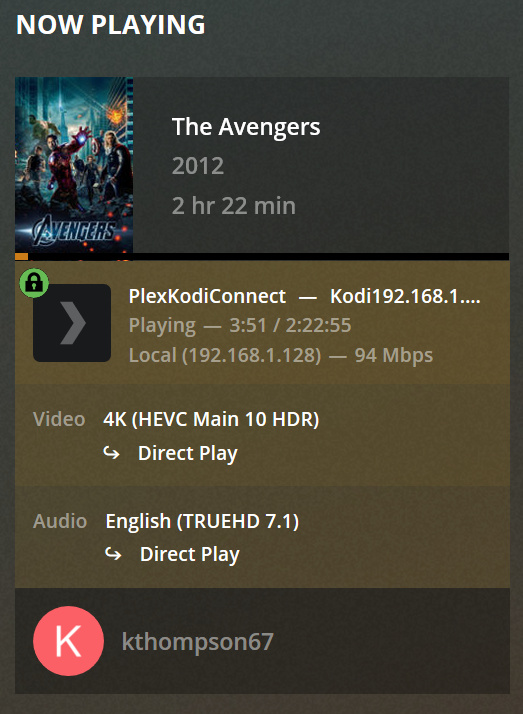
Here’s a screenshot of the current activity in PMS: