I saw similar posts to this in the forum but they were close with no conclusive answer or possible workaround.
So today I decided to listen to an album I have synced in Plexamp for offline playback. I was at the park with no wifi.
When I got home I got an alert from my mobile provider because I’m in a very limited data plan at the moment.
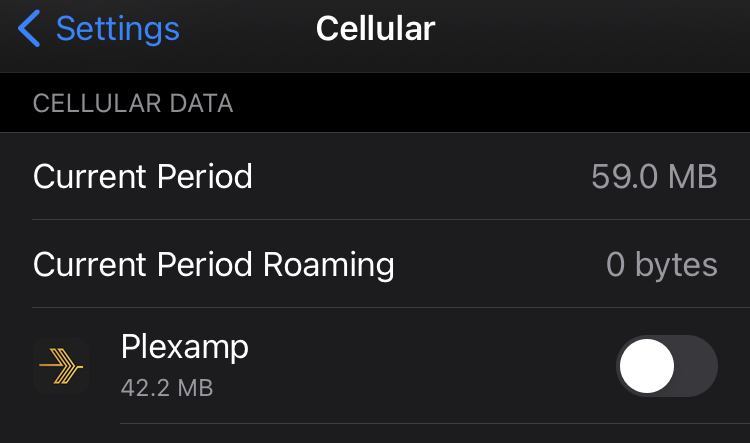
Turns out Plexamp used about 400Mb of data according to iOS while the setting was off. Wifi assist was also off since I already had issues with this in the past. So it not only used the LTE data but it also didn’t played the local version of the album or did something else in the background that used a lot of data. The album is in flac format so the 400Mb size sounds reasonable.
I tried removing the app and installing it again, that’s why the screenshot shows a smaller amount of data usage. I then turned my wifi off and tried playing some music and it worked right way. Even with no music synced after reinstalled the app. Even when choosing a track that has never been played on the phone before.
Any idea how to avoid this in the future other than not using Plexamp at all?
Yes, it was from the download tab. I only had a handful (less than 10) albums synced.
I feel stupid admitting this but I did more testing and found other apps (but not all) having the same issue (using data while the toggle for data was off for said app) so the problem seems to be on iOS side and not Plexamp.
After a phone reboot iOS seems to be respecting the data toggle for individual apps, including Plexamp.
My guess is that it has something to do with app updates since the ones that where displaying the issue all had recent updates. I guess I will check again the next time Plexamp updates to see what happens.
played from the downloads tab it will use a bit of data to update play state on the server, but not stream media from the server. if you disable cellular data it will save that playback data and batch it back to the server when next connected.
I made a thread about this very same problem last week. Like usual I was told it is my fault. But I do not think it is.
Edit: The setup about disallowing data is another thing. If you play a downloaded album from the downloaded tab you expect that it will be played from the downloaded files and not from streamed from the server.
Well, in my case the problem was indeed with my device and not limited to Plexamp only.
My guess is that after updating the apps for some reason iOS stops properly identifying which apps are not supposed to be using mobile data and defaults to allowing the connection.
A reboot solved it for now and I will see if the problem comes back after the next update.
The amount of data used is suspicious though, the synced album in question takes 289Mb in the sync tab but iOS reported over 400Mb of mobile data usage, but since the system wasn’t working properly I don’t know if the iOS reported numbers can be trusted.