Quick question for PLEX engineers. Does PLEX recognize File naming in this structure?

Not a Plex Engineer, but here’s the Support Article that deals with local assets for movies:
https://support.plex.tv/articles/200220677-local-media-assets-movies/
Seems to indicate a No on that filename format:
Poster Artwork
Posters are typically displayed for movies on Plex app dashboards, library views, and when looking at details for the movie. Poster art is typically of 1:1.5 aspect ratio. Custom Poster artwork will be detected and used if named and stored as follows:
MovieName (Release Date).extorMovie/MovieName (Release Date)/Custom_Poster_Name.ext
Where Custom_Poster_Name is:
- cover
- default
- folder
- movie
- poster
…and ext is the file extension. (Some operating systems such as Windows may hide your file extensions by default.)
Good Luck,
Chris
It shows this Movie/MovieName (Release Date)/Custom_Poster_Name which my Scraper has been doing since XBMC days. If PLEX can’t see that why are they trying to reInvent the wheel?
Conventional naming My Folder is Movies/Breakheart Pass (1975) inside that folder is been the standard for over 10 years PLUS since XBMC so you saying PLEX will not use this structure?

I’ve always called mine fanart.jpg and poster.jpg and never had a problem. I’ve never tried how you have named them but just to confirm, do you have Use local assets enabled on your libraries advanced settings as that IS needed to get plex to scan local assets (artwork)?
Seems to indicate to me that you could use either
Breakheart Pass (1975).jpg
or as @anon5074910 mentioned
poster.jpg
You could setup a test library, copy over a movie or two and then experiment with that instead of your main library.
Someone like @OttoKerner could verify that the documenation reads this way.
Good luck,
Chris
The mp4 can also have a poster.

My original library has just poster and fanart. But not many of those left as I update those movies to better resolution when transferring files I find it easier having the name of the movie with the poster for a better description whats floating around
Nope. That’s the legacy agents/scanner and not the new modern one which the documentation refers to.
That setting is under the advanced settings on the library itself.
Okay, I get the legacy. But the Poster/Fanart should be used by any of agent even the new one. Since I want local assets used not PLEX’s
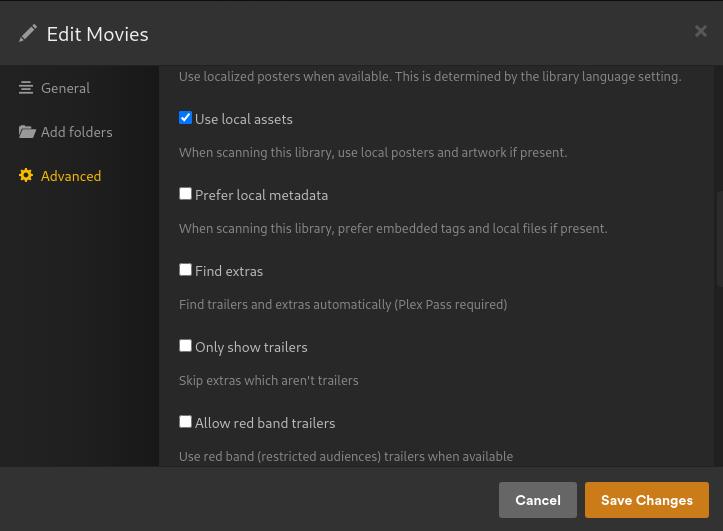
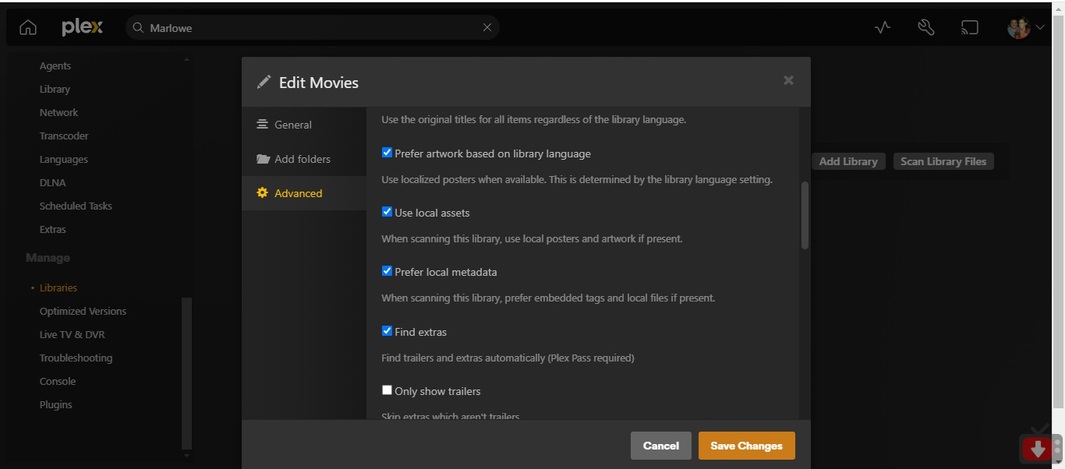
Just a note, never enable “Prefer local metadata” unless you know exactly what you’re doing and you know exactly what that option does and that it works with your files. You generally only enable this when you have meticulously curated tags in your media files.
I suspect your issue is that the mp4 file has an embedded poster in it. Remove the embedded poster from the media and it will pick up the next local asset.
The word “Prefer” is very ambiguous. All of my Libraries have nfo files for KODI to read and 2/3 of the Library has nfo and mediainfo.xml because I thought that is what PLEX uses. So one would think if it can’t find a mediainfo.xml the fallback would be the proper naming of the Folder of the Movie or TV Show series. So the definition should read NO mediainfo.xml do not use?
Plex does not use NFO files.
Yes I know this. Thats why I was confused about the Prefer because is says below"When scanning this library, prefer embedded tags and local files if present." If not present it falls back. This has worked because 99% of the LIbrary scanned in. Correctly. This problem is goofy because all the info of the movie was scanned in correctly except for the poster which was stored in the same folder is when PLEX had a brain fart. And falls back use local if present artwork
Right, a better name for this feature as implemented would be “Prefer metadata embedded in video file”, because it’s not “local” (on the server) metadata that’s being used exactly.
