Ok, then ill wait with buying the app until this is implemented, as for me it is one of the most important features.
Any chance of Casting/Airplay integration, similar to Allcast, which worked across all platforms (Roku, Apple, Chromecast, Amazon products, etc)? This feature is a must for me.
Is ‘continuing where you left listening’ already implemented? Would love to continue using the app. Currently i’m holding off getting a subscription due to this feature not being available. If you could let me know if or when this will be available, that would be great!
Thanks! Collin
Yep this was added in the latest version (1.2.1).
Also - there is no subscription for the app, it’s just a one-time purchase.
Hope you like it!
2 Likes
Thanks @_Ich just paid up 
I’m using it primarily for my Audiobook library that I have in plex, my wishlist (With no pressure at all obviously!)
- Easier way to scrub on large files, trying to move accurately on at 12 hour file was a bit of a struggle
- Sleep Timer
- Speed Read (1.25% faster or whatever increments)
- Auto Bookmark - My previous Audiobook app had this clever feature that automatically created a bookmark whenever anything happened (Started playback, plugged headphones in, stopped playback), it’s useful for pocket playback by mistake and also combined with sleep timer
Anyway, I’ve hijacked this enough, great app as it is and I appreciate I’m not using it for it’s primary function!
I’m actually working on a dedicated audiobook app right now. Beta should be available in the next week or so - I’ll post here when it’s ready if you’re interested.
2 Likes
I havnt bought the app yet but im curious if it had a top songs radio feature? I really dislike making my own playlists and I just want to select the mood / genre im looking for and then pandora style it just plays GOOD songs for that style. Like I have a pop / alternative playlist but it plays all kinds of songs I just dont like cuz it plays EVERY song in that genre not the ones I know that make it to the radio.
Awesome, I’ll keep a look out for it!
Prism Music is the Apps I am looking for long. The Official Plex Apps just sucks.
I have a trial on your Apps (Version 1.2.1 (4417)) , so far , the experience is quite good.
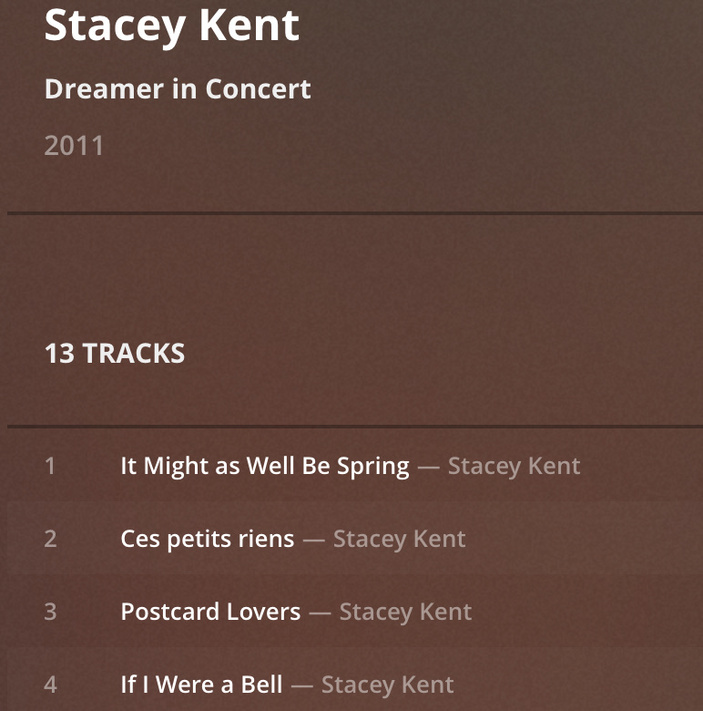
However, I think I find a bugs on FLAC streaming when I played the Album Stacey Kent - Dreamer in Concert .
(https://www.last.fm/music/Stacey+Kent/Dreamer+In+Concert)
At the end of playing track 1, it stucks on the beginning of track 2 for 2,3 seconds , then it skips to track 3 directly.
When I download it to the phone, it plays smoothly.
Also, I tried to stream the ALAC version of this album, (I keep 2 versions FLAC and ALAC on Plex), it also streams smoothly.
I have tried the other albums with the FLAC format, they streamed smoothly.
So, I guess it should be a bugs on flac streaming in some particular circumstances.
The FLAC is the uncompressed FLAC format.
(P.S. Although this album play smooth on the Official iOS Plex Client, I still insist that the Official iOS Plex Client sucks. It got a lot of tidy problems when playing the downloaded items. Also it can’t do repeated the same song for at least 6 months)
I attached info on the track 1, 2 ,3 for your reference.
Thank you so much for your good work on Plex Music Clients.


IMHO, please just keep this app on Music only.
Podcast and Audiobook should not be the features of this app.
One of the main problems of the Official Plex Client is that it tries to do every thing but it keeps all the standard down (Music, Video, Podcast).
I suggest the following features might be included.
- Replaygain support
- Gapless Playback support ( I am not sure this features included)
- All Downloaded tracks and Albums could be viewed and played in one single location.
- Last.fm Scrobbling ( I know Plex support Scrobbling on server-based) I hope it is client-based so the iTunes Library could also be scrobbled.
Pretty sure I broke FLAC streaming in a recent release (in trying to work around another issue). I’m looking into this right now.
Thanks for the detailed report!
IMHO, please just keep this app on Music only.
Podcast and Audiobook should not be the features of this app.
One of the main problems of the Official Plex Client is that it tries to do every thing but it keeps all the standard down (Music, Video, Podcast).
Totally agree - audiobooks will be a separate app altogether built especially for audiobooks. Prism will remain a 100% music app.
- Replaygain support
It’s on the list - not completely sure if it’s possible using Apple’s player API yet, need to look into it more closely
- Gapless Playback support ( I am not sure this features included)
Full gapless is supported depending on what format your music is in.
Gapless: lossless formats (FLAC, ALAC) + AAC when encoded by iTunes or afconvert
Gaps: mp3, other lossy formats
- All Downloaded tracks and Albums could be viewed and played in one single location.
You can manually add a “Downloaded” filter or use the quick filter menu by long press / 3d touching the filters button:

- Last.fm Scrobbling ( I know Plex support Scrobbling on server-based) I hope it is client-based so the iTunes Library could also be scrobbled.
Coming soon!
2 Likes
Really enjoying this app and the CarPlay support is really appreciated.
Not sure if this is on your roadmap, but I would like to see some enhanced filtering options, specifically being able to filter based on the song’s bitrate and frequency.
Yes! I have lots of ideas for new filters, but want to implement filter saving (basically smart playlists) before I go too crazy.
The next major update (1.3) is focused around filters, so I’ll be adding a bunch of new ones then.
1 Like
Very cool app.
But I must be missing something completely obvious here or this is a major blunder.
I have playlists on my plex which I would like to play in the app but I do not see such an option? I can create smart filters and a lot of other things, but I simply just want to be able to click on my playlist and play the songs in there. I can create filters for all the playlists, but when I click on them it’s empty and it then wants me to add another filter on top of that.
Playlist support in the app is admittedly not great at the moment, but it should import your Plex playlists, which you can then filter by. A quicker way to filter by a playlist is just by tapping the search button, you should see them there:
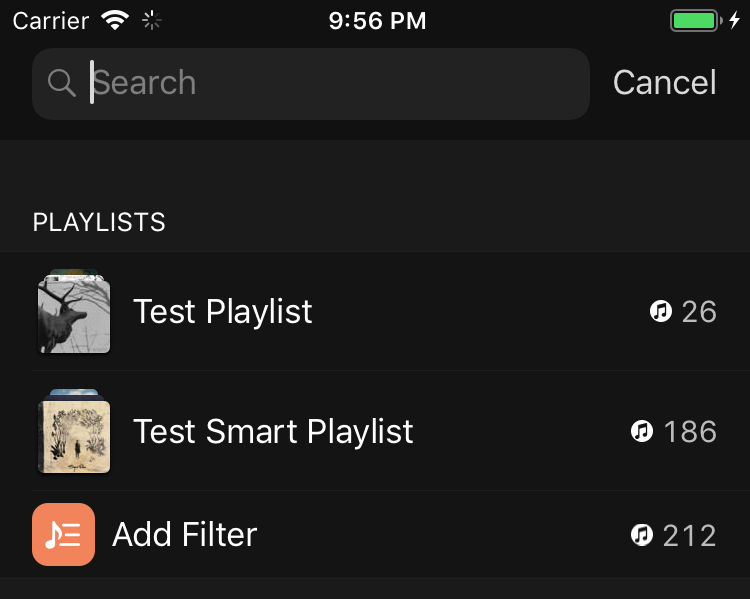
If your playlists aren’t showing for some reason, shoot me an email via Settings -> Report an Issue and I’ll look into why.
Hi thanks for the quick reply.
I can see the playlists when i tap the search button, but it says: “No Results” “Adjust Filters”. When I try to add a filter for a playlist it then doesn’t show. I’ve screenrecorded to better illustrate my point:
copy video url to a new fan for better quailty.
OK, so what’s happening is when you tap on a playlist it adds a filter on that playlist. In other words, you get just the songs that are in that playlist. (You can see a filter is added when the button turns purple.)
Then you tap on another playlist, so it adds a filter on that one, too. Now you’re asking for songs in the first playlist and the second playlist, and since there isn’t any you’re getting “No Results”.
If you just want the songs in a playlist, clear all filters, tap the playlist you want and you’re good to go. You can clear filters quickly by long pressing on the filter button.
I know filters can get confusing, and I’ve been meaning to simply add a menu option somewhere so you can simply browse playlists - just haven’t had time yet.
Filters add a bunch of flexibility, though - for example you could add a playlist filter on “Rap”, then another filter on a “Top Songs” playlist and you get a list of top rap songs pretty easily.
Thanks again.
But I’m still confused as hell lol.
Now I’ve cleared all filters, but it creates a filter automaticaly when I click on a playlist. When you say “tap the playlist you want” you mean from the search button right?
Yep - you had it initially, then you added a second filter which messed things up. At 10 seconds into the recording the songs in that list (Chop Suey, Come as You Are, End of All Hope…) are songs in your “Rock” playlist. If you hit play then you’d only get songs in that playlist.
You then added a filter on “Random but good ■■■■” - and since there are no songs that are in both “Rock” and “Random but good ■■■■” you get no results.
But it adds those filters automatically. How do you switch from one playlist to another playlist without adding a filter?
