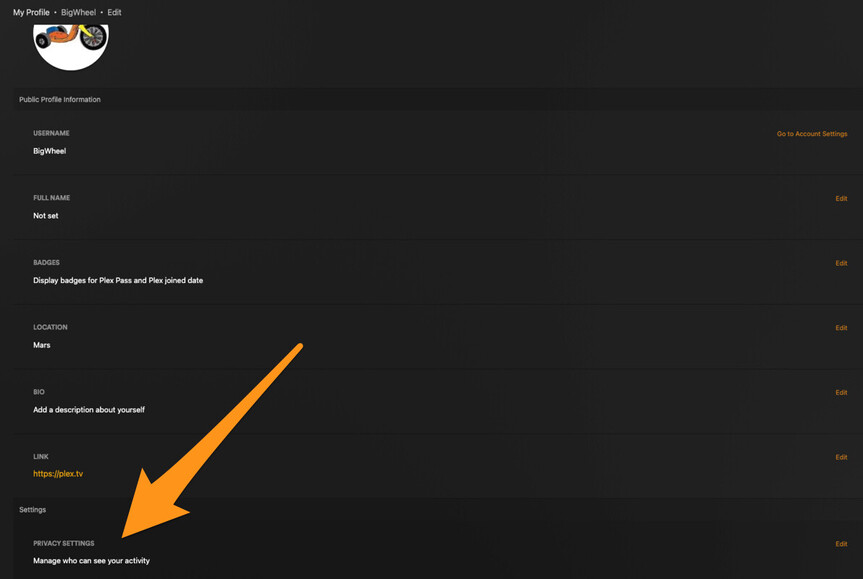
I am trying to find the settings to turn my account private and prevent sharing of my watchlist and watch history to friends. I have looked here: https://support.plex.tv/articles/friends/#:~:text=Connect%20with%20friends%20on%20Plex,Activity%20Feed%20and%20Detail%20Pages. but that didn’t help. I looked here: https://support.plex.tv/articles/activity-feed/ and it tells me “If you don’t want others to view your activity you can set the types to private in your Profile settings.” I follow the link on the word “Profile” to go to: https://support.plex.tv/articles/profile/ It tells me to click my account icon and go from there. The only link in my account icon goes to: https://app.plex.tv/desktop/#!/settings/account but there is no privacy preferences anywhere in there. I click on “Privacy Preferences” and it just brings me to: https://www.plex.tv/about/privacy-legal/privacy-preferences/#opd How in the world do I change my privacy preferences if they’re nowhere at all in the UI? I see the one little checkbox for not sharing data such as bit-rate, etc with Plex itself, but where are the settings to choose whether I share my watch history with friends?
“account” is not the same thing as “profile”.
You click on avatar to get to your profile. The avatar is the circle that’s either the image you uploaded it would be the first letter in your username. In the article there are images with orange boxes highlighting the avatar.
or you can click on the link that says view profile in the web app

When on the profile click on Edit profile

When on the edit profile page the privacy setting are toward the bottom