@ChuckPa I noticed the same thing when our automated PlexAPI tests broke today with PMS 1.31.0.6654-02189b09f.
https://github.com/pkkid/python-plexapi/actions/runs/4176590460/jobs/7233157380#step:11:54
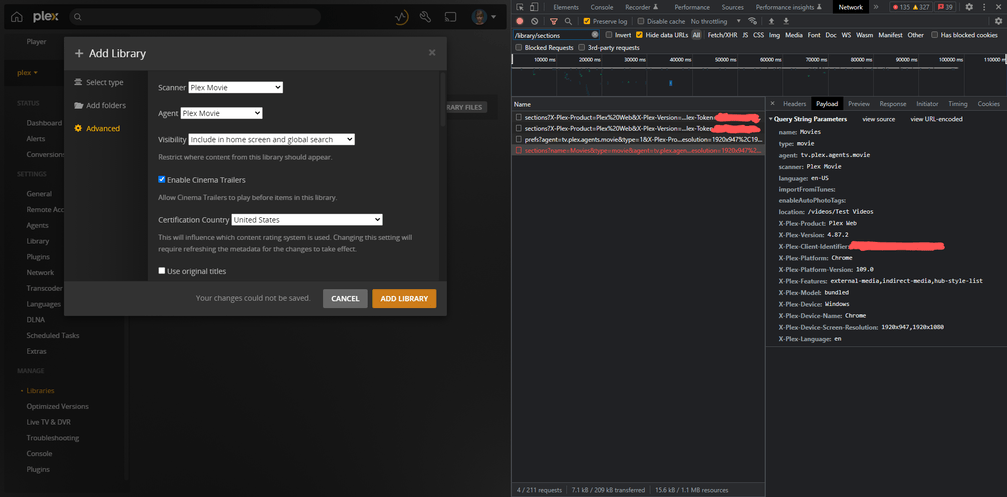
Specifically, the POST /library/sections API command is returning a status code 400 Bad Request.
When trying to add a library, the error in the Plex Media Server logs is “‘agent’ is missing or invalid, ‘language’ is invalid, new scanner needs to be paired with new agent”.
Plex Media Server Logs_2023-02-14_21-20-39.zip (114.0 KB)
Feb 14, 2023 21:20:33.136 [0x7fc07d9b2b38] INFO - Request: [192.168.0.199:29027 (Allowed Network (Subnet))] POST /library/sections?name=Movies&type=movie&agent=tv.plex.agents.movie&scanner=Plex%20Movie&language=en-US&importFromiTunes=&enableAutoPhotoTags=&location=%2Fvideos%2FTest%20Videos (6 live) #1c5 GZIP
Feb 14, 2023 21:20:33.137 [0x7fc07d9b2b38] ERROR - [Req#1c5] Library: Couldn't create section: 'agent' is missing or invalid
Feb 14, 2023 21:20:33.137 [0x7fc07d9b2b38] ERROR - [Req#1c5] Library: Couldn't create section: 'language' is invalid
Feb 14, 2023 21:20:33.137 [0x7fc07d9b2b38] ERROR - [Req#1c5] Library: Couldn't create section: new scanner needs to be paired with new agent
Feb 14, 2023 21:20:33.138 [0x7fc07f4ffb38] INFO - Completed: [192.168.0.199:29027] 400 POST /library/sections?name=Movies&type=movie&agent=tv.plex.agents.movie&scanner=Plex%20Movie&language=en-US&importFromiTunes=&enableAutoPhotoTags=&location=%2Fvideos%2FTest%20Videos (6 live) GZIP 1ms 492 bytes (pipelined: 3)
However, you can see the parameters are included, and correct, in the request screenshot below.
From a bunch of my own testing today, this only happens with a completely new unclaimed server on PMS 1.31.0.6654-02189b09f without any previous app data. Claiming the server with a PLEX_CLAIM token does not produce this error. Also, a simple restart of PMS “fixes” it and allows you to create a library.
Steps to reproduce:
- Create a new unclaimed Docker container.
version: "3"
services:
  plex:
    image: plexinc/pms-docker
    container_name: plex
    network_mode: host
    environment:
      - ALLOWED_NETWORKS=192.168.0.1/24  # to allow access to settings of an unclaimed server
    volumes:
      - /mnt/videos:/videos
- Access your server’s local web app settings page (to skip the setup wizard).
http://IP-ADDRESS:32400/web/index.html#!/settings
- Go to Manage > Libraries > Add library.
- Create a new movies library with the default Plex Movie agent.
- Status code
400 Bad Requestis returned and the UI shows “Your changes could not be saved”. - Restart (not recreate) the Docker container.
docker restart plex
- Repeat steps 2-4, an you will be able to create a library.
I also tested the above with PMS 1.30.2.6563-3d4dc0cce and did not encounter any issues creating a library with a new Docker container.
