Server Version#: 1.24.0.4930
Player Version#: 4.64.3
I recently thought I’d try the updated Plex music features (using the categorisation from musicbrainz etc).
One thing that continues to occur is where I have multiple versions of the same album. An example is Abbey Road by the Beatles. I have the original 1969 album, and the 2019 remixed album. Rather than have the album appear twice in my library, I thought it would be easier to just merge the album, so disc 1 is the 1969 version and disc 2 is the 2019 version. The metadata has also been edited so the FLACs files reflect the disc numbers.
However, whenever I run a scan, Plex will merge disc 1 and disc 2. So the track listing will read:
Come Together
Come Together - 2019 Mix
Something
Something - 2019 Mix
(edit, that should read, two of track 1 and two of track 2 but the forum amends it!)
and so on…
If I manually revert the change in Plex (so they are showing as disc 1 and disc 2 again), it just merges the disc again after a rescan!
Is this intentional or is there something I am doing wrong?
Unless you configure Plex to prefer local metadata (which will require every album in your library to have accurate embedded tags — a big job if it’s not already that way), Plex will always try to match your albums to the MusicBrainz database. Here you’ve created a custom ‘album’ that doesn’t exist in the real world or the MB database, so Plex does its best.
Without configuring Plex to prefer local metadata, the best you can probably do is to lock as many of the tag fields as you can.
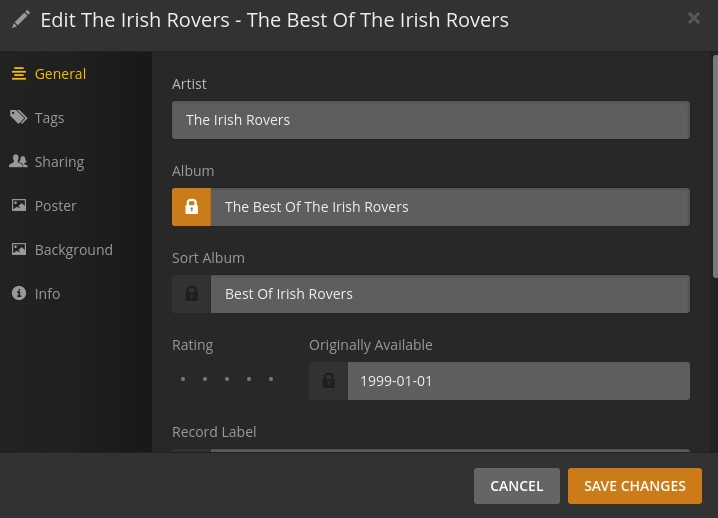
In the Edit dialogs, you’ll see ‘lock’ icons next to most fields. When the icon is orange, the lock is engaged, and Plex shouldn’t overwrite that field on a scan (there have been instances where Plex doesn’t respect these locks. I don’t know what the current state of that issue is).
Thank you for the response. It appears this is one of those instances where the lock is ignored - the disc number has an orange lock, but after the scan, it changes from 2 to 1 with the lock still coloured orange.