Has anyone else updated their QNAP server today with the newest Plex Media Server released today?
It’s not working for me.
Anyone know of the best way to rollback to previous version? I can’t seem to find the download file anywhere.
Has anyone else updated their QNAP server today with the newest Plex Media Server released today?
It’s not working for me.
Anyone know of the best way to rollback to previous version? I can’t seem to find the download file anywhere.
I upgraded Plex Server on my QNAP to that version this afternoon and it works correctly. I recommend that you log out of PLEX in to your QNAP and log in again with your username and password.
Actualicé Plex Server en mi QNAP a esa versión esta tarde y funciona correctamente. Le recomiendo que salga de la sesión de PLEX en su QNAP y vuelva a iniciar sesión con su usuario y contraseña.
Suerte!
I just checked the build.
It’s working ok here.
Before downgrading, Restart the QNAP. (i know. painful – the fix is in QA now)
The fix corrects a problem between PMS/QTS (app center).
I can give you that fix to manually install if needed.
Totally OK here… except it says it’s not available outside the network when it totally is. Not sure if that counts?
Ah, gotcha.
I’ve tried a restart of the NAS, still not working.
Can I grab that fix so I can manually install it?
If you’ve done the reboot and it’s still not starting – the script fix I have won’t help.
I would like to see what’s happening.
Please create a shared folder named PlexData (exact capitalization) anywhere you want. It won’t contain actual data. It provides an easy access link for use in FileStation.
After creating it, Start Plex once then stop it.
Now open FileStation; PlexData → Plex Media Server
Right-click Logs → Compress (to create the ZIP file)
Download that ZIP and attach it here for me to look at
Attached Logs zip. Really appreciate you helping and looking into this.
download_2022-01-13_15-31-53.zip (77.1 KB)
Did you have a power failure / abrupt shutdown of the NAS?
The database is corrupt.
Jan 13, 2022 15:30:11.240 [0x7f8259c9e0c8] DEBUG - Opening 2 database sessions to library (com.plexapp.plugins.library.blobs), SQLite 3.35.5, threadsafe=1
Jan 13, 2022 15:30:11.241 [0x7f8259c9e0c8] ERROR - SQLITE3:0x80000001, 11, database corruption at line 66843 of [1b256d97b5]
Jan 13, 2022 15:30:11.241 [0x7f8259c9e0c8] ERROR - SQLITE3:0x80000001, 11, database corruption at line 66993 of [1b256d97b5]
Jan 13, 2022 15:30:11.241 [0x7f8259c9e0c8] ERROR - SQLITE3:0x80000001, 11, statement aborts at 10: [] database disk image is malformed
Jan 13, 2022 15:30:11.241 [0x7f8259c9e0c8] ERROR - SQLITE3:0x80000001, 11, database disk image is malformed in "PRAGMA cache_size=2000"
Jan 13, 2022 15:30:11.241 [0x7f8259c9e0c8] ERROR - Database corruption: sqlite3_statement_backend::prepare: database disk image is malformed for SQL: PRAGMA cache_size=2000
Jan 13, 2022 15:30:11.241 [0x7f8259c9e0c8] ERROR - Error: Unable to set up server: sqlite3_statement_backend::prepare: database disk image is malformed for SQL: PRAGMA cache_size=2000 (N4soci10soci_errorE)
To recover and use your backup database:
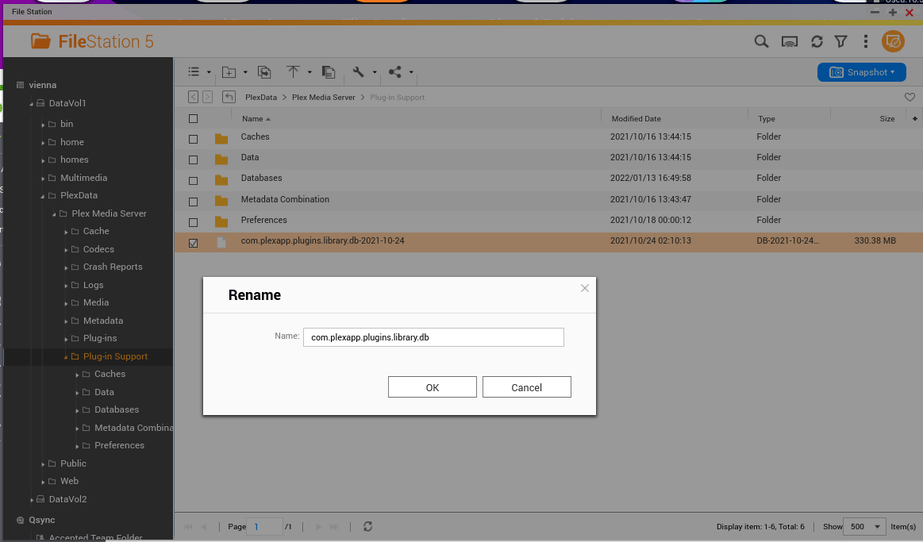
Open PlexData/Plex Media Server/Plug-in Support/Databases
Find your most recent backup of com.plexapp.plugins.library.db
Right-Click → Copy
Navigate up 1 level to “Plug-in Support”
Right-click → PASTE
Now you’ll see the copy of the db there
Rename it → Remove the date part of the name (after .db)
Highlight. right-click → COPY
Click back down into Databases.
Right-click PASTE → Overwrite. (replaces the corrupt with your last backup)
Now delete com.plexapp.plugins.library.db-shm and com.plexapp.plugins.library.db-wal if they exist.
Start Plex
Give it a moment to stabilize.
After it’s stable and you’ve opened it, Update your libraries / scan files / Refresh metadata IF you’ve added or removed any media since the date of the last backup
I followed the steps, here’s the newest log.
Plex Media Server.log.zip (1.3 KB)
I used a db backup from a week and half ago.
Still not working, was working flawlessly till the latest update.
@ChuckPa Is it worth trying to reinstall the previous version of Plex? Any chance I can grab that file?
Or do I need to rebuild the db completely?
@ChuckPa tried just deleting the DB file and restarting plex (desperate here). Here’s what the log said after that.
Plex Media Server.log.zip (8.9 KB)
Hold up please? I’m getting here 
Let me catch up please
Please check your PM