Latest QNAP OS: QTS 5.0.1.2277
Latest NVidia Kernel: 5.0.1.2277
Latest NVidia GPU Driver: 5.1.0.0822
Latest Plex Server: 1.31.2.6739
Hardware Transcoding is no longer working. With it set in both QTS and in the Plex App, Plex reverts to CPU Transcoding and ignores the NVidia GPU. This results in severe CPU load and poor performance. I have tried downgrading the QTS OS, Nvidia Kernel, and GPU Driver to no avail. I cannot get the hardware transcoding to restart.
DEBUG server logs which capture this please .
Can’t do anything without them.
I have a TVS-1282 i7-7700 on same firmware and all is well with it.
Plex Media Server.log (9.0 KB)
Plex Transcoder Statistics.log (54.9 KB)
Here are the latest. Support responded with:
"Please try this version. https://download.qnap.com/QPKG/NVIDIA_GPU_DRV_5.0.4.1_x86_64.zip
According to our database, this issue should be related to the Nvidia GPU driver 5.1.0.0822 and 5.0.4.1 should make transcoding work again. Please let me know if it persists."
I am in the process of trying this as well.
Curtis
I tried the driver that support suggested, and again it is still not working. The GPU seems to never engage when transcoding is started. Instead I see the CPU jumping to 80% or higher. The GPU stays a solid 0%.
Please turn DEBUG logging back on. You turned it off. I can’t see anything about what PMS was deciding.
Mar 06, 2023 16:02:16.160 [0x7f0a4c008b38] ERROR - DVR:Device: Error refreshing existing device device://tv.plex.grabbers.hdhomerun/qnkwjwmj, marking as dead.
Mar 06, 2023 16:02:19.628 [0x7f0a4a3deb38] INFO - [Req#24] AutoUpdate: no updates available
Mar 06, 2023 16:03:08.927 [0x7f0a4a3deb38] WARN - [Req#120/Transcode] [FFMPEG] - No quality level set; using default (20).
Mar 06, 2023 16:03:08.933 [0x7f0a4a3deb38] ERROR - [Req#120/Transcode] [FFMPEG] - Failed setup for format vaapi: hwaccel initialisation returned error.
Mar 06, 2023 16:03:08.933 [0x7f0a4a3deb38] WARN - [Req#120/Transcode] Codecs: packet decode testing returned -95 for decoder 'hevc'
Mar 06, 2023 16:03:08.934 [0x7f0a4a3deb38] ERROR - [Req#120/Transcode] [FFMPEG] - Cannot load libcuda.so.1
Mar 06, 2023 16:03:08.934 [0x7f0a4a3deb38] ERROR - [Req#120/Transcode] [FFMPEG] - Could not dynamically load CUDA
Mar 06, 2023 16:03:08.935 [0x7f0a4a3deb38] ERROR - [Req#120/Transcode] [FFMPEG] - Failed setup for format vaapi: hwaccel initialisation returned error.
Mar 06, 2023 16:03:08.935 [0x7f0a4a3deb38] WARN - [Req#120/Transcode] Codecs: packet decode testing returned -95 for decoder 'hevc'
Mar 06, 2023 16:03:08.936 [0x7f0a4a3deb38] ERROR - [Req#120/Transcode] [FFMPEG] - Cannot load libcuda.so.1
Mar 06, 2023 16:03:08.936 [0x7f0a4a3deb38] ERROR - [Req#120/Transcode] [FFMPEG] - Could not dynamically load CUDA
Mar 06, 2023 16:03:27.222 [0x7f0a4a3deb38] WARN - [Req#1f0] QueryParser: Invalid field 'contentDirectoryID' found, ignoring.
Mar 06, 2023 16:03:27.222 [0x7f0a4a3deb38] WARN - [Req#1f0] QueryParser: Invalid field 'pinnedContentDirectoryID' found, ignoring.
Mar 06, 2023 16:03:27.223 [0x7f0a4e453b38] WARN - [Req#1f4] QueryParser: Invalid field 'sectionID' found, ignoring.
Mar 06, 2023 16:03:27.223 [0x7f0a4e453b38] WARN - [Req#1f4] QueryParser: Invalid field 'contentDirectoryID' found, ignoring.
Mar 06, 2023 16:03:27.223 [0x7f0a4e453b38] WARN - [Req#1f4] QueryParser: Invalid field 'pinnedContentDirectoryID' found, ignoring.
Mar 06, 2023 16:03:27.237 [0x7f0a47567b38] WARN - [Req#1f5] QueryParser: Invalid field 'contentDirectoryID' found, ignoring.
Mar 06, 2023 16:03:27.237 [0x7f0a47567b38] WARN - [Req#1f5] QueryParser: Invalid field 'pinnedContentDirectoryID' found, ignoring.
Mar 06, 2023 16:03:27.238 [0x7f0a4776ab38] WARN - [Req#1f6] QueryParser: Invalid field 'contentDirectoryID' found, ignoring.
Mar 06, 2023 16:03:27.238 [0x7f0a4776ab38] WARN - [Req#1f6] QueryParser: Invalid field 'pinnedContentDirectoryID' found, ignoring.
Mar 06, 2023 16:03:27.530 [0x7f0a501c9b38] ERROR - Session 0x7f0a4cc78628 terminated
Mar 06, 2023 16:03:27.566 [0x7f0a503ccb38] ERROR - Session 0x7f0a4cc78628 terminated
Mar 06, 2023 16:03:27.944 [0x7f0a47567b38] WARN - [Req#1f5] SLOW QUERY: It took 46740.000000 ms to retrieve 84 items.
Mar 06, 2023 16:03:32.217 [0x7f0a4796db38] WARN - [Req#209] QueryParser: Invalid field 'contentDirectoryID' found, ignoring.
Mar 06, 2023 16:03:32.217 [0x7f0a4796db38] WARN - [Req#209] QueryParser: Invalid field 'pinnedContentDirectoryID' found, ignoring.
Tells me nothing of value.
Which Nvidia card is in use here?
Turned on the Debug Logging per your request. Attached is the latest server log attempting to play a movie that stutters, then switching it to “Convert Automatically.”
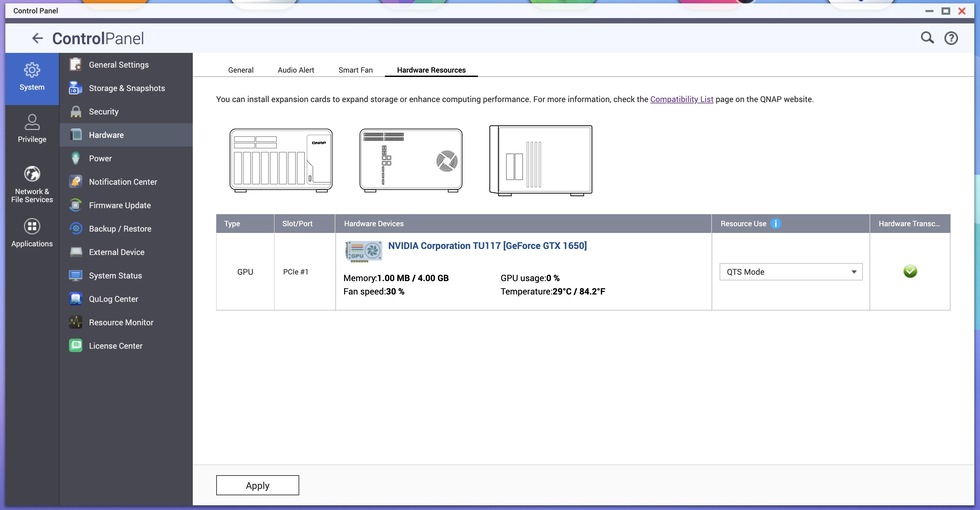
The card is a Nvidia GTX 1650. According to QTS, the card is in “QTS Mode” and Hardware Transcoding is Green Checked. I have tried both the latest kernel and driver as well as the older one support recommended from their database search. Neither work.
Plex Media Server.log (207.0 KB)
Plex Transcoder Statistics.log (59.0 KB)
From what I see here.
Mar 06, 2023 16:59:44.661 [0x7f089b920b38] DEBUG - [Req#2ff/Transcode] Found session GUID of efo5ys1yow4rueod6f2qq9kd in session start.
Mar 06, 2023 16:59:44.661 [0x7f089b920b38] DEBUG - [Req#2ff/Transcode] TranscodeUniversalRequest: adapting profile with augmentation data: add-limitation(scope=videoCodec&scopeName=hevc&type=upperBound&name=video.bitDepth&value=10&replace=true)+append-transcode-target-codec(type=videoProfile&context=streaming&protocol=dash&videoCodec=hevc)+add-limitation(scope=videoTranscodeTarget&scopeName=hevc&scopeType=videoCodec&context=streaming&protocol=dash&type=match&name=video.colorTrc&list=bt709|bt470m|bt470bg|smpte170m|smpte240m|bt2020-10|smpte2084&isRequired=false)+append-transcode-target-codec(type=videoProfile&context=streaming&audioCodec=aac&protocol=dash)
Mar 06, 2023 16:59:44.661 [0x7f089b920b38] DEBUG - [Req#2ff/Transcode] TranscodeUniversalRequest: using augmented profile Web
Mar 06, 2023 16:59:44.661 [0x7f089b920b38] DEBUG - [Req#2ff/Transcode] Downloading document http://127.0.0.1:32400/library/metadata/87645?checkFiles=1&includeBandwidths=1&offset=-1&X-Plex-Incomplete-Segments=1&X-Plex-Session-Identifier=vhhdu81ni1a4st82f96uceek
Mar 06, 2023 16:59:44.664 [0x7f089b920b38] DEBUG - [Req#2ff/Transcode/Req#312] It took 10.000000 ms to retrieve 167 items.
Mar 06, 2023 16:59:44.667 [0x7f089b920b38] DEBUG - [Req#2ff/Transcode/Req#312] It took 0.000000 ms to retrieve 167 items.
Mar 06, 2023 16:59:44.668 [0x7f089b920b38] DEBUG - [Req#2ff/Transcode/Req#312] We're going to try to auto-select an audio stream for account 1.
Mar 06, 2023 16:59:44.668 [0x7f089b920b38] DEBUG - [Req#2ff/Transcode/Req#312] Selecting best audio stream for part ID 89844 (language: )
Mar 06, 2023 16:59:44.668 [0x7f089b920b38] DEBUG - [Req#2ff/Transcode/Req#312] Audio Stream: 225398, Subtitle Stream: 0
Mar 06, 2023 16:59:44.670 [0x7f089b920b38] DEBUG - [Req#2ff/Transcode] Found session GUID of efo5ys1yow4rueod6f2qq9kd in session start.
Mar 06, 2023 16:59:44.670 [0x7f089b920b38] DEBUG - [Req#2ff/Transcode] Cleaning directory for session efo5ys1yow4rueod6f2qq9kd ()
Mar 06, 2023 16:59:44.683 [0x7f089b51ab38] DEBUG - [Req#30e] It took 10.000000 ms to retrieve 167 items.
Mar 06, 2023 16:59:44.700 [0x7f089b920b38] DEBUG - [Req#2ff/Transcode] Starting a transcode session efo5ys1yow4rueod6f2qq9kd at offset -1.0 (state=3)
Mar 06, 2023 16:59:44.721 [0x7f089b920b38] DEBUG - [Req#2ff/Transcode] TPU: hardware transcoding: enabled, but no hardware decode accelerator found
Mar 06, 2023 16:59:44.721 [0x7f089b920b38] DEBUG - [Req#2ff/Transcode] [Universal] Using local file path instead of URL: /share/CACHEDEV2_DATA/Apple TV/Plex Library/Movies/The Fifth Element (1997) {edition-REMASTERED}/The Fifth Element (1997) {edition-REMASTERED}.mp4
Mar 06, 2023 16:59:44.721 [0x7f089b920b38] DEBUG - [Req#2ff/Transcode] TPU: hardware transcoding: final decoder: , final encoder:
Mar 06, 2023 16:59:44.721 [0x7f089b920b38] DEBUG - [Req#2ff/Transcode/JobRunner] Job running: FFMPEG_EXTERNAL_LIBS='/share/CACHEDEV2_DATA/.qpkg/PlexMediaServer/Library/Plex\ Media\ Server/Codecs/2584b51-4483-linux-x86_64/' X_PLEX_TOKEN=xxxxxxxxxxxxxxxxxxxx4c68-b897-019780cd0b85 "/share/CACHEDEV2_DATA/.qpkg/PlexMediaServer/Plex Transcoder" "-codec:#0x01" hevc -ss 0 -noaccurate_seek -analyzeduration 20000000 -probesize 20000000 -i "/share/CACHEDEV2_DATA/Apple TV/Plex Library/Movies/The Fifth Element (1997) {edition-REMASTERED}/The Fifth Element (1997) {edition-REMASTERED}.mp4" -map "0:#0x01" -metadata:s:0 language=eng -codec:0 copy -map "0:#0x02" -metadata:s:1 language=eng -codec:1 copy -f dash -seg_duration 5 -dash_segment_type mp4 -init_seg_name 'init-stream$RepresentationID$.m4s' -media_seg_name 'chunk-stream$RepresentationID$-$Number%05d$.m4s' -window_size 5 -delete_removed false -skip_to_segment 1 -time_delta 0.0625 -manifest_name "http://127.0.0.1:32400/video/:/transcode/session/efo5ys1yow4rueod6f2qq9kd/e6c4faaf-db9f-4a1e-974a-c7214841670b/manifest?X-Plex-Http-Pipeline=infinite" -avoid_negative_ts disabled -map_metadata -1 -map_chapters -1 dash -start_at_zero -copyts -vsync cfr -y -nostats -loglevel quiet -loglevel_plex error -progressurl http://127.0.0.1:32400/video/:/transcode/session/efo5ys1yow4rueod6f2qq9kd/e6c4faaf-db9f-4a1e-974a-c7214841670b/progress
Mar 06, 2023 16:59:44.721 [0x7f089b920b38] DEBUG - [Req#2ff/Transcode/JobRunner] In directory: "/share/CACHEDEV2_DATA/.qpkg/PlexMediaServer/Library/Plex Media Server/Cache/Transcode/Sessions/plex-transcode-efo5ys1yow4rueod6f2qq9kd-e6c4faaf-db9f-4a1e-974a-c7214841670b"
It’s seeing the SkyLake CPU.
It knows the SkyLake can’t decode HEVC HDR
AS you said, no it’s not seeing the Nvidia.
When you SSH into the QNAP, and type ls -la /dev/dri, what does it show you?
Do you see card0 and card1 as well as renderD128 and renderD129 ?
Here is what the command returned:
[~] # ls -la /dev/dri
total 0
drwxr-xr-x 2 admin administrators 120 2023-03-06 18:06 ./
drwxr-xr-x 19 admin administrators 22740 2023-03-07 05:20 …/
crw------- 1 admin administrators 226, 0 2023-03-06 09:59 card0
crw------- 1 admin administrators 226, 1 2023-03-06 18:06 card1
crw------- 1 admin administrators 226, 128 2023-03-06 09:59 renderD128
crw------- 1 admin administrators 226, 129 2023-03-06 18:06 renderD129
I forgot to mention that is with the suggested driver from Plex Support (NVIDIA GPU Driver 5.0.4.1) installed. Do you want me to install the latest NVIDIA GPU Driver and report back what it shows to the same command?
YES.
If you look at the date regarding when I recommended 5.0.4 – that’s when QNAP was having issues with that specific firmware.
That has since been superseded . It works ok on our lab machines with both current firmware and NVIDIA_GPU_DRV
Okay, I applied the update to the DRV and made sure everything was up to the latest revisions. I rebooted the NAS and then attempted to play the same file again. No change. I have attached all screenshots and logs for you to make sure everything looks correct. As for the results of the command you asked for:
[~] # ls -la /dev/dri
total 0
drwxr-xr-x 2 admin administrators 120 2023-03-07 12:06 ./
drwxr-xr-x 20 admin administrators 22780 2023-03-07 12:13 ../
crw------- 1 admin administrators 226, 0 2023-03-07 03:58 card0
crw------- 1 admin administrators 226, 1 2023-03-07 12:06 card1
crw------- 1 admin administrators 226, 128 2023-03-07 03:58 renderD128
crw------- 1 admin administrators 226, 129 2023-03-07 12:06 renderD129
[~] #
Plex Media Server.log (341.9 KB)
Plex Transcoder Statistics.log (100.2 KB)
when both are present, in Preferences.xml, you must select which one.
Did you do this ?
HardwareDevicePath="/dev/dri/renderD129"
Looks like this when done
SomePref="value" HardwareDevicePath="/dev/dri/renderD129" />
The CPU is on renderD128
The Nvidia gets added next by the kernel at startup.
We’ve been begging Engineering for a selector IN PMS but this is all we have at the moment.
That seems to do the trick now (at least I am seeing load on the GPU when I select to “convert the media automatically”). I will do some further testing and report back. I was unaware of this and now I don’t know why it was working for so long until now. I agree a drop down to select the proper rendering target would be great. If they don’t want to do that, a function to edit the Preferences.xml from within the web GUI would also be great.
It is unfortunate as many are unaware.
PMS knows both are there but doesn’t give you the choice or autoselect the best one.
Changes in our testing lab are making the need quite clear & justified by itself.
Maybe this will be the nudge we need.