Marvv
July 6, 2024, 10:32am
1
Hello everyone,
I have a Qnap server, but I get the same error message when transcoding. (at least at 20Mbit)
With the jellyfish video I could not repoduce it but with the movie Ready Player One in 4K HVEC 74k Bitrate I could.
I don’t know if it helps or if a thread should be created for this, but I’ll post my logs.
Version 1.40.3.8555
Transcode Log.zip (73,1 KB)
@Marvv
I moved you here because QTS and TrueNAS operate very differently.
Would you please turn VERBOSE logging OFF ? It only serves to complicate debuffing because it’s reporting every packet received or sent…
After changing the logging level, please restart PMS.
I did find this where the block of data was transcoded.
Could this be a player problem?
Jul 06, 2024 12:15:15.918 [140254573726520] DEBUG - Completed: [127.0.0.1:34142] 206 PUT /video/:/transcode/session/out5kg799ukfcuxf25s9e364/d4a08a04-d3ea-449f-b54f-b6ec4211e11b/progress?progress=0.5&size=-22&remaining=1049&vdec_packets=1108&vdec_hw_ok=1105&speed=7.7&vdec_hw_status=1 (10 live) #4307 0ms 355 bytes (pipelined: 32) (range: bytes=0-)
Jul 06, 2024 12:15:16.446 [140254466763576] DEBUG - Request: [127.0.0.1:34142 (Loopback)] PUT /video/:/transcode/session/out5kg799ukfcuxf25s9e364/d4a08a04-d3ea-449f-b54f-b6ec4211e11b/progress?progress=0.6&size=-22&remaining=1121&vdec_packets=1196&vdec_hw_ok=1193&speed=7.2&vdec_hw_status=1 (10 live) #430d Signed-in Token (PlexPowerUser) (range: bytes=0-)  / Accept => */* / Connection => keep-alive / Host => 127.0.0.1:32400 / Icy-MetaData => 1 / Range => bytes=0- / User-Agent => Lavf/LIBAVFORMAT_VERSION / X-Plex-Http-Pipeline => infinite / X-Plex-Token => xxxxxxxxxxxxxxxxxxxxxxxxxxxxxxxxxxxxxxxxxx
Marvv
July 7, 2024, 10:05am
3
I activated the debug logging again and restarted the server.
I was able to reproduce the error with the Windows app, iOS app as well as Android (cell phone) and Android (TV) were able to play the transcoding in various stages without errors.
I am not at all experienced in being able to read an error in the code now. Loopback shouldn’t occur though I guess.
Logs.zip (563,2 KB)
@Marvv
Would you please recreate the error with Plex/web and attach that logs ZIP please ?
Marvv
July 8, 2024, 4:41pm
5
Unfortunately I can’t get it to work, in Plex Web I can only select 720P / 2 Mbit as quality…
Plex/web has a quality setting just as all the other players. It’s a little obscure to find it (mid-upper left in browser). Was it set for more than 720p/2Mbps? — which is the default for an indirect/plex-relay connection .
Marvv
July 8, 2024, 5:25pm
7
After restarting PMS, more quality levels were available at once.
I have now played the same movie in Plex Web, at 20 and 12Mbit nothing loaded (black screen) but no error was displayed.Plex Media Server.zip (170,2 KB)
@Marvv
PMS is not seeing a usable device.
Jul 08, 2024 19:17:17.358 [140031164140344] DEBUG - [Req#18a/Transcode] Audio Stream: 92654, Subtitle Stream: 0http://127.0.0.1:32400/video/:
Both of the QNAP-provided Nvidia packages (kernel and runtime) are installed and QTS restarted ?
PMS looks for a card at PMS start.
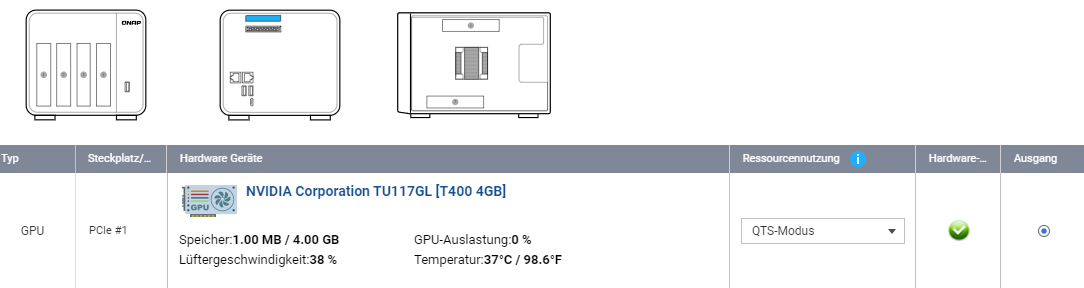
The card must be in “QTS mode” (Control Panel - Hardware)
Marvv
July 9, 2024, 4:07pm
9
Thanks for the feedback but I think I need to elaborate a bit more on my server.
My server has been running for 4 years without any problems, the whole setup is not new. But since I have been away for the last 4 weeks, I had to transcode series or movies more often.
The Nvidia graphics card is of course running in QTS mode and all the necessary drivers are installed and up to date.
Because of the other thread with the same error message (TrueNAS), I got in touch and wanted to contribute logs to localize the error.
I will try other movies than Ready Payer One or series this weekend. I get no error message via Plex Web, just a black screen. This could also be due to the TrueHD / DTS-HD audio transcoding.
i have changed the T600 to an T400 - not surprising
Please look carefully at the nvidia-smi output.
First, your T400 is better than my P2200
Look at the “CUDA Version:” N/A ??
You cannot hardware tonemap without CUDA.
Please observe my P2200
[chuck@lizum ~.2021]$ nvidia-smi
Tue Jul  9 15:43:55 2024
+---------------------------------------------------------------------------------------+
| NVIDIA-SMI 535.183.01             Driver Version: 535.183.01   CUDA Version: 12.2     |
|-----------------------------------------+----------------------+----------------------+
| GPU  Name                 Persistence-M | Bus-Id        Disp.A | Volatile Uncorr. ECC |
| Fan  Temp   Perf          Pwr:Usage/Cap |         Memory-Usage | GPU-Util  Compute M. |
|                                         |                      |               MIG M. |
|=========================================+======================+======================|
|   0  Quadro P2200                   On  | 00000000:07:00.0 Off |                  N/A |
| 47%   37C    P8               4W /  75W |      1MiB /  5120MiB |      0%      Default |
|                                         |                      |                  N/A |
+-----------------------------------------+----------------------+----------------------+

+---------------------------------------------------------------------------------------+
| Processes:                                                                            |
|  GPU   GI   CI        PID   Type   Process name                            GPU Memory |
|        ID   ID                                                             Usage      |
|=======================================================================================|
|  No running processes found                                                           |
+---------------------------------------------------------------------------------------+
[chuck@lizum ~.2022]$
Something is not working right at here.
Got access to our TS877 machine.
from the shell:
[/share/CACHEDEV1_DATA/.qpkg/NVIDIA_GPU_DRV/usr/bin] # export LD_LIBRARY_PATH=$LD_LIBRARY_PATH:../lib
[/share/CACHEDEV1_DATA/.qpkg/NVIDIA_GPU_DRV/usr/bin] # ./nvidia-smi
Tue Jul  9 18:40:28 2024
+-----------------------------------------------------------------------------+
| NVIDIA-SMI 515.48.07    Driver Version: 515.48.07    CUDA Version: 11.7     |
|-------------------------------+----------------------+----------------------+
| GPU  Name        Persistence-M| Bus-Id        Disp.A | Volatile Uncorr. ECC |
| Fan  Temp  Perf  Pwr:Usage/Cap|         Memory-Usage | GPU-Util  Compute M. |
|                               |                      |               MIG M. |
|===============================+======================+======================|
|   0  NVIDIA GeForce ...  Off  | 00000000:0F:00.0 Off |                  N/A |
| 29%   29C    P8    N/A /  75W |      2MiB /  4096MiB |      0%      Default |
|                               |                      |                  N/A |
+-------------------------------+----------------------+----------------------+

+-----------------------------------------------------------------------------+
| Processes:                                                                  |
|  GPU   GI   CI        PID   Type   Process name                  GPU Memory |
|        ID   ID                                                   Usage      |
|=============================================================================|
|  No running processes found                                                 |
+-----------------------------------------------------------------------------+
[/share/CACHEDEV1_DATA/.qpkg/NVIDIA_GPU_DRV/usr/bin]
Using our GT1050
[/share/CACHEDEV1_DATA/.qpkg/NVIDIA_GPU_DRV/usr/bin] # ./nvidia-smi
Tue Jul  9 18:49:21 2024
+-----------------------------------------------------------------------------+
| NVIDIA-SMI 515.48.07    Driver Version: 515.48.07    CUDA Version: 11.7     |
|-------------------------------+----------------------+----------------------+
| GPU  Name        Persistence-M| Bus-Id        Disp.A | Volatile Uncorr. ECC |
| Fan  Temp  Perf  Pwr:Usage/Cap|         Memory-Usage | GPU-Util  Compute M. |
|                               |                      |               MIG M. |
|===============================+======================+======================|
|   0  NVIDIA GeForce ...  Off  | 00000000:0F:00.0 Off |                  N/A |
| 29%   53C    P0    N/A /  75W |    607MiB /  4096MiB |     65%      Default |
|                               |                      |                  N/A |
+-------------------------------+----------------------+----------------------+

+-----------------------------------------------------------------------------+
| Processes:                                                                  |
|  GPU   GI   CI        PID   Type   Process name                  GPU Memory |
|        ID   ID                                                   Usage      |
|=============================================================================|
|    0   N/A  N/A     25011      C   ...diaServer/Plex Transcoder      603MiB |
+-----------------------------------------------------------------------------+
[/share/CACHEDEV1_DATA/.qpkg/NVIDIA_GPU_DRV/usr/bin] #
Marvv
July 10, 2024, 3:25pm
12
oh, okay! I hadn’t noticed that
I uninstalled the Nvidia GPU driver, restarted the server and reinstalled the driver. But I can’t delete or stop the NVKernel driver.
The Cuda driver is still not available in nvidia-smi.
I forget how that works.
From what I remember, you can go into the shell and manually uninstall themuninstall.sh file somewhere
Marvv
July 10, 2024, 5:07pm
14
I was able to remove the kernel driver using the uninstall command.
I had to reinstall the GPU driver several times until the driver worked.
I’m at a bit of a loss now, I can’t do more than uninstall and reinstall
Can you confirm, in Control Panel - Hardware, the GPU is in “QTS Mode” ?
I wonder if you got an update to the drivers?
https://www.qnap.com/en-us/compatibility/device_category=gpgpu&brand=nvidia
Here’s where you can get older versions.
https://www.qnap.com/en/download
Marvv
July 11, 2024, 3:05pm
18
The fact that the card is not listed should not really matter with the same chip (TU117). Otherwise it would not be recognized
I have contacted Qnap to officially support and list the GPU T400 and T600.
The hardware transcoding works anyway, without Cuda.