Server Version#:
Player Version#: PlexMediaServer-1.41.8.9834-071366d65-x86_64
Hi i don’t why since 4 days my plex qnap (TS-251D 4GO) was OFF, impossible to show my librairy.
I have updated to -1.41.8.9834-071366d65-x86_64 but still the same problem
I think first time i opened on my compture i saw my librairy and said me to increase right i think but not sur. No i have nothing
I don’t know hox to fixe it and if you want some informations to help tell me and I will try to find it
Thanks a lot
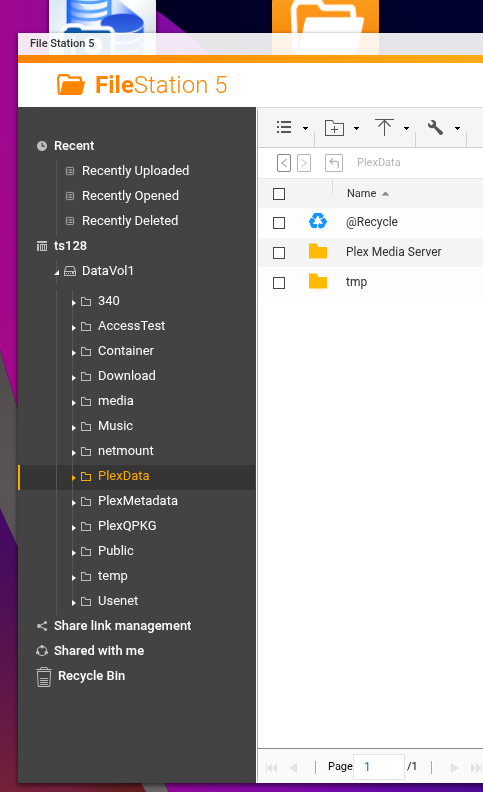
Please create a shared folder named exactly PlexData (upper-lower sensitive)
It can be anywhere
- Stop PMS
- wait 30 seconds
- Start PMS
- wait 2 minutes
- Stop PMS
-
Open FileStation → PlexData → Plex Media Server
-
Right-click Logs → Compress
-
When complete (ZIP or tar.gz) - Download it and then attach here.
thanks to help me !!!
I open my nas on computer, i go to filestation but i can’t find plexdata !
When i try to go direct with file explorer i can see a plexdata field but impossible to open it ask me password
maybe i do something wrong?
thanks again
thanks again
Iwas impossible to create the shared folder plexdata because it already exist. I put the same proprieties as you
I stop PLEX and restort again but still no have folder as you down DataVol1
I restart NAS but still no PlexData 
An idea? 
Delete the shared folder
SSH into the QNAP and make certain the linux folder is gone too
Now recreate it again as it should be.
Restart and confirm it’s populated.
If not, then PMS is not trying to start.
In this case, DO NOT UNINSTALL PMS.
Confirm you have the right package file.
Reinstall the same QPKG on top of what exists.
ok i will delete the folder but it ask me if i want to delete data, i do?
sorry i don’t understand that i am a novice
SSH into the QNAP and make certain the linux folder is gone too
oh great i succeded, i give me acces here
now i have
@guill575
Do you have your own domain assigned to the QNAP?
What’s happening is that it’s superseding the built-in (required) certificate. This prevents your PMS from talking to Plex.tv
Jun 06, 2025 18:38:21.976 [139760216591160] WARN - [HttpClient/HCl#3c] HTTP error requesting PUT https://plex.tv/devices/ea267d0ea16f3d99fc2e3a045858eea9f4621c13?Connection[][uri]=http://89.89.74.29:22352&Connection[][uri]=http://192.168.1.194:32400&Connection[][uri]=http://10.0.5.1:32400&Connection[][uri]=http://10.0.3.1:32400&Connection[][uri]=http://10.0.7.1:32400&Connection[][uri]=http://[2001:861:4040:c8a0:265e:beff:fe3e:711]:32400&httpsEnabled=1&httpsRequired=0&dnsRebindingProtection=0&natLoopbackSupported=1&X-Plex-Token=xxxxxxxxxxxxxxxxxxxx (60, SSL peer certificate or SSH remote key was not OK) (SSL: no alternative certificate subject name matches target host name 'plex.tv')
(60, SSL peer certificate or SSH remote key was not OK) (SSL: no alternative certificate subject name matches target host name ‘plex.tv’)
yes it was my own qnap where i have all my folders
How i can fix it? why before june i didnt have this problem
Do you think is a port problem? doesent work http://192.168.1.194:32400/
This one works http://192.168.1.194:8080
maybe tou didnt see my question
Thanks a lot
When you have a domain assigned to your QNAP, it’s important to also give that information to PMS in the Settings - [server] - Network - Show Advanced page.
Given this is a curl error 60 (which means the certificate identification it received does not match what it expected – namely plex.tv, we need to look at what caused it. Possible causes:
-
A Proxy server, with its own FQDN, which is capturing all inbound traffic to the Plex port and not forwarding correctly.
-
An expired certificate for your domain.
I looked at your Plex certificate and it’s ok.
-
Unlikely, but possible – Date/time is out of sync with real time and preventing HTTPS (cert operations) from completing correctly.
To answer your question –
- I do not think it’s the port because there is inbound traffic.
- I think it’s traffic which is using a FQDN URL to connect to the QNAP which PMS doesn’t know about (most common)
To test this:
- Using the computer on your LAN,
- Open a browser
- Open the QNAP Plex port directly ( http://LAN.IP.of.QNAP:32400/web)
– This avoids use of all certificates except Plex’s for browser<-> server
- Depending on the results of this test, we will need to look further.
Do you have a PlexData shared folder ? (upper/lower case is required)
If you do,
- Stop Plex
- Navigate to: PlexData / Plex Media Servere
- Right-Click
Logs -> Compress
- Download the Logs.zip / Logs.tar.gz
- Upload the file here
how you can find `Settings - [server] - Network - Show Advanced, it is impossible for me beacause i don’t have. maybe i look for in the wrong place
I stop plex and here
Logs.zip (607.0 KB)
We are my hero !
Are you using a certificate you created ? (Self Signed)
Jun 08, 2025 15:04:24.421 [140643080383288] WARN - [HttpClient/HCl#b] HTTP error requesting GET https://plex.tv/api/v2/user?includeSubscriptions=1&includeProviders=1 (60, SSL peer certificate or SSH remote key was not OK) (SSL: no alternative certificate subject name matches target host name 'plex.tv')
Jun 08, 2025 15:04:24.421 [140643065793336] DEBUG - MyPlex: using cached data for request for https://plex.tv/api/v2/user?includeSubscriptions=1&includeProviders=1
Jun 08, 2025 15:04:24.422 [140643080383288] WARN - [HttpClient/HCl#e] HTTP error requesting GET https://plex.tv/api/v2/features?X-Plex-Token=xxxxxxxxxxxxxxxxxxxx (60, SSL peer certificate or SSH remote key was not OK) (SSL: no alternative certificate subject name matches target host name 'plex.tv')
Jun 08, 2025 15:04:24.422 [140643038370616] DEBUG - FeatureManager: Using cached data for features list
Jun 08, 2025 15:04:24.422 [140643065793336] DEBUG - MyPlex: username is guill575, login is guillaume@9business.fr, home is 0, no pin
Jun 08, 2025 15:04:24.423 [140643080383288] WARN - [HttpClient/HCl#f] HTTP error requesting GET https://plex.tv/media/providers?X-Plex-Token=xxxxxxxxxxxxxxxxxxxx (60, SSL peer certificate or SSH remote key was not OK) (SSL: no alternative certificate subject name matches target host name 'plex.tv')
I ask because error 60 also can happen when you create your own certificate.
PMS raises the error because:
- It cannot authenticate the certificate
- The name in the certificate does not reference or allow
plex.tv , which is required
Look here:
* Rebuilt URL to: https://backend.example.com/
*   Trying 127.0.0.1...
* Connected to backend.example.com (127.0.0.1) port 443 (#0)
* found 139 certificates in /etc/ssl/ssl.cert/cacert.pem
* found 600 certificates in /etc/ssl/certs
* ALPN, offering http/1.1
* SSL connection using TLS1.2 / ******_RSA_***_***_GCM_*****
*    server certificate verification OK
*    server certificate status verification SKIPPED
*    common name: *.example.com (matched)
*    server certificate expiration date OK
*    server certificate activation date OK
*    certificate public key: RSA
*    certificate version: #3
*    subject: OU=Domain Control Validated,OU=PositiveSSL Wildcard,CN=*.example.xyz
*    start date: Mon, 04 May 2019 00:00:00 GMT
*    expire date: Wed, 07 June 2021 23:59:59 GMT
*    issuer: C=GB,ST=Greater Manchester,L=Salford,O=Sectigo Limited,CN=Sectigo RSA Domain Validation Secure Server CA
*    compression: NULL
* ALPN, server accepted to use http/1.1
This shows:
- There is a match
- Shows the issuer of the certificate
PMS is complaining for you because there is no match.
I have no idea if is it certificate I created.
You know i am a novice and i think i have follow a tutoriel to instal plex 3 years ago
How can fixe it? create a new certificate?
hi
can you help me please when you have time?