Question on adding new drives to plex

I am slightly confused on adding drives, My tv show drive got filled up so I added another drive , labeled it a tv show, now I have two tvshows showing on the left sidebar, Is there a way to combine these drives to show as on in plex? Did i miss something when install,

also, its been bugging me that my recently added movies is last on the list behind all the new context plex supplied from crackle etc, is there someway to move these around?
Thank you again!!

plex12|352x1003

Edit first library, and add additional path as well

…and then remove the 2nd library.

Here is an example of a TV library with more than one folder in it. In your case, each entry would be each drive you have…

2 Likes

Click on Home at the top of the left side menu.
Then at the top right click the Pencil Edit icon.
Screenshot_2021-01-07 Plex
Click on Disable (Manually Manage).


Click the Edit icon again.
You can then arrange the items the way you want. You can also Hide anything you don’t want to see in the Home section.

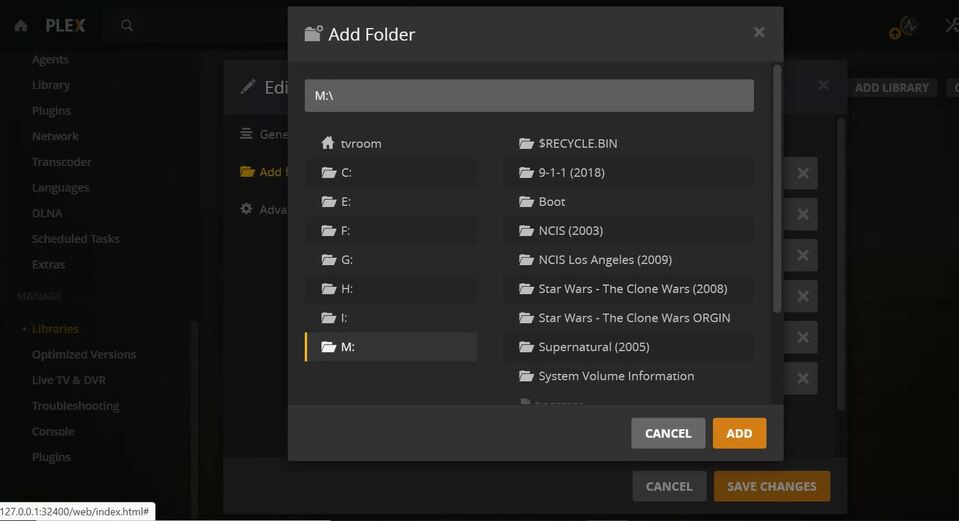
I still a little lost as why I have recycle bin and the other stuff listed in that drive.


Do i have to manually add every new show as pictured?

you should put all the show folders inside of a main ‘tvshows’ folder, leaving them in the root drive can cause problems.

you never want to add the show folder directly, only its parent folder.

each path below is a ‘drive’ (or raid array) on linux. it would be the same for windows, drive letter + tv folder

image

the official naming standards are @

1 Like

And strongly advice, that you add a directory at the root of the drive, and name it like movies

Then add that to the library path, and put your movie directories in that.

Having medias at the root of a drive is bad, due to system folders (like the trash etc.) and files

@borntworide in your case, the directory would probably be M:\TV Shows.

It also looks like you can see hidden files and folders, so you want to hide them. If you are on a Mac, you can do this with <.>

1 Like

i am on a pc,

Thanks i think this is what you are telling me to do!

2 Likes

yes, that’s correct!

1 Like

Thank you!!! last question what is the best way to set this system up so plex will see it by years?
I have tried tv show, and other movies , it just does not find them correctly

you should name the folders and files according to Plex’s required formatting.

But, to see them by years (in Plex), set the sort to “release date”.
Screenshot 2021-01-07 at 21.53.50

edit: Sorry, just realised you are referring specifically two “AMA Supercross”. Plex needs to be able to match the shows to something in the TVDB.com, and I cannot find something that will match 2017 onwards (there is a match for 2019).

normally I would suggest show name (year)

but for sports, you probably want to do something like

/sports/ama supercross/season 2017/ama supercross - s2017e01 - episode title [any extra optional info].mkv

keep in mind that sports (and news) metadata is probably going to be much more limited than regular tv/movie content.

2 Likes

There is a scanner you can use to get metadata for your AMA stuff. I actually have an AMA Supercross library.
I’ve been using this for 3 yesrs but it could stop working any time.
SportScanner uses sportdb

2 Likes

could you post a pic fo how its names. that just blew my mind man!

The file names must have the race date in them. Here is an example;
AMA.Supercross.2020.01.04 - Round #1 - Anaheim, CA – Angels Stadium of Anaheim.mkv
The Agent gives the race an episode # based on the race date. Looks like this;

This topic was automatically closed 90 days after the last reply. New replies are no longer allowed.