@Pyrotech1620 Disabling monitoring of remote access in Tautulli would be the only thing that makes a difference if you are getting hit by this Plex bug. The rest of Tautulli’s functionality has nothing to do with this bug so if you are just using it to record history simply disabling that option under “Settings -> Plex Media Server -> Monitor Plex Remote Access” should be sufficient.
I disagree. After a reboot of the plex server and not starting Tautulli I still have issues connecting to the Plex web interface from the Plex server. It has me select which user and attempts to connect to my sever and fails. It connects to a server that is shared with me and after hitting retry on my server 5 or 6 times it finally comes up. This is all with Tautulli not running.
DM’d you the logs from this morning
@Arcanemagus I completely disabled Tautulli and still having issues. =[ . I turned on logging and will send it over to @sa2000 after it has some time to run and produce some logs.
Thanks for the logs from this morning. They show an issue with the server communications with a pubsub server pubsub13.pop.ewr.plex.bz - I am not sure at this stage what is giving rise to the problem and if it is on that server or due to the bug we have in Plex Media Server.
The communication with the pubsub servers is what Plex Media Server uses as an indication if there is an internet connection or not and is also used when establishing remote access
If the problem is still there, could you shutdown Plex Media Server and delete the following registry entries and then relaunch Plex Media Server - if issue persists please get me fresh logs
The registry entries to delete are within
HKEY_CURRENT_USER\Software\Plex, Inc.\Plex Media Server\
Delete PubSubServer
Delete PubSubServerPing
Delete PubSubServerRegion
Then restart Plex Media Server
1 Like
I did it and after restarting I am having the same issues. My region is still showing ewr, but the IP address switched to 50.116.59.4. If you still need the logs I will try and get them. I am using teamviewer at the moment.
I would need logs from launch time up to now to see if behaviour is the same after switching to different pubsub server
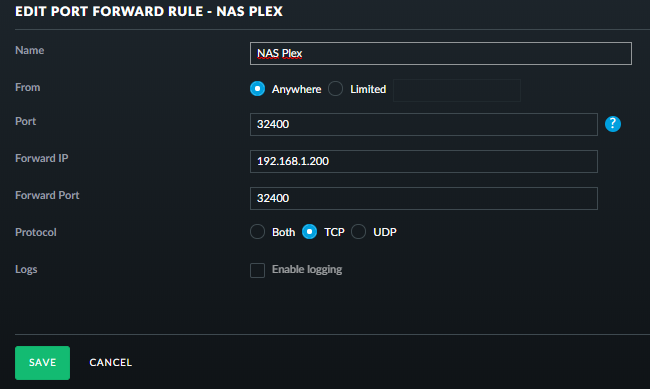
Have looked at your logs and I see you have set public port 32400 as the port to use. The log shows nothing coming in to Plex Media Server through that wan port. What IP address did you port forward it to in the router? Could you upload screenshot of the port forward setup in the router
I see you have a number of Network Interfaces
Jul 31, 2018 10:40:14.995 [0x7faed8a9a800] DEBUG - Network interfaces:
Jul 31, 2018 10:40:14.995 [0x7faed8a9a800] DEBUG -  * 1 lo (127.0.0.1) (loopback: 1)
Jul 31, 2018 10:40:14.995 [0x7faed8a9a800] DEBUG -  * 6 bond0 (192.168.1.200) (loopback: 0)
Jul 31, 2018 10:40:14.995 [0x7faed8a9a800] DEBUG -  * 8 docker0 (10.0.5.1) (loopback: 0)
Jul 31, 2018 10:40:14.995 [0x7faed8a9a800] DEBUG -  * 9 qvs0 (192.168.1.197) (loopback: 0)
Jul 31, 2018 10:40:14.995 [0x7faed8a9a800] DEBUG -  * 10 lxcbr0 (10.0.3.1) (loopback: 0)
Suggest you make use of the new feature that came in with version 1.13.5 which allows you to tell Plex Media Server which network interface to use and of course you also need to make sure that the port forward in the router is to that IP address and make sure that IP is a DHCP Reservation so it does not change
see https://support.plex.tv/articles/200430283-network/ for info on this feature
I just sent in DM
Screenshot of both router and plex. I had tried using the new feature that lets you pick a certain IP but that didnt work so I tried All. I have selected 192.168.1.200 in the Network section and restarted Plex. Still same issue. It shows connected for a split second and then goes to the screenshot.

I think I just found my issue… Where are the servers located that determine the “Remote Access” is up? I use GEOIP Filtering for all countries but the USA. I turned that off and it is now working without issue. @sa2000
Edit/Update: Did a traceroute of plex.tv back to Ireland and added that to the list of approved Countries and all my issues fixed…
I had a disconnect this afternoon. Tautulli isn’t checking connectivity and the network remained stable the whole time. There’s no reason it should have gone down.
All I know is that suddenly the only access was indirect access.
I turned off remote access, turned it back on, and everything worked fine.
I’m running a stock Ubuntu 16.04 installation which also seems to be stable. I’m uploading the the logs for your review. I hope they help.
If I can do anything else, feel free to ask.Plex Media Server Logs_2018-07-31_18-09-32.zip (3.6 MB)
Plex Media Server Logs_2018-07-31_18-09-32.zip (3.6 MB)
1 Like
From a previous post or two, It’s starting to seem more and more as though Tautulli isn’t the issue. (I never really thought it was.)
I don’t know if there is any corresponding factor, however, all but one (6/28) of my remote access notifications have always started between 4am and 6am EST.
From oldest to newest, here are the dates, how many notices I got in the time frame, and beginning and ending times. (I found more I’d deleted, so this has one or two more days than my previous post list)
Date - Quantity - Start - End (Times are US EST)
6/4 - 6 - 0557 - 0634
6/6 - 6 - 0336 - 0633
6/8 - 6 - 0430 - 0633
6/14 - 10 - 0425 - 1145
6/28 - 21 - 2208 - 6/29 0805
7/16 - 22 - 0600 - 1447
7/17 - 24 - 0320 - 1446
7/19 - 20 - 0449 - 1446
Adjustment to 12 minute interval was on/about 7/20
7/28 - 28 - 0511 - 1935
Adjustment to 21 minute interval was on 7/29
... no more... (yet..I'm not anywhere near confident the issue is corrected)
would like to know about what you meant by “didn’t work”
Good news. Thanks for the feedback. The Amazon cloud servers could be anywhere and yes Ireland servers are involved
This was a list linked to from Amazonws.com https://ip-ranges.amazonaws.com/ip-ranges.json
may coincide with a network issue overnight or a database optimization that may lead to a request coming in for connectivity test timing out
Whoops, left out the “and it is actually being caused by Tautulli” in that first sentence! 
Found this discussion because I too am using Tautulli and seeing the async identifier messages spamming my logs. After reading the somewhat heated discussion between @SwiftPanda16 and @sa2000, I have to agree with Jonny. As a DevOps engineer who deploys applications at scale in both Physical datacenters and cloud environments (AWS), I find it a little appalling that a member of the Plex team would not understand how APIs should function, as well as the admittance that “Plex did not build infrastructure to handle requests”. While you may not operate at the scale I do daily, My management team (all the way up to the top) would find it unacceptable if I or my team did not properly scale our infra to handle an increase in load, whether that be rate-limiting like Jonny suggested, or by adding load balancers and more backend machines to handle the request. Given that you run a lot of your infra in AWS, it is not hard to add ELBs and/or autoscale groups to spin up more machines as necessary.
Given that you have what I assume to be a large number of Plex-Pass users (myself being one), Plex owes it to it’s customers to ensure that it’s infrastructure (Physical or otherwise) can grow and keep up with any sort of demand. As far as the API issue, again Jonny is correct. You designed the API so it is your job to dictate it’s usage. Google does this, Facebook does this, every company sets restrictions on number of queries, etc for their APIs. It is not on the user of the API to regulate their usage.
Just my 2 pennies
5 Likes
It was a guess on my part which you found appalling. and I did say
may not have allowed for when sizing the plex.tv infrastructure.
There is a big difference between a couple of connectivity tests from a server a day and 1440 connectivity tests a day
That was only one aspect - the other being if you have a timing related bug in the code then the likelihood of hitting is a lot more if you go through the code 1440 times a day instead of say on average once or twice a day
Well if I didn’t have bad luck I wouldn’t have any. Most days I think that would be better.
Somehow the firewall on the router got enabled and it didn’t hit until the day I updated Plex. After installing an older version and seeing the exact same thing I got on the router and seen my issue.
It was strange how it all happened at the same time as these threads.
That is normal - it happens all the time. Coincidents. Jusr like the recent windows 10 update bug which causing transcoder errors that was blamed on a PMS update.
The symptoms in your case were different - in that we were not successfully establishing communication with the pubsub servers - the ones used for connectivity testing events
