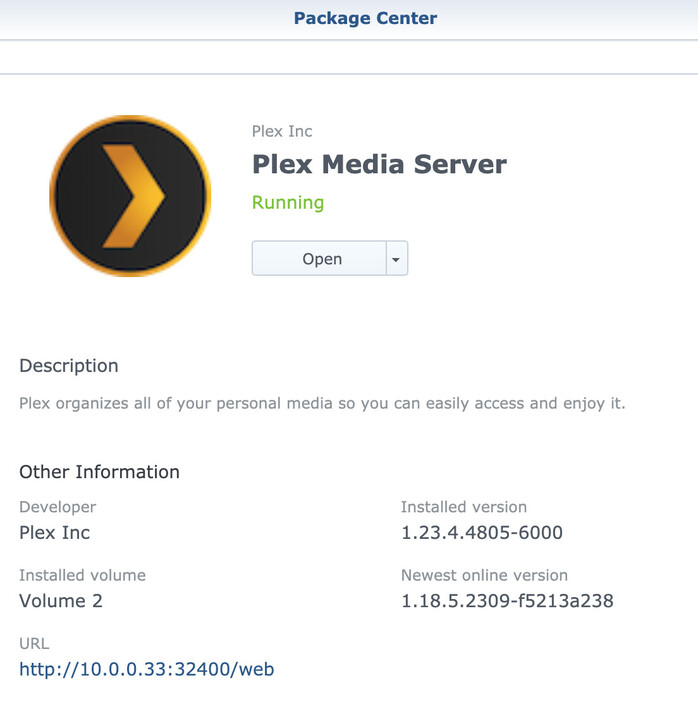
I have been having issues playing multiple different video files (TV Shows to be specific, in various different formats) via the Plex Media Server from my DS918+. I looked through some of the threads and set the Debug level to ‘Enabled’, and the issue still persists.
It happens on my local area network as well as when playing remotely.
I also have noticed some of the files play on certain platforms, and not on others (e.g. one series will play on my basement TV, but not my upstairs TV).
I am a beginner when it comes to these areas, so I am not even sure as to where I would find the player and server version. I have attached a screenshot of the ‘Installed Version’ of Plex on my Synology NAS.
I don’t see anything stating any of my files are in a ‘Plex shared folder’. After reading some of the information from the linked post that you sent me, I realize now it is in a shared folder. I do not have much experience with this, as you can probably tell, so please bare with me.
I was reading the link you sent me, but it seems I would have to create another, separate shared folder. Thankfully I have used less than half of the total space I have available, so I am able to create a shared folder for Plex now (and will be able to move all of my data sitting in the Plex shared folder to the appropriate, new created folder).
It asks me if I want to enable data checksum, which I have no idea what that means. I will most likely not be storing any surveillance tapes, etc., as mentioned here, but because it wasn’t already checked, I created the folder, keeping this option unchecked.
I’m not arguing, trumpy. I’m simply stating a fact. It does not state it is a shared folder, it simply states the file path, which does not mention anything about shared folders. I told you I am new to this. No need to capitalize words, I can read them clearly. I’m not sure why you are so irritable, I’m simply trying my best to understand and do what I need to do.
There is a shared folder called Plex. a screenshot from the install guide link posted above. It contains most the files the server needs to run. putting media files or other things in there can mess things up.
Need to make another folder like the one in image called “MyMedia” ( call it whatever you want) and put files in there.
Did all of this, let it scan all my files overnight because I have terabytes of files and it was taking a bit of time. I will update you on if it solves the playback issues asap.
On a separate note, could you tell me if I need to move or copy the applications folder located in the original Plex shared folder to my new folder holding all of the files?
Thank you, this was perfect advice for a newbie like me, in regards to this Synology Linux OS. I made my own shared folder, wish me luck that the issues don’t persist!
I have since moved all of the files from the Plex shared folder to a new folder, yet I am still having an issue playing certain video files. I have attached the updated DEBUG ZIP files.
I started using and purchased one year of Filebot, it’s working great so far. Thank you.
I have attached the logs after trying to play an episode of American Dad, Season 14, Episode 1, which was renamed properly with Filebot. I attempted to play this on my TV, I assume it doesn’t matter where I attempted to play the file.
Also, here is the XML text from the specific video file I tried to play:
I am running FIleBot on macOS, FYI. I have it set up on my Mac so I can go to the Finder > Locations > then choose my NAS, and because of this I assume I wouldn’t need to transfer all files out of my NAS and back to rename them.
I’m not sure what this would mean, but would I need to try any of this if the files play without issues, or is this simply a suggestion if the files do not play properly?
Thank you again for all the help, I truly appreciate it.
I have attached updated Debug Logs. All is playing fine now it seems.
What if I want to include the TV Show or Season info - can I add this optionally at the end of each TV Show folder name or Season folder name (e.g. American Dad! (2005) [1080p], or Season 01, 1080p)?