@geosidi_plex Hi, having tested this is still not fixed on Nvidia shield Android TV. See picture uploaded. This behaviour occurs after allowing a TV channel for play for an hour or so then pressing the back button to exit play. This takes you back to as in the picture.
Can you please provide an update

I got the same results on my MiBox (Andriod TV ) and my Nvidia Shield TV so I won’t upload what would be duplicate pictures as uploaded by PristDean.
should have added, both are running Plex 9.17.0.xxxx
Ok thank you both for replying. We’ll have to investigate further.
Thank you, this is particularly interesting as in 9.17 a fix is specifically listed as:
- [TV] LiveTV: fix an issue where going back to the TVGuide would not focus the channel currently playing.
So, could this possibly be an Android OS setting that prevents a background process from running / updating ?
Please keep us posted with thoughts / progress. Thanks
@geosidi_plex As an observational update on this, it is clear to me that the guide tracks the time in the background whilst a channel is being watched, as the correct time is displayed when exiting the channel back to the guide. What is missing a is refresh of the guide itself.
If you move across to the side menu (with a half blank guide) and select ‘Discover’ for example, then move back to the guide, you will notice the guide contents refresh.
So a refresh of the guide upon exiting the channel being watched is what’s missing here.
Just wanted to say having some of the same issues on both a FireTV Cube 2nd gen and a Apple TV 4k (2022) regarding the guide. Mainly watching something for a while and going back to the guide will leave it at the previous time. And sometimes if the time gap is large there is all the blank spaces. As others have said it seems to be a refresh issue, or lack there of, as closing out and going back in fixes it.
1 Like
@PristDean thanks for the additional details. We’ve been able to replicate and working on a fix.
@AllanD Could you grab a screenshot and/or logs next time you see that happening on your Apple device?
1 Like
Unless this part of the apple app is a lot different then the android app the same fix for @PristDean should work as it sounds like a identical problem, especially since I see it on both the AppleTV and the FireTV. With that said I’ll try to grab a picture next time it happens and the steps to get there.
my Apple TV 4k had been operating without issues, UNTIL a Plex Server update this past week. Now my Apple TV 4k is have very similar issues, with the Program Guide.
Maybe instead of worrying about new features, getting basic existing feature working, then keeping them working once they are fixed would be very welcoming. Note that this issue goes back to Sept 2022.
Again, I like the Plex UI, when it works correctly.
1 Like
Try to describe what happens. If I watch Live TV using the Plex Server for more than an hour (other timeframes may have the same result, but I haven’t tested), try to change the Live TV (Plex Server) channel/program, programs are shown, typically not the correct time and I can not get anything to highlight, so it is not possible to change to another channel/program…
At this point if I go to the Plex Server and Plex Live TV selection (top left of the program grid), select the Plex Live TV and let the program grid populate, then go back and select the Plex Server, the program guide will populate correctly and a program can be selected.
Additionally, I have verified the time on the Apple TV 4k was correctly set. And when I talk above about “programs shown are not the correct time” , an example, if the time is 730pm the Program Guide will showing programs after 830pm, and I can not scroll back to the 730pm time.
Hopefully that will help
Please review the current posts for the topic [Regression behavior on the EPG (positioning according to the current time in the guide)] for additional info regarding the Programing Guide on Apple TV.
Thank you
after the Plex Server update I discussed above the only thing I did not do was reboot the Apple TV 4k, which I did this morning. After the reboot the Plex App seems to be back to operating normally, so that even after an hour the Program Guide populates as I would expect. As I continue to test I will post my results.
as the saga continues… went to another app on my Apple TV 4k, a little over an hour returned, the program Guide popped up as mostly blank, as shown below. After about 2-3 minutes the Guide populated, note that .the time had just changed to a new hour. Time shown 9:59am, repopulated after displaying 10:00am.

@geosidi_plex Just tested on Android TV on NVidia Shield, and pleased to say it appears to be working. Client 9.19.0.85 and server 1.31.3.5819
I’ll continue to test, but must say, thank you @geosidi_plex for pushing this forward for us.
1 Like
@zello43 Thanks for reporting the issue on Apple TV. I have notified someone from the Apple team and it’ll be looked into.
The codebase between Android and Apple is not shared so this is a separate issue to the one reported for the Android clients.
@PristDean nice that you’re seeing an improvement. There are some edge cases that are still being worked on and will be pushed with the next release.
1 Like
So same thing, not as bad since I only watched a hour or so before hitting back just to see if it would do it:
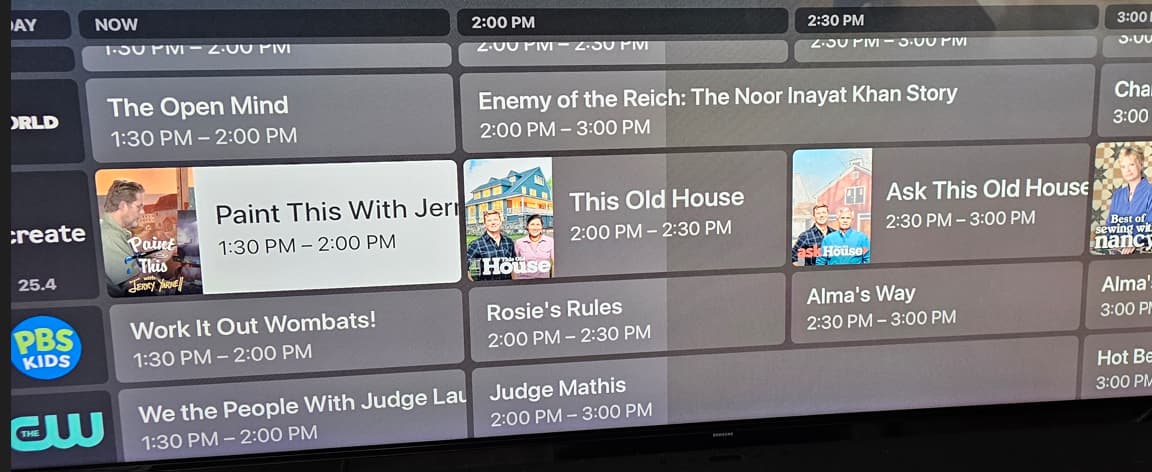
If I leave it longer (2+ hours) it would do the blank screen thing. However I have kinda given up on the Plex app for AppleTV. If I hook my system up correctly (AppleTV → Soundbar → TV) I get a ton of audio delay and video stutter while streaming uncompressed 4k content from my Plex server. I also had random video stutter from standard live TV although no audio issues. If I use my FireTV Cube 3rd Gen hooked up the exact same way there are no issues.
Now if I could passthrough audio while also turning on the mach frame rate setting I’ll be set but I’m sure that’s another bug post somewhere.
Thank you for the update, hopefully the Apple TV can be a resolved quickly. Thank you for pushing all of this, including the Apple TV issue.
Okay, so after further testing on NVidia Shield & Android TV OS shows the following with TV guide:
- If left for an hour with no signal interruption - Guide will update when returned to from a TV prog
- If left for an hour with signal interruption - Guide will show gaps when returned to from a TV prog
- If left for approx 2 hours - Guide will show gaps when returned to from a TV prog as over this period likely interruption to signal (even if just a small glitch)
UPDATE: Just seen that 9.19 has been released, will test again
Okay, no joy. Still the same after letting a TV prog run for 2 hours then returning to the guide… In fact, now worse, guide is pretty much completely blank
