I just went to repeat the procedure and collect fresh log files for troubleshooting. However, I couldn’t replicate the issue - upon doing a refresh this time, the tile was updated from the main title to the en title.
Looking at the com.plexapp.agents.hama.log log whilst running a refresh shows it correctly using the en name. I’ll try and have a look over my logs from last night when I had the issue to see if there’s any indicators why it was occurring then.
The only error I observed whilst monitoring the log was an IO error when writing to TVDB/episodes. After creating this folder and assigning the appropriate permissions this error was resolved. I’m not quite sure why I was missing just this folder, but it’s there now and being populated.
@KJKingJ: Thanks for letting me know. This folder was added in recent enough version of the agent (last year). That means the agent was updated but not the agent data folders. If series episodes had no screenshots, would have worked, but crashed hence changing nothing if episodes in thetvdb had screenshots…
Hello everybody)
Iv’ got problem with HAMA+ Absolute Series Scanner. All content like release year and description was downloaded almost perfect (90%). Except posters, banners. etc. Any of 220 series. Any suggestions what is wrong?
Partially it helps))
I’ve created folders, copied new version scanner .py. Absolute Series Scanner stopped working at all. Than ‘Better scanner’ was installed. But scanner is not so good as ‘Absolute’. Changing default plex folder fixed problem)
Wanna report my problem:
Saw in the logs that the ._StoredValues was missing
So i used the fix
mkdir “/var/lib/plexmediaserver/Library/Application Support/Plex Media Server/Plug-in Support/Data/com.plexapp.agents.hama/._StoredValues” chmod 777 “/var/lib/plexmediaserver/Library/Application Support/Plex Media Server/Plug-in Support/Data/com.plexapp.agents.hama/._StoredValues” chown plex:plex “/var/lib/plexmediaserver/Library/Application Support/Plex Media Server/Plug-in Support/Data/com.plexapp.agents.hama/._StoredValues” service plexmediaserver restart
The problem was that a folder was created not an file.
I created a file by myself and the agent is working now.
Don’t think so. Seem like a plex linux issue.
Agents are not meant to have folders copied them so that might contribute to the issue but that allow to download any poster or picture once only and all xmls in case a site goes down…
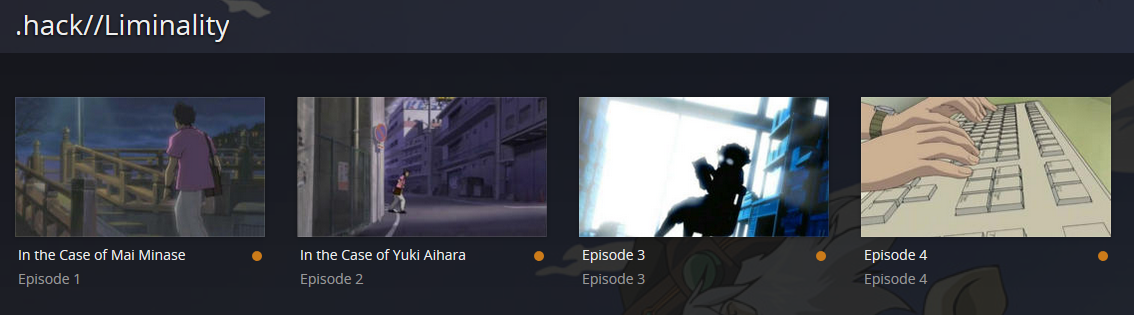
I have attached my log and a screenshot of what’s happening. Is there a reason that only some of the episode names are pulling in instead of all of them? Any help would be greatly appreciated.
Ever since Fairy Tail Zero started and they added that as a separate anime id in anidb I have just been adding files to the same folder and using them without episode metadata.
However, they have changed anidb now so all episodes are listed under the same title however no matter how much I’ve tried refreshing my library I still only see the metadata for episodes up to number 90.
Does anyone else have this problem and know how to fix it?
I’ve just updated to the latest hama.bundle and ASS scanner from ZeroQIs git repo directly and refreshing the library using ASS (previously was using BABS) makes no difference.
@clowncracker said:
I have attached my log and a screenshot of what’s happening. Is there a reason that only some of the episode names are pulling in instead of all of them? Any help would be greatly appreciated.
I also appear to be having this same issue with several different Anime folders.
I can’t find any reason why there should be any difference between the episodes that show with the correct data and those that don’t.
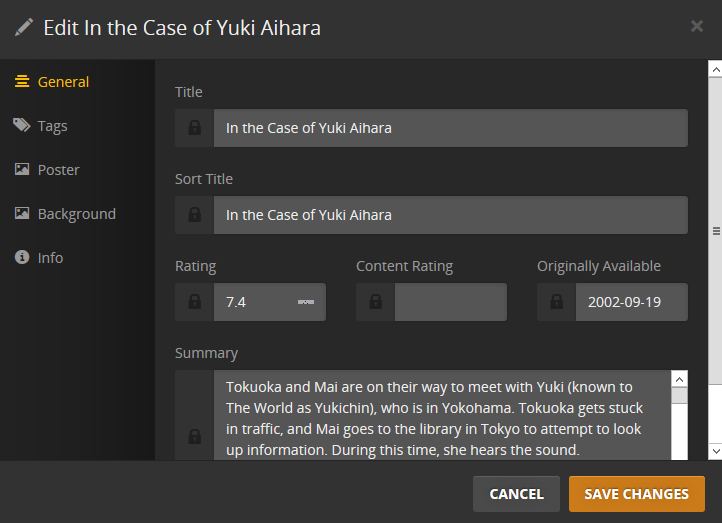
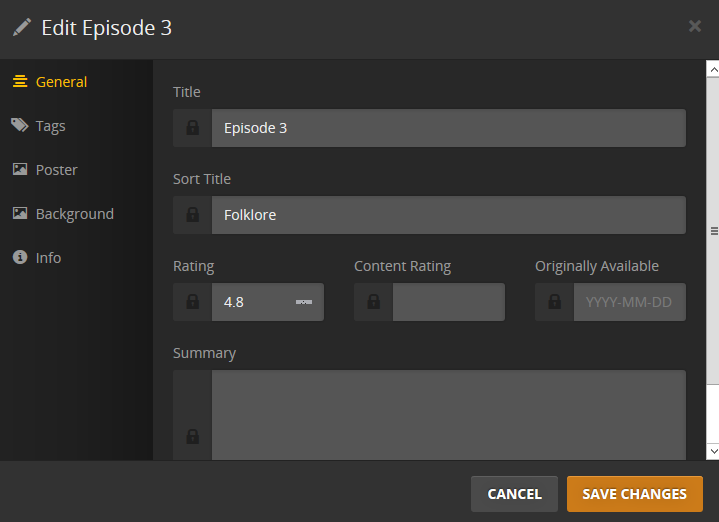
I have noticed on some of them that the correct title information shows up in the “Sort Title” but not in the “Title” for the incorrect episodes.
Actually, I’ve just noticed the metadata from episode three is the sort title and rating for episode three of .HACK//SIGN instead of .HACK//LIMINALITY so it appears to be mixing the episodes up between series somehow.
UPDATE: OK, I managed to fix this (and the issue above with Fairy Tail) by removing the folder, rescanning the library, then adding it back and rescanning again. This seems to update all the metadata for that series completely and fixes all the missing episode titles. However, you do lose the watched status of the episodes in that series.
@clowncracker said:
I have attached my log and a screenshot of what’s happening. Is there a reason that only some of the episode names are pulling in instead of all of them? Any help would be greatly appreciated.
I also appear to be having this same issue with several different Anime folders.
I can’t find any reason why there should be any difference between the episodes that show with the correct data and those that don’t.
I have noticed on some of them that the correct title information shows up in the “Sort Title” but not in the “Title” for the incorrect episodes.
Actually, I’ve just noticed the metadata from episode three is the sort title and rating for episode three of .HACK//SIGN instead of .HACK//LIMINALITY so it appears to be mixing the episodes up between series somehow.
UPDATE: OK, I managed to fix this (and the issue above with Fairy Tail) by removing the folder, rescanning the library, then adding it back and rescanning again. This seems to update all the metadata for that series completely and fixes all the missing episode titles. However, you do lose the watched status of the episodes in that series.
Unfortunately, that solution didn’t work for me. I have deleted and uploaded my entire library multiple times to try and get this to work.
@clowncracker: you gave me the scanner log for a metadata issue, which is agent related, but that allowed me to see you used seasons, hence tvdb numbering.
The tvdb page for one piece show 8 episodes for season 1 and bizarre coincidence, it can’t see episodes summaries for episode 9 onwards. http://thetvdb.com/?tab=season&seriesid=81797&seasonid=31893&lid=7
You are using seasons but not tvdb naming convention. Where did you saw season 1 had 62 episodes ?
@ZeroQI said: @clowncracker: you gave me the scanner log for a metadata issue, which is agent related, but that allowed me to see you used seasons, hence tvdb numbering.
The tvdb page for one piece show 8 episodes for season 1 and bizarre coincidence, it can’t see episodes summaries for episode 9 onwards. ワンピース - TheTVDB.com
You are using seasons but not tvdb naming convention. Where did you saw season 1 had 62 episodes ?
I went ahead and tried updating the seasons per TVDB. However, I originally used wikipedia for the original episode order.
However, now only episode 4 is populating the name. I have attached the latest HAMA log (I think that’s the one that is necessary). Please let me know what other information I can provide.
Just run into a problem where the match function is bringing back the wrong poster + background.
Also the text doesn’t work, but I assumed it had never worked as it has always been like this.
@clowncracker: you do not use anidb numbering since there is seasons nor tvdb numbering since you don’t reset the ep number each season so it hybrid numbering (which nobody else supports i believe in a metadata agent. EndOfLine369 did helped a lot in implementing it in the agent and scanner). This can work on latest code by specifying " [tvdb3-81797]" at the end of the serie name, or tvdb3.id file in the serie or serie/Extras folder. if you have all eps in absolute mode without seasons, you can use tvdb2 instead to show it with seasons resetting the ep number each season
@krabbymcnabby: Plex change the code so html links stopped working, so i removed them from series descriptions Jul 28, 2014. First update hama (and data folders since i added screenshots since and the new agent will crash without. they are in the release in github) please click on my signature and read the readme which include a troubleshooting section.
anidb: abs numbering
tvdb: seasons numbering/folders (american series)
tvdb2: abs numbering displayed with tvdb numbering (best for separate series seen as seasons, like Sword Art Online)
tvdb3: abs numbering displayed with tvdb seasons but keeping the abs ep number (best for long series)
Just updated Hama readme for install instructions from github release not to have to do packages.
@ZeroQI said: @clowncracker: you do not use anidb numbering since there is seasons nor tvdb numbering since you don’t reset the ep number each season so it hybrid numbering (which nobody else supports i believe in a metadata agent. EndOfLine369 did helped a lot in implementing it in the agent and scanner). This can work on latest code by specifying " [tvdb3-81797]" at the end of the serie name, or tvdb3.id file in the serie or serie/Extras folder. if you have all eps in absolute mode without seasons, you can use tvdb2 instead to show it with seasons resetting the ep number each season
anidb: abs numbering
tvdb: seasons numbering/folders (american series)
tvdb2: abs numbering displayed with tvdb numbering (best for separate series seen as seasons, like Sword Art Online)
tvdb3: abs numbering displayed with tvdb seasons but keeping the abs ep number (best for long series)
Just updated Hama readme for install instructions from github release not to have to do packages.
This ended up helping me fix the episode names. Thank you very much!
I’m having an issue getting OVAs and movies associated with specific animes to show up correctly in my library. What is the exact naming convention required to get to appear in each specific anime subfolder?