Server Version#: 1.40.2.8395
running on macOS 14.5 m1 Mac mini
Playback via: Shield TV, laptop, desktop, phone, tablet
Hello,
I am a relative noob at Plex and even more so with networking. I’ve been trying to learn things, mostly by trial and error, a little help from the Discord. I’ll apologize in advance for the length this is sure to become. Also, I do not YET have a Plex Pass. I’m currently working under the philosophy of try before you buy. When I’m satisfied everything will work for me I will be more than happy to support further development with a Pass.
That said, a description of my setup: Spectrum ISP modem-only, Netgear Nighthawk XR500 router, Mac mini (detailed above) running PMS ethernet direct to router with static assigned IP (via macOS). 32400 port ‘forwarded’ in my router for that IP. Additional layer of confusion: I used to like running a VPN system-wide. I am trying to learn how (side project) to only apply the VPN to specific uses but running into headaches. However, I do use Torguard with Port Forwarding and Plex successfully shows Remote Access is good when the VPN is connected. I’ve been testing recently accessing Plex (local and remote) when the VPN is NOT connected however, and no connections are made (local included) via the app.plex.tv. Though, if I navigate to internalip:32400 I get an initial warning that ‘this application is not hosted by Plex…’ but it does work when I acknowledge and sign-in.
Some potentially useful server settings I’ve applied: Secure Connections Preferred, No Relay, no extras in the ip/custom/etc fields.
My current questions regarding my setup:
When I visit Plex web or the desktop player (on the machine that is also the PMS server), click settings, click the server name, it shows ‘Nearby’. When I do this same process from any other device, whether it’s on my LAN or outside, it shows ‘Remote’. I think this is right but I’m trying to decipher how to tell if a local player is playing remotely… Additionally, I recently discovered that (according to Tautulli) any/all playback is shown as ‘LAN’ whether that playback is local or remote (even when playing back on cellular). For further information - this is the way it works behind a VPN with port forwarding. Right now I’m limited by ports not opening when not running a VPN. But I just tested all this with the VPN not running. Plex won’t even show on any other device in or out of network without the VPN/port fix.
I’m looking for any info you can provide about this routine. Whether it’s likely behaving correctly or not and welcome any and all suggestions!
TIA for reading and any help you can provide untangling this with me!
Make sure Plex functions correctly without the VPN. Once that happens, you can then configure the VPN for split tunneling, so Plex bypasses the VPN.
With the VPN disabled, start Plex Media Server (if PMS is running when you drop/disable the VPN, then restart PMS)…
Monitor playback via Plex Dashboard → Now Playing + Expanded View.
All devices on your local network should display as Local. If you have multiple subnets, you will need to make appropriate entries in Settings → Network → LAN Networks.
Devices using remote access should display as Remote. If they display as Indirect, then connections are via Plex Relay and remote access is not functioning correctly.
You need to configure the VPN to use split tunneling, so Plex bypasses the VPN (see Torguard docs for configuration details).
Otherwise, the Plex server will be isolated from local devices. Their connections will show up as Remote or Indirect in the Plex Dashboard, meaning the stream is routed to the Internet, then back to your location.
Regarding “not hosted at Plex” message, that just means you’re loading the web client from your local server, not from app.plex.tv.
Hi! I appreciate what you’re saying but so far in my searching this amounts to “easier said than done.” Plex does not work without the VPN - why I started this post. I can’t configure the VPN for split tunneling either because a. macOS hasn’t supported split tunneling in a while and b. Torguard doesn’t offer split tunneling for their VPN on macOS, I’ve checked.
I will further investigate what Plex Dashboard has to say but I think as a free user it’s rather limited and as I said Tautulli sees everything as LAN. For the ‘Remote’ bit I was referencing the little icon of the server in the web view I can click and it says nearby or remote. 2 Dashboard pictures attached. Mayor of Kingstown local on Shield. Good Doctor ‘remote’ over cellular.
So far as I’ve seen anyway I don’t remember seeing anything saying “Indirect”
I’m open to suggestions for the split tunneling but so far I haven’t found a way to do it in macOS aside from possibly virtual machines. That will be my next project when/if I get Plex working without the VPN…
Parameters: As you said I stopped PMS, disconnected & quit VPN, started PMS. Checked local playback from local apps. Checked connection through web address app.plex.tv.
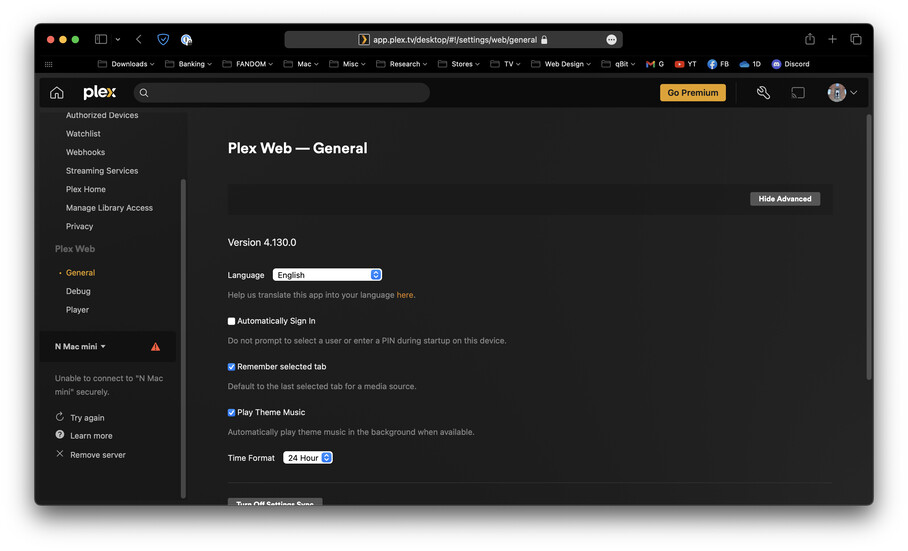
Findings: Local playback from local apps resulted in no new information on Dash or otherwise. Remote Access still blocked without VPN. If I sit and watch the Remote Access page it seems to go in and out but it stays mostly out on the WAN side of the routing (Internet < (here) WAN IP. Access to my server through app.plex.tv results in image attached - ‘Unable to Connect Securely’.