Remote Access dropping or Streaming/buffering issues with Plex on Firestick

Server Version#: 1.26.0.5715
Player Version#: 8.31.2.31564

I’m not sure what area of the forum this should be posted into and I’m not sure how to even describe the issue I’m having using Plex on my Firestick.

I’ve been using Plex for years now and have had no problems like this ever before. I have 2 Firesticks. One in the living room, and one in my bedroom.

On the Firestick in the living room, it works perfectly fine. All the videos are the resolution they should be. The opening logos and video footage is crisp and clean. No problem with anything. No spinning, no delays when opening the app.

Now the Firestick in the bedroom has been fine since I got in last year, with no problems. Until yesterday. Now it’s slow, almost as if the video or app is buffering. Even opening the Plex app on the stick is slow to open the Home page with my Continuing List and Newly added lists.

Going into the selected video, it spins for 10-20 seconds before it starts and it’s just horrible quality. Like somewhere between 480p and 720p, but most of the content I watch is 1080p either x264 or x265. I’d compare it to when Netflix is buffering a show and just looks blurry and rough.

I tried uninstalling the app on the Firestick, that didn’t fix it. I tried resetting the Firestick to factory settings. that didn’t fix it.

I’ve looked into the Remote access being the issue, but honestly I haven’t ever paid much attention to it before. I have the 2 Firesticks in my home, two profiles on my account, and have given my sister access to my library from her Firestick. Everything was fine until yesterday. And I know from the casual times I’ve gone through the settings, I’ve always seen a green check by the Remote access area, so never really paid much attention to what it means or if this is indeed the issue I’m having now, but it does say

"Not available outside your network
Your server is signed in to Plex, but is not reachable from outside your network."

I tried forcing it to enable, but it only lasted for a minute before it seems to disable itself. I tried restarting the server app on the computer. Which seems to enable the remote access, but it only stays green for a minute then back to red and disabled. Even with it disabled though, the living room Firestick has no problems playing the content at the correct resolution with no issues. So I’m lost and confused.

Does anyone have any ideas what the issue could be? Any help would be appreciated.

Let’s start by pinning down what’s actually going on.
If the stream is bad because the FireTV stick in your bedroom thinks it’s streaming remotely, this should be something you can fix inside your home network setup.

What information is showing in the “now playing” tile for that playback on the Plex server dashboard when you attempt to stream a video on this device? I’m particularly interested if the stream is labelled as Local, Remote or Indirect – but also if there’s any transcoding.
Exemplary screenshot from the "now playing" section
https://support.plex.tv/articles/200871837-status-and-dashboard/

If you’re streaming over WIFI, you’ll very much depend on the quality of that wireless connection. This will depend on a lot of factors – some of those you control yourself, some … well, not so much :wink: Sometimes it can be enough for a neighbor of yours setting up a new router that interferes with the frequencies/bands used by your own network and your connections go south…
So this is what’s currently playing in the house. The living room is on the left, playing Windy City Rehab, and the bedroom is playing Our Flag Means Death.

I also asked my sister who I share access to my library with, if she could watch stuff as well from her home (2 hours away from my city) and she said it was all fine, looked great.

I am on WIFI and have been since I started using Plex many years ago. I also use VPN’s (NordVPN) on the computer and both sticks. But I’ve been using them for years, and never a problem. I was able to stream to both sticks and my sisters many times, at the same time, with no buffering issues or any issues for any of us. And have even used the WatchTogether feature multiple times, no problems. Until yesterday when my stick started this drama.

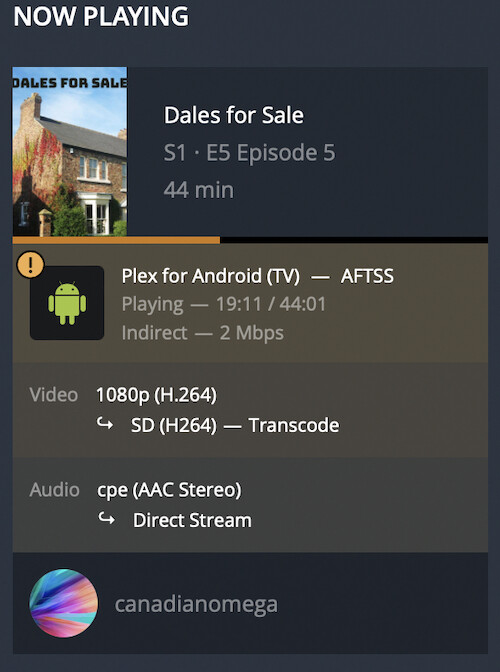
The Indirect on the bedroom stick implies Plex is considering the connection to be remote but cannot establish a direct connection between the two devices. Instead the traffic will go through a relay server of Plex. Those indirect connections are restricted to 1 Mbps (2 Mbps for Plex Pass members).

Your first priority should be to reestablish an actual local connection. This could be linked to the devices being on different subnets (e.g. if one of your access points is configured to assign its own IP addresses vs. relying on your main router to do so). VPN setups are also known to cause such issues.

Once you have that working you could start looking into why your remote connections are relayed. This could be due to a bad remote access configuration (somewhere between your ISP, your router, your home network and the Plex Media Server) or again some conflicts with the VPN.

Sorry for the delayed response. Also, thank you so much for the help and information. I do appreciate it.

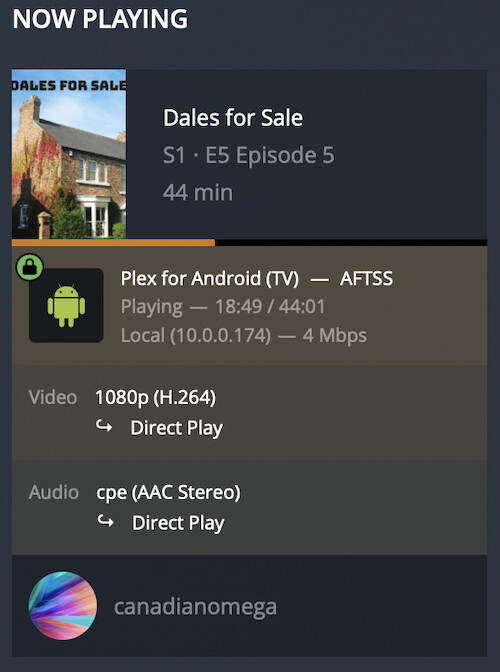
I have to admit, I’m not quite sure of exactly everything you brought up, only because most of the tech information, language, usually goes well over my head. But I picked up on trying to “reestablish a local connection”. Which I was able to once I turned off the VPN on the stick. When that’s not on, it’s perfectly fine as seen below.

Direct

But once I turn the VPN back on, It’s gone back to either “Indirect” as seen below, or as it said yesterday “remote”.

Indirect

Why all of a sudden this is happening to the bedroom Firestick is confusing to me, as it was fine for years, up until a few days ago. And the living room stick, the VPN on the stick doesn’t seem to be an issue at all.

As for how or why, I’m a bit lost. I’m not really sure how to go out figuring out how the remote connection is relayed or why it’s a bad remote access and what an access point is and configuring its own IP addresses.

This is a very dumb question… Is there a way I could just tell Plex it’s a local connection?

I suspect there’s a minor configuration difference in how the two sticks are setup that’s having a big impact on the bedroom stick. There’s quite a number of factors in the game when it comes to a network configuration – especially when it involves a VPN. Even if you’re not changing one component (e.g. the configuration of the stick), some other components could change outside your control/visibility and break the e2e experience.

While this isn’t solving the underlying problem you could attempt to identify the different networks/subnets (incl. the VPN) and tell your server they’re all part of your local network.
Settings > [Server Name] > Network > LAN networks

Example:

  • Your server is in a subnet ranging from 192.168.0.0 to 192.168.0.255
  • Some of your clients are connected to a WIFI where the WLAN access point establishes a separate subnet ranging from 192.168.1.0 to 192.168.1.255
  • The server’s own subnet is always considered local
  • You can add the 2nd subnet by using the following notation: 192.168.1.0/24 or 129.168.1.0/255.255.255.0 – both versions identify how many bits of that address are part of the static range (where each of the 4 blocks of the IP address consist of 1 byte / 8 bits [0-255]). The /24 tells the configuration that the 1st 24 bits of the address specify the network; in the /255.255.255.0 notation it tells basically the same as the 1st 3 bits are “maxed” to be part of the network address – both versions leaving 1 byte / 8 bits to address devices inside that network… that’s your average home network setup.

Identifying the proper network range / subnet mask for the VPN will be a little more tricky and depend on your VPN provider.

PS: sorry for getting even more technical…

This topic was automatically closed 90 days after the last reply. New replies are no longer allowed.
