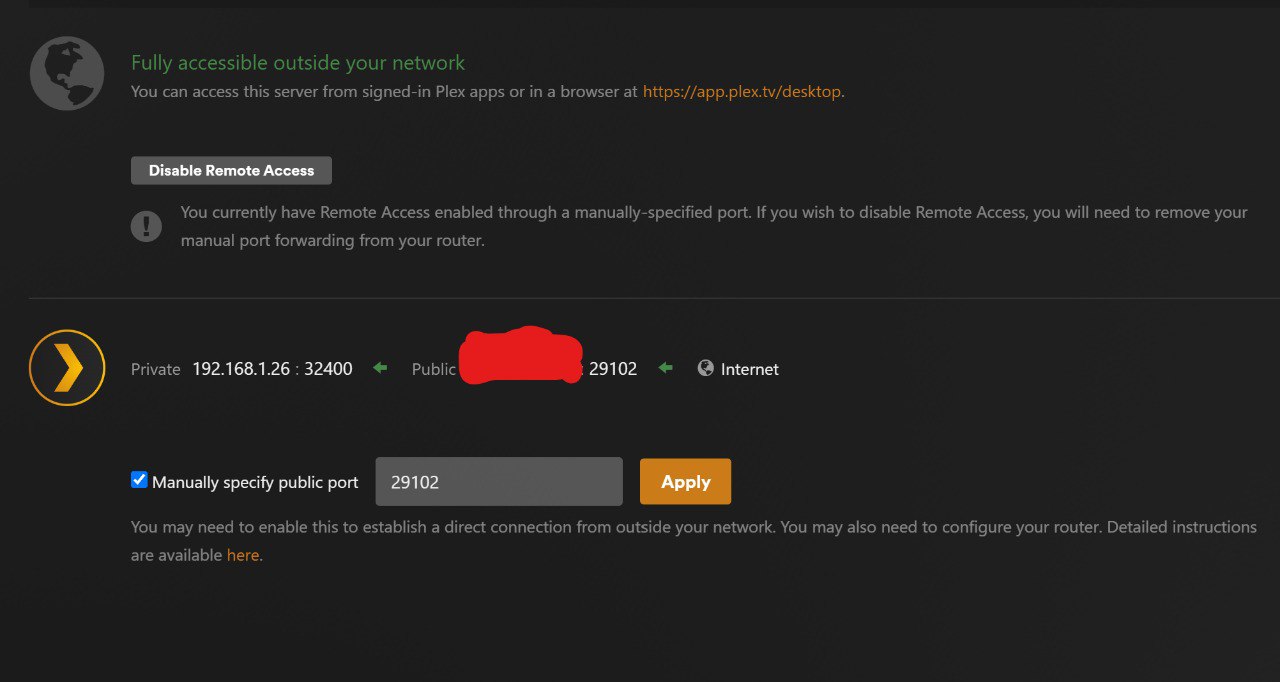
I’m having a recurring issue with Plex Media Server on Windows 11 — every time I restart my PC, Remote Access shows as disabled.
If I go into Settings → Remote Access and manually disable it, then re-enable it, it connects instantly and works perfectly until the next reboot. After every restart, however, it goes back to being disabled again.
Port forwarding: Port 29102 manually opened (and also listed as the latest posted by UPnP)
VPN: None
Firewall: Default Windows Defender (Plex fully allowed, 32400 manually opened)
Server startup: Plex set to launch automatically with Windows
It looks like Plex doesn’t automatically re-establish the remote access session after Windows boots — it only reconnects if I toggle the remote access setting manually.
Has anyone else run into this issue or found a permanent fix to make remote access persist across reboots?
You have ticked the checkbox in Plex “Manually specify public port”.
This is for the case when you create the port forwarding manually in the configuration of your router.
UPnP on the other hand is picking a random port number automatically every time. Therefore you don’t tick the checkbox, if you want to continue using UPnP.
However, most routers nowadays are disabling port forwardings which were created by UPnP after a certain amount of time.
It is therefore recommended to create a port forwarding by hand, tick the checkbox and enter the public port number behind it.
It is recommended to NOT use the Plex default port number of 32400 for the public (WAN) side. Instead, use a random number between 20000 and 50000. But keep the internal (LAN) port number always at 32400. Only forward TCP packets.
Thanks for the reply. I’m gonna try that out in a second.
There might be another problem though when using manual port forwarding- I don’t have a static public IP. My ISP uses shared public IPs.
The thing is- since I don’t have a static public IP-wont that mean every single time my IP changes I have to reconfigure the server settings? I wanted to use upnp at first because of that.
You need to discern between the public IP of your router and the private IP of your server.
Even if the public IP of your router changes, the port forwarding remains in effect.
Because it doesn’t play a role in the port forwarding. You are forwarding from the WAN port of your router (no matter which IP it has) to the private IP of your Plex server. The Plex server is never changing its private IP, so the forwarding rule remains valid.
Looks like you are right! Upnp for some reason was messing things up. When I forwarded port manually to other number in my router’s NAT/PAT settings and disabled upnp it all went smooth.