Remote Access Not available outside your network

Server Version#: 1.18.7.2457
Windows 10 x64

So I have been trying to figure out how to get remote access working for months now to no avail, but I am able to connect indirectly. I think I’ve gone through almost every youtube and plex forum so I’m kinda losing it now ha. Here are all the things I’ve set without being able to connect

  • I have set a static IP which I verified through ipconfig
  • Setup TCP port forwarding though port 32400 using the static IP.
  • Turned on UPnP
  • Added a inbound/outbound firewall rule for 32400
  • Turned off my firewall completely

I have gone to canyouseeme.org and the connection is timing out (I think that’s because plex isn’t actually connecting through that port but not sure) When I connect to 192.168.xx.xx:32400 on my server desktop I can connect.

I am not super well versed in the networking world so a lot of this is new to me. Any help will be awesome

So I continued my search and it looks like I should be able to see my port even when remote access isn’t working. I feel like this has got to be the issue which to me means something with my routher or with my ISP. I have a netgear router and use Spectrum as my ISP.

Plex Media Server Logs_2020-03-03_21-01-51.zip (3.0 MB)

is your ISP router an all in one gateway by chance? If so, and you are also using a separate router, that would create an issue. You’d want to put your ISP gateway in “bridge mode” so that your separate router can handle everything after the modem.

You’ve set a static IP, but did you also add that IP to your router for that device? Wasn’t sure if you assigned that through the router or just manually on the pc.

My router is all in one (modem & router) but it is not connected to any other router.

I did set the static IP through my computer and not the router. I will look into how I add the static IP to my router as well then report back.

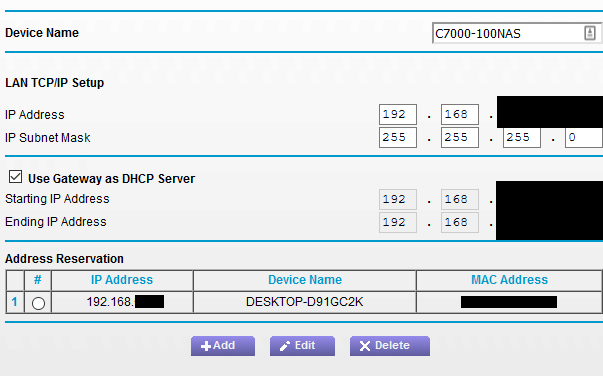
I’ve set the static IP (under the address reservation) in my router and it didn’t change anything. Also tried to set my network to private with no change as well

image

Any update or resolution to this issue?

No unfortunately this is still unresolved.

I hope I finally figured it out… it was my VPN.

I have tried to connect with my VPN on and off and it hasn’t made a difference. I’ll give this a go though and see if anything changes.

Thanks

This topic was automatically closed after 90 days. New replies are no longer allowed.