when there are multiple versions available, Plex picks the best one.
480 vs SD is still < 720p so it’s going to be used interchangeably
(SD might also be 525 interlaced (525i) if NTSC)
when there are multiple versions available, Plex picks the best one.
480 vs SD is still < 720p so it’s going to be used interchangeably
(SD might also be 525 interlaced (525i) if NTSC)
So it would automatically switch to SW vs HW transcoding as they mentioned above that resolved the issue on those files?
PMS will attempt to use HW transcoding if it’s available.
If HW transcoding fails to start, it will fall back automatically to SW
Being candid. 480p at what bitrate? 1-2 Mbps ? When it’s that low, the HW will work but the quality is going to be absolute crap ( There aren’t enough bits/sec for the HW to work with… KNOWING the HW is going to less smooth than software)
Bingo. Maybe this needs to be a whole different topic… But with Dark Angel, I notice that it transcodes when playing locally on the web browser, but direct plays (at a lower bit rate) when I set the quality to maximum and play it on my phone. I assume this is because of a browser limitation vs the Plex app on my pone.


Learning so much today!
Bingo. Browsers are dumb. Smart devices … Smarter playback 
You’re not getting bandwidth artificially pumped up with transcoder rounding
Now for the next question.
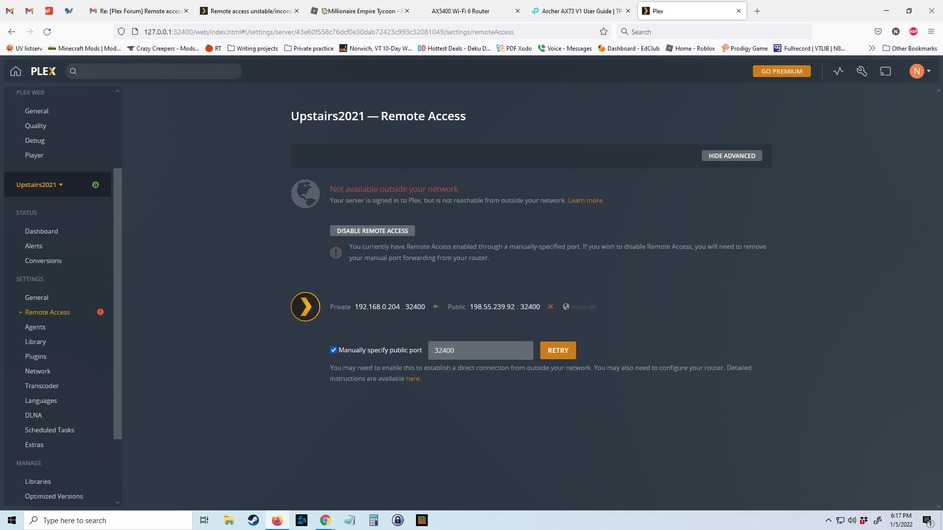
Does your Windows firewall sofware allow incoming connections from WAN to port 32400 ? (Address: “Any” or “0.0.0.0” on some)
An update to this thread: I just got off the phone w/my ISP’s tech support and am trying a few things there. They did say that the ISP uses “Carrier grade NAT”, which from my limited understanding suggests there may indeed be a double NAT issue at play, preventing port forward from working properly. I followed through the steps determining whether there might be a double NAT a few weeks ago and couldn’t find any evidence of this, but I either misunderstood the directions or this particular setup is an exception to the usual double NAT problem.
It’s won’t work with Carrier-grade NAT, you will need to get your ISP to provide you a Static IP address assignment to be able to open ports to the internet.
Yeah, they are looking into turning it off for my account in particular, it sounds like this is something they do/have done but I’m not sure of their policy as to when they grant such a request. If I have to live with it, is there any workaround from the router/my side of things?
A long shot would be to enable the relay in Plex
Settings \ Network (Show Advanced) \ Enable Relay
might work, but not ideal.
Last update has blown it for me. I see what is being said about bandwidth / crap hardware and yes i get that.
Bottom line for me. Plex always worked. Everywhere. Crystal clear. I have the same hardware, the same media and i have better fibre than when i first had plex (for free)
I have since paid up and Now Plex is pixalated. Even with 100mbps connections. Even sometimes on local/didect playback
To stop it i need to stop plex running on my nas and restart it. Sometimes i need to do this several times. After every server update, plex goes offline and i need to log in and reset it/restart remote play.
Previously, turning off the more advanced settings made it all work. Last update has goosed this for me and im back to watching square blocks again
Now im not technical enough to go into massive detail and perhaps Yes i need a better NAS and I know hardware etc plays a massive part but when it isnt broke why fix it. plex was solid every single time and my hardware hasnt changed, only Plex has, now its just totally unreliable.
So why when my old nas has worked fine and my media hasnt changed and my isp has improved its service, should i have to fork out for better hardware to fix what seems to be a plex server issue?
The only positive is remote access is still solid and not dropping out as it was. Media quality however just isnt cutting it. Like i said, rock solid as a free user. Kinda sucks that
Final report: ISP turned off Carrier-grade NAT and now remote access is working. Apparently Carrier-grade NAT functions a bit differently than other NATs, so the typical “test to see if you have a double NAT problem” steps didn’t quite apply.