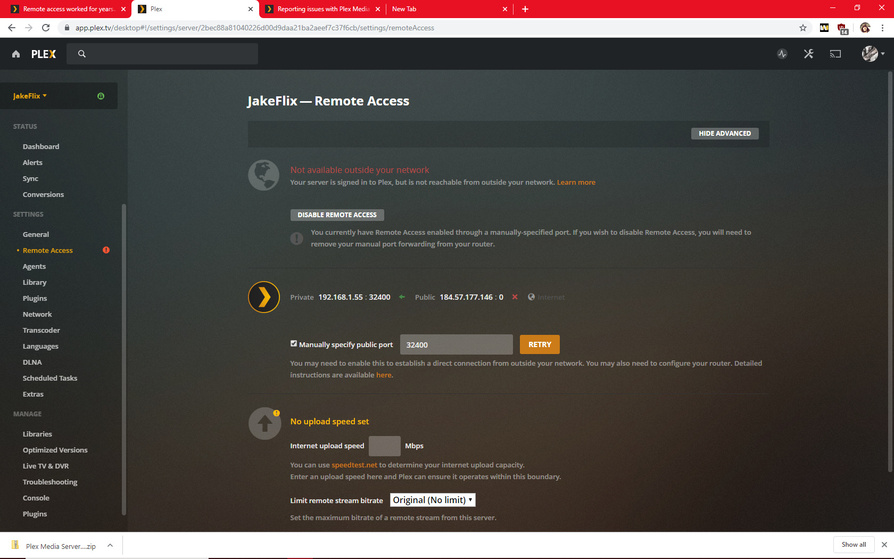
Server Version#: newest avail
Player Version#: newest avail
I HAVE NEVER HAD A PROBLEM WITH REMOTE ACCESS. that being said spectrum came out and fixed an internet issue i had re-defaulting my modem and replacing all my coax cables inside and out and new Ethernet as well. Needless to say now none of it works unless i am on my own network. i have never had an issue before. i have tried every answer in these forums, the router settings are set as they were, there is no firewall block, and i went nuclear and completely deleted my plex server including registry and my local app data folder which was plus 300gbs! i completely rebuilt the whole thing, new server, new folders, new password…AND STILL…i just want it to work outside of my house again.
AND I AM ABSOLUTELY APPALLED THAT I AM A PAYING PLEX CUSTOMER AND IT SAYS UNDER CONTACT AND TECHNICAL SUPPORT YOU WILL NOT BE ANSWERED AND YOU SHOULD COME HERE AND READ ALL THE ANSWERS THAT CLEARLY DONT WORK BECAUSE FROM WHAT I CAN TELL ONCE YOU LOSE REMOTE ACCESS YOU MIGHT AS WELL THROW YOUR WHOLE COMPUTER OUT.
pretty damn dumb that i paid for a yearly subscription and i cant write these guys one freaking email?!?!?!?!?!!?
as you can tell im at my witts end
probably gonna burn my whole house down and start over
oh and just in case this helps my public IP address has changed so under the tab for port forwarding it reads an old public IP and wont switch to the new one I’m 100% positive this is where my problem is and yet i cant change this and building a new server just recognized the old public IP. idk if this actually means anything but i kinda think it has something to do with it. that’s all.