Server Version#: 1.20.1.3252-a78fef9a9
Player Version#: Any remote player
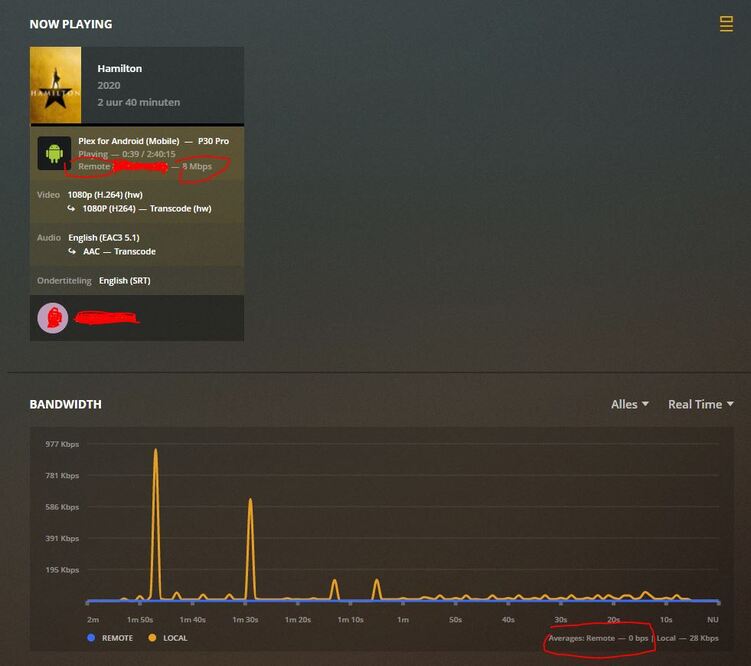
I am running Plex Server and Nginx on a windows machine. Its working great only the bandwidth of remote players is not visible on the dashboard and history. The streams are shown as remote (See attached screenshot).
I am usingbelow nginx config, any users running behind a proxy have the remote bandwidth meter working?
#Upstream to Plex
upstream plex_backend {
#Set this to the IP address that appears in ifconfig (NATTED LAN IP or Public IP address) if you want the bandwidth meter in the server status page to work
server 127.0.0.1:32400;
keepalive 32;
}
server {
listen 80;
#Enabling http2 can cause some issues with some devices, see #29 - Disable it if you experience issues
listen 443 ssl http2; #http2 can provide a substantial improvement for streaming: HTTP/2 is here! Goodbye SPDY? Not quite yet
server_name plex.EXAMPLE.COM;
send_timeout 100m; #Some players don't reopen a socket and playback stops totally instead of resuming after an extended pause (e.g. Chrome)

#Faster resolving, improves stapling time. Timeout and nameservers may need to be adjusted for your location Google's have been used here.
resolver 8.8.4.4 8.8.8.8 valid=300s;
resolver_timeout 10s;

#Use letsencrypt.org to get a free and trusted ssl certificate
ssl_certificate /path/to/fullchain.pem;
ssl_certificate_key /path/to/privkey.pem;

ssl_protocols TLSv1 TLSv1.1 TLSv1.2;
ssl_prefer_server_ciphers on;
#Intentionally not hardened for security for player support and encryption video streams has a lot of overhead with something like AES-256-GCM-SHA384.
ssl_ciphers 'ECDHE-RSA-AES128-GCM-SHA256:ECDHE-ECDSA-AES128-GCM-SHA256:ECDHE-RSA-AES256-GCM-SHA384:ECDHE-ECDSA-AES256-GCM-SHA384:DHE-RSA-AES128-GCM-SHA256:DHE-DSS-AES128-GCM-SHA256:kEDH+AESGCM:ECDHE-RSA-AES128-SHA256:ECDHE-ECDSA-AES128-SHA256:ECDHE-RSA-AES128-SHA:ECDHE-ECDSA-AES128-SHA:ECDHE-RSA-AES256-SHA384:ECDHE-ECDSA-AES256-SHA384:ECDHE-RSA-AES256-SHA:ECDHE-ECDSA-AES256-SHA:DHE-RSA-AES128-SHA256:DHE-RSA-AES128-SHA:DHE-DSS-AES128-SHA256:DHE-RSA-AES256-SHA256:DHE-DSS-AES256-SHA:DHE-RSA-AES256-SHA:ECDHE-RSA-DES-CBC3-SHA:ECDHE-ECDSA-DES-CBC3-SHA:AES128-GCM-SHA256:AES256-GCM-SHA384:AES128-SHA256:AES256-SHA256:AES128-SHA:AES256-SHA:AES:CAMELLIA:DES-CBC3-SHA:!aNULL:!eNULL:!EXPORT:!DES:!RC4:!MD5:!PSK:!aECDH:!EDH-DSS-DES-CBC3-SHA:!EDH-RSA-DES-CBC3-SHA:!KRB5-DES-CBC3-SHA';

#Why this is important: https://blog.cloudflare.com/ocsp-stapling-how-cloudflare-just-made-ssl-30/
ssl_stapling on;
ssl_stapling_verify on;
#For letsencrypt.org you can get your chain like this: https://esham.io/2016/01/ocsp-stapling
ssl_trusted_certificate /path/to/chain.pem;

#Reuse ssl sessions, avoids unnecessary handshakes
#Turning this on will increase performance, but at the cost of security. Read below before making a choice.
#https://github.com/mozilla/server-side-tls/issues/135
#https://wiki.mozilla.org/Security/Server_Side_TLS#TLS_tickets_.28RFC_5077.29
#ssl_session_tickets on;
ssl_session_tickets off;

#Use: openssl dhparam -out dhparam.pem 2048 - 4096 is better but for overhead reasons 2048 is enough for Plex.
ssl_dhparam /path/to/dhparam.pem;
ssl_ecdh_curve secp384r1;

#Will ensure https is always used by supported browsers which prevents any server-side http > https redirects, as the browser will internally correct any request to https.
#Recommended to submit to your domain to https://hstspreload.org as well.
#!WARNING! Only enable this if you intend to only serve Plex over https, until this rule expires in your browser it WONT BE POSSIBLE to access Plex via http, remove 'includeSubDomains;' if you only want it to effect your Plex (sub-)domain.
#This is disabled by default as it could cause issues with some playback devices it's advisable to test it with a small max-age and only enable if you don't encounter issues. (Haven't encountered any yet)
#add_header Strict-Transport-Security "max-age=63072000; includeSubDomains; preload" always;

#Plex has A LOT of javascript, xml and html. This helps a lot, but if it causes playback issues with devices turn it off. (Haven't encountered any yet)
gzip on;
gzip_vary on;
gzip_min_length 1000;
gzip_proxied any;
gzip_types text/plain text/css text/xml application/xml text/javascript application/x-javascript image/svg+xml;
gzip_disable "MSIE [1-6]\.";

#Nginx default client_max_body_size is 1MB, which breaks Camera Upload feature from the phones.
#Increasing the limit fixes the issue. Anyhow, if 4K videos are expected to be uploaded, the size might need to be increased even more
client_max_body_size 100M;

#Forward real ip and host to Plex
proxy_set_header Host $host;
proxy_set_header X-Real-IP $remote_addr;
#When using ngx_http_realip_module change $proxy_add_x_forwarded_for to '$http_x_forwarded_for,$realip_remote_addr'
proxy_set_header X-Forwarded-For $proxy_add_x_forwarded_for;
proxy_set_header X-Forwarded-Proto $scheme;
proxy_set_header Sec-WebSocket-Extensions $http_sec_websocket_extensions;
proxy_set_header Sec-WebSocket-Key $http_sec_websocket_key;
proxy_set_header Sec-WebSocket-Version $http_sec_websocket_version;
   #Websockets
proxy_http_version 1.1;
proxy_set_header Upgrade $http_upgrade;
proxy_set_header Connection "Upgrade";

    #Disables compression between Plex and Nginx, required if using sub_filter below.
#May also improve loading time by a very marginal amount, as nginx will compress anyway.
    #proxy_set_header Accept-Encoding "";

#Buffering off send to the client as soon as the data is received from Plex.
proxy_redirect off;
proxy_buffering off;

location / {
	#Example of using sub_filter to alter what Plex displays, this disables Plex News.
	#sub_filter ',news,' ',';
	#sub_filter_once on;
	#sub_filter_types text/xml;
	proxy_pass http://plex_backend;
}