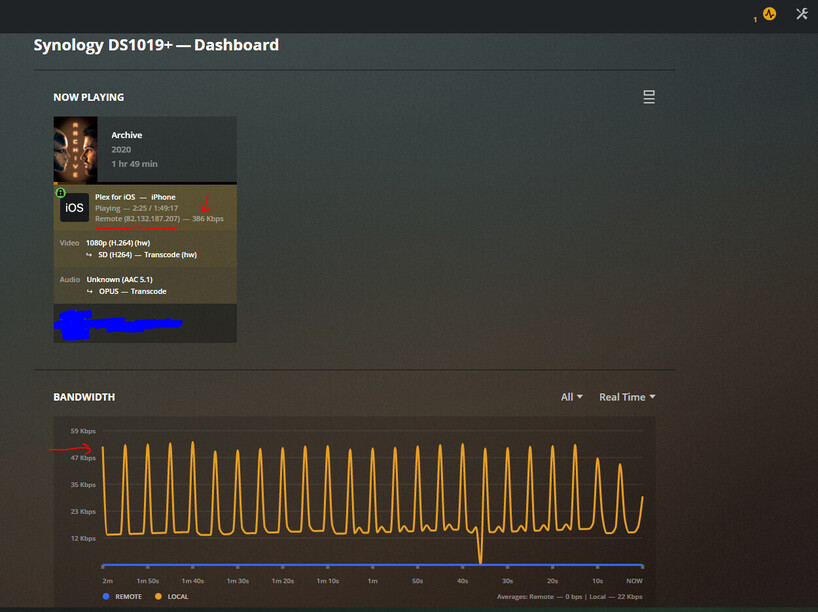
So I’m running plex ( Version 1.21.1.3876) on a DS1019+. Plex is remotely accessible over https on a private domain with ssl certs, and a reverse proxy configured on the Synology. Everything appears to be working fine, no issues with certs and remote streaming works great… however for some reason, the bandwidth monitor doesn’t show any of the remote traffic as shown below
As you can see, the reverse proxy is putting in the remote IP into the header correctly and plex is in fact picking the IP up as a remote IP. So no issues with reverse proxy.
Iniitially, I thought perhaps the plex server still might think the traffic is local because of how it’s being routed, however I noticed the stream rate was 386Kbps which isn’t reflected in the bandwidth graph. Surely enough, stopping the remote stream made no change to the bandwidth.
So from what I can tell from all this, the bandwidth being shown in the graph is just the bandwidth used from my local machine to the plex server which I’m using to actually look at the bandwidth monitor… and the remote stream is just not showing at all.
This sounds like a bug with plex. Is anyone else able to confirm?
The Proxy is local. PMS, regardless of the header, is going to key off that address for the bandwith because it’s sending to a local socket.
Your proxy is not “connected” to PMS bandwidth monitor. It’s a local destination address. What happens after that is up to the proxy. That is what a proxy does, true?
I see where you’re coming from, but two things on that.
If PMS knows a public IP is being used to connect to it, why isn’t bandwidth monitor just programmed to show it as remote bandwidth? I don’t see the reason why you would want it to show as local, regardless of the local proxy.
If it’s showing as local bandwidth because of the proxy, why is there a discrepency in the bandwidth usage? In my screenshot, you can see the device is pulling 386Kbps, however the local bandwidth is only peaking at 47kbps. Further to this, there’s no change to bandwidth usage when the remote device stops streaning. This indicates that the local bandwidth being shown isn’t from the remote device at all.
This is why I’ve come to the conclusion that for some reason, PMS isn’t showing any remote bandwidth.
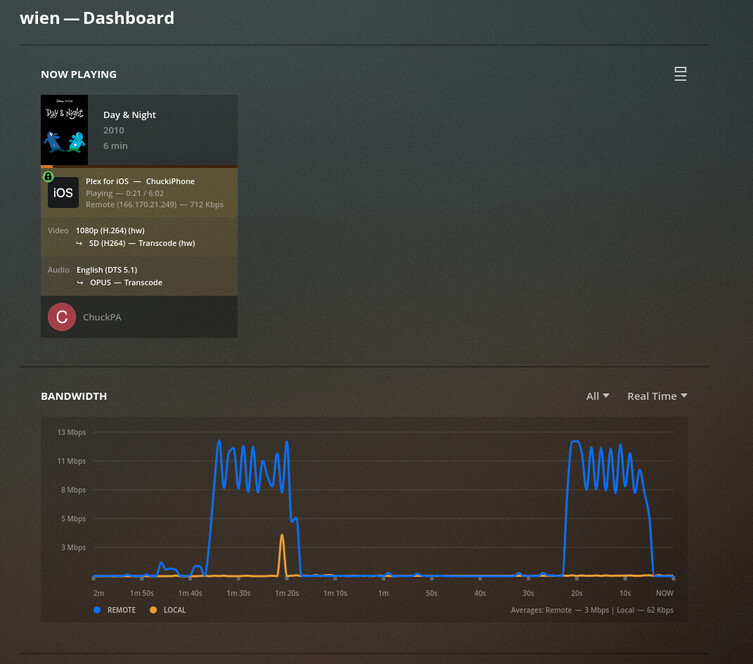
Have someone connect through Plex.tv ( a shared user ) through the normal “WAN” mechanism.
You’ll see they are seen as remote. The source address and reply address are the same IP.
What is the Reply-To IP in your proxy? Most proxy configurations I’ve seen are bi-directional. They are a true ‘proxy’ in that all traffic passes through it (both directions).
Not to be dumb, but may I ask why a proxy?
Granted, I finally got decent internet and can share my server but I find it works flawlessly out of the box and can’t see myself adding something like a proxy.
Sorry I’m not sure I understand. The screenshot I took was from an iPhone using the plex app with WiFi turned off. It wasn’t connected to the LAN at the time I took the screenshot. Are you saying you want me to test it using a web browser as supposed to the app?
I’m using a reverse proxy on the synology, I believe the backend of it is nginx? Happy to share the config if you want. I have a private domain that I use so I can stream when I’m not on the LAN, without the use of a VPN. The reverse proxy means I don’t need to open multiple ports on my router, instead… all I do is point whatever device to plex.myDomain.co.uk and the reverse proxy handles the rest. No benefit if that’s the only service I use remotely but it isn’t, hence I have multiple subdomains pointing to different things, all routing through 1 port on the WAN interface of the router. It reduces my surface of attack. So the idea is, better to only have one port open instead of several. I run a Pi-hole internally, with complimenting DNS records… so effictively I have a split DNS. But I don’t think that’s related. I mention this because if I didn’t have internal DNS records, the internal requests to my Synology would have to route through the WAN interface, which I don’t want it to do. This way, internal requests to that domain stay on the LAN.
We’re getting to the end of what I can do remotely.
I can only show you how I added my domain on top of Plex.
Before doing this, which still works for everyone I share my server with:
My LAN is a 192.168.0.x and all devices are on that single subnet.
I have a single edge router/device.
Everything here is as “Vanilla” as it can be.
Normal “Plex Remote Access” , which hides my IP and identity, still works as it should.
All remote traffic shows as “remote”.
Now, here is how my pfsense (router / edge device connected to the ISP’s modem). As Info, the modem is a pure modem. it has no routing capabilities.
You can see that my FQDN IP address is here.
The pfSense updates the CloudFlare DNS every time it detects an IP address change.
By tracking the IP, the host entry I added to my FQDN is always valid.
This means that edge.mydomain.XXX is the firewall and host.mydomain.xxx gets forwarded by the pfsense directly to the NAS which is my PMS server.
Here you can see me telling PMS which FQDN to use for accessing my server.
Here, as demonstration of it working, is what happens when I open it in the browser directly by the FQDN:32400/web
This is why I asked about a proxy. I don’t feel one is needed. These screenshots demonstrate that.
So the reverse proxy means I don’t need the vanila user to type plex.myDomain.co.uk:32400, instead, all they need to type is plex.myDomain.co.uk
I’ve tested it and it works without any issues
Doing it with a reverse proxy also means I don’t have to open up specific ports on the WAN interface for every service I wish to host. So, doing it your way means I’d have to open up a port on my WAN interface specifically for Plex. The more ports that are open on the WAN interface, the higher the surface of attack is for outsiders. Instead, I can open a single port and funnel all traffic through that. I have a single rule on the router which says, all trafic from that port goes to the reverse proxy, which then distributes the traffic (to different interal IP’s, or one IP but seperate ports) based on the domain name (plex.myDomain.co.uk / dsm.myDomain.co.uk / otherService.myDomain.co.uk / etc)
The reverse proxy facility is built into the Synology for this exact reason
I suppose my next question to all this would be, is plex designed/intended to be used with a reverse proxy? If not, is there any way we could put this as a suggestion, as it’s slightly more secure.
I only opened one firewall port; the one PMS opens via UPNP automatically when it enables Remote Access. I can’t have a smaller attack vector than that and still share a server.
I control access through Plex user accounts.
If you want to rewrite the inbound URL to add the ports, fine. That’s more than I can help you with here.
I have my family and friends use the Plex apps. It works flawlessly.
Any other friends who want non-Plex access can access directly via FQDN:port as managed users .
Yea I will never use UPnP, it’s very insecure as you can get rogue devices opening ports on your firewall which you have no idea about unless you go and manually check it periodically. It’s safer to just open ports manually instead of relying on UPnP to do it for you. But I suppose everyone has different approaches to risk, so no right or wrong answer.
If you only have one service (Plex) that you host with external access, then there’s absolutely no issue with your approach, but as soon as you start hosting more than one service, that’s when a reverse proxy has it’s benefits. I’m in the later situation.
Thanks for your time ChuckPa, I appreciate it non the less.
Don’t suppose you happen to know how to find out if a reverse proxy is supported… and if not, how to submit a suggestion, or a request for a feature?