Server Version#: latest
Player Version#: latest
<If providing server logs please do NOT turn on verbose logging, only debug logging should be enabled>
I am starting a new post specific to remote streaming. ChuckPA was very helpful with it but in a post about another topic.
I continue to have remote streaming issues. I don’t know if it’s hardware or settings related.
I have ATT 10gbe fiber with an ATT modem and Orbi router.
I have a Dell poweredge r630 enterprise server with 2 xeon 2.1ghz processors 10gbe, running a community script PMS lxc in proxmox.
I have a QNAP NAS TS464 with a CIFS media share to the PMS lxc
At first PMS remote access would green check intermittenly. ChuckPA recommended to set the ATT modem to passthrough which I have done. Now i have a solid green check but new plex player on iphone buffers every 5 seconds outside the network. I have 1080p files but mostly 7.1 audio.
ATT Modem
Passthrough mode
Orbi settings
Router mode
UPNP ON with portmap table displaying the correct PMS IP, standard PMS internal port, and a different external port. If I turn off wifi on my phone and browse to the public IP and port I can access Plex Web
Dynamic DNS OFF
Port forwarding empty
No static IP’s
Plex settings
manually specify public port OFF
network: enable relay
Let’s start by taking a look if your remote connection work straight between the client and server, or if the involve a Plex Relay. Indirect connections via the relay are limited to 1 Mbps (2 Mbps for Plex Pass members) – they usually imply there’s an issue with your remote access setup.
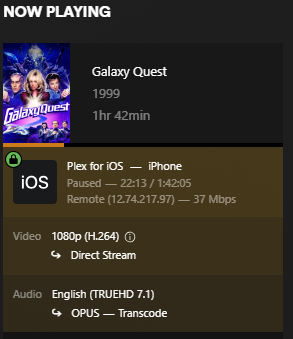
Sort of – it shows the remote is indeed a “direct remote connection”, not running through a Plex relay server and your stream isn’t restricted by that.
Other than that…
What’s the official upload speed you get from your ISP (at the location of your PMS)?
I’ve seen a number of AT&T pages listing their connection with 1, 2 or 5 Gbps of download, but only 35 Mbps for upload. That could already be a problem with your stream (which according to your screenshot averages at around 37 Mbps – peak bitrates can significantly exceed the average bitrate and therefore bandwidth requirement).
It’s the speed test done from the orbi app on my phone or the web portal while home on the network.
Is there something specific you want me to look for?
In the Orbi web portal WAN setup, only disable IGMP proxying is checked. I can check disable port scan and DoS protection, I can add a default DMZ server (I assume add the plex internal IP), respond to ping, or NAT filtering.
I don’t know this app.
If it’s testing the speed / bandwidth between your phone and the Orbi, this isn’t what we’re looking for. We’re looking for the internet upload speed from your router to the internet. That’s usually the limiting factor when it comes to streaming something from your home server to a client outside your home network.
How about just going to Speedtest.Net on your device (whatever device you’re trying to use as a client) and running an Internet speed test? That will give you a better idea of upload and download speeds.
Since you’re on an iPhone, you can also download the Speedtest.net app from the App store - it’s free.
It might also be worth checking your contract details from the ISP. In most countries, they’re obliged to list the promised service characteristics in those documents (or a separate product description).
These tend to be „up to“ promises. But they should tell you
(a) what internet upload speed to expect (e.g. if their promise is „up to 35 Mbps upload“, you know that your 37 Mbps file is likely to run into buffering issues)
(b) if it might be worth to reach out to them (e.g. if they promise an upload bandwidth significantly exceeding what you get to see in a speedtest app; their standard reaction will usually be to ask if this is a permanent degradation or a temporary situation)