Server Version#:1.27.2.5929-a806c5905
Player Version#: 1.48.2.3124-647ff031
Hello,
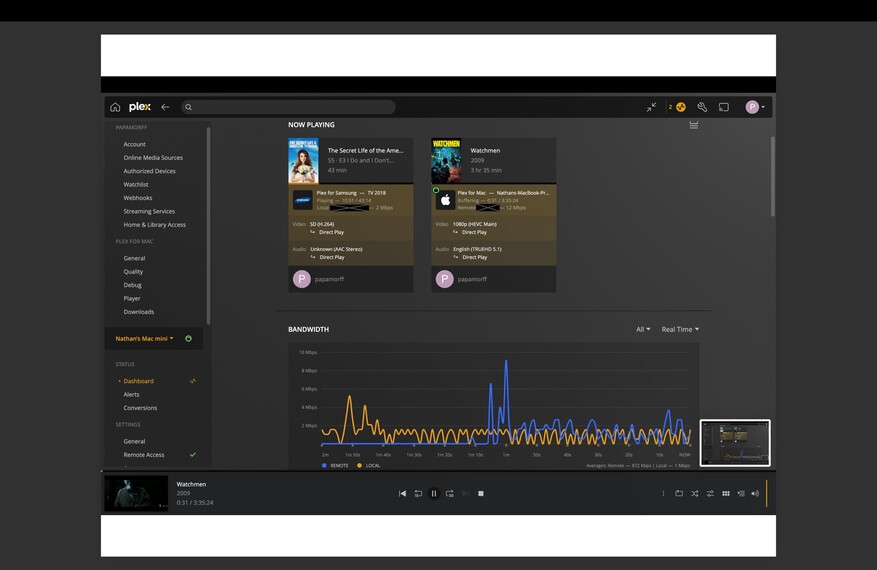
I am having issues my remote stream setup. It appears that the stream will start out at the correct bitrate, and then plummet below the required rate to keep the content streaming smoothly. My upload at home is 200Mbps and download remote is about 25mbps-50mbps. That being said, i don’t usually attempt to watch anything above 20mbps.
-When i download a file on my Mac’s client, i am able to hit numbers that correlate to my current download speed (remotely), but when streaming it continuously fails to provide a steady rate.
-I have multiple devices that i can test remotely, and all of the settings for quality are set to maximum.
-I use a VPN on my router to remotely manage the server, and even when tunneled into that i am unable to meet certain streaming requirements.
Any assistance on the issue is greatly appreciated.
That’s expected. Video files are not a constant bitrate, unless you’ve encoded it that way, but that (IMHO) is not the right way to do it.
Unless you’ve put in an internet speed limit on your server, your server will send the data as fast as it can until the client has built up a cache. The size of this cache will depend on the client and if it is transcoding or direct playing. When transcoding the client will only buffer a small amount so this can lead to buffering. It could also be your server is not able to transcode fast enough.
You’ll need to reproduce and provide logs from the server and the client so we can check where the bottleneck is.
Thanks for getting back to me quickly.
I haven’t set any sort of limit for internet speed, i can actually get desirable speeds when downloading a test file on Plex.
There is no cache built up when streaming content (assuming that cache would be represented in the seek/progress bar)
I wouldn’t say it’s an issue with transcoding either, only because I still experience the issue when watching “direct play” content.
Is there specific logs that are needed? Also, are there any potential security risks when sending them?
The Plex for Samsung app does not buffer very much due to the limited memory on TVs, so you may have issues there with higher bitrate files. That 2 Mbps file should be ok.
The Plex for Mac app should definitely be caching a lot more. Al though the bandwidth window would say that it’s not going very fast.
Is your server hardwired or running on WiFi? If WiFi, I would recommend changing that. If not, then yes please provide the logs after reproducing the problem. You can PM the logs to me so you don’t need to share them in public.
I’m not quite sure how far back those logs go, but I’ve sent you the ones from yesterday.
To answer your question, the computer is hardwired to the router. I’ve done speed tests on it and have 200mbps upload.
This is why I said to reproduce the problem, so I know where to look. Please reproduce and get me new logs. I’ll also need the log from the Plex for Mac app. Windows/Mac app logs | Plex Support