I’ve been sitting on 1.22.1.4275 for a while now, I updated this morning and after a few hours I had users reporting they were getting errors when trying to stream content or it just sits there loading (they just say they can’t play anything) on mobile devices and web browsers.
This happens every time I update to a new beta build… Is there something I should be doing after updating to ensure all clients can connect and stream? I don’t see any logical reason why this would happen unless there are backend changes that aren’t being mentioned in the release notes.
I likely won’t be providing logs for this as the logs that matter would be client ones (I think) which I don’t have easy access to.
I previously tried to delete the codecs and have the server redownload them, that didn’t help.
I know I haven’t provided much info here, I’m hopping I’m not the only one this happens to…
I’ve had the same problem for the last week and a half now. I can’t find any responses anywhere on how to deal with this. I’ve even put in my own post and still nothing.
I always have debugging enabled - with that being said, will logs persist through a rollback/update? I updated, but then after getting reports of errors, I rolled Plex back just as a quick fix, but debugging has been enabled the whole time - will those log entries still be there? I never delete the logs, so in theory as long as Plex doesn’t purge them at any point, they should still be there.
I know the username of the user and the time that they texted me about it, I know this info helps if those logs are still there, but Plex logging has always been a mystery to me.
In my eyes, if I never delete logs I should be able to look back all the way to day 1 for Plex first being booted up (in theory).
(I’ll post logs depending on the answer to this question, or I’ll have to set up a scenario that I can reproduce it.)
Here you go! I’ve got one person to recreate the situation. The error has to be replicated by those added to my plex server. I’m not getting any issues at home but I think it’s only because direct connected to it. Remote Access has been green this entire time and other people in the forums (Although Spread Out) have the exact same problem.
I’m no expert, especially when it comes to GPU’s + Plex + HW transcoding but this to me looks like a driver issue, hence the codec warnings. FFMPEG is stating it’s not able to load CUDA which I believe to be (part of) the driver for Nvidia cards, it’s also showing it’s unable to load “libcuda.so.1” which I believe feeds into my theory.
I would check to see if there are any available drivers/updates for your video card, especially anything referencing CUDA. I’m hoping someone else more knowledgeable will chime in.
Does transcoding work period for you? I imagine it should, the server may just not be able to utilize the HW transcoding. I get the feeling your issue won’t be isolated to remote play, but transcoding in general (could be wrong).
Hopefully the ChuckPA guy responds back to me! Maybe he has some guidance.
With your advice, I checked for the latest driver and installed it. Everyone seems to still be having issues connection. The stuff you’re saying makes sense to me too. And yes, the transcoding seems spotty depending on the video/time/day and/or device for the clients connected. It’s tough but those Errors you pointed out are all consistent.
I’mma work into some research on this “Libcuda.so.1” issue and reinstall the update if need be. I’m confused on what to do. Got some angry family members right now. lol
Here is an updated Debug Log from my plex server. I’m really close to trying another platform to see if issues persist but I don’t really want to. Any help is grateful.
I get the feeling that your issue isn’t completely related to mine, you may be better to create your own post in the forum (may have better luck too).
I get the feeling people who try to help you may need more information than what you’ve already posted which would then take this thread (potentially) vastly off topic in comparison to my issue.
I, on the other hand will wait to see if someone will answer any of the questions I asked above in relation to Chuck’s post.
Until then, I’m sitting on 1.22.1.4275 which is running perfectly fine (would love to update though).
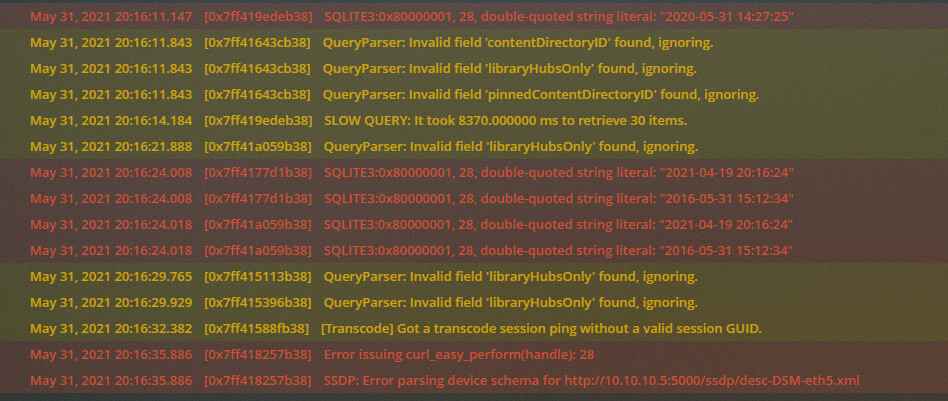
@ChuckPa I just tried updating to the latest version and my logs were filled with this and it was completely unusable - slow web UI, my phone client couldn’t connect at all. I only updated because my server crashed moments before this (user reported), it’s been fine for nearly a month.
Hello, I don’t know if your bug is related to mine but since the upgrade to 1.23.xxx both my laptop clients on Win7 that I use for music stopped working. Reverting to 1.22.3.4392 fixed the problem.
I wouldn’t say I found a fix, but I did end up having to start my Plex server from scratch. Even then every now and again it seems to becomes unresponsive - like it is currently. Lol I remember when my server used to stay up for months without issue.