Hi all - Help
I have 3 computers Hostname DC2003B( Plex running here ) pcgamer1 and pcgamer2 and one LG TV,
Well As of 6-1-205 pcgamer1 and 2 keep getting that message ’ Remote Watch Pass ’ asking me to pay 1.99 for one month and 19.99 annually to watch on my local network.
But the LG TV ( on same network) still will play my videos but not the 2 Windows 10 PCs Windows ( 22H2 )
The Plex Computer DC2003B will play where it Plex is installed.
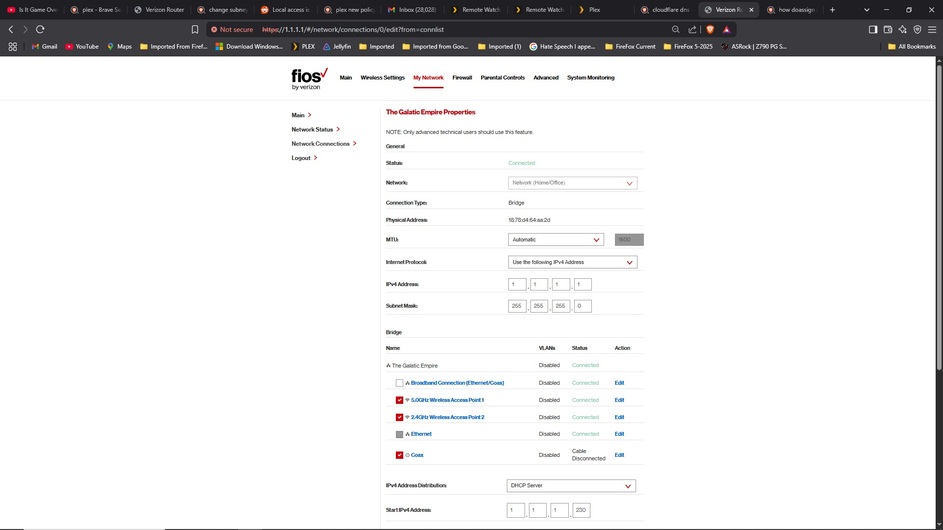
All IP addresses are all static. same subnet. No change to DNS, router, No Change to anything. No VPN
All 3 PC are in the same room. LG TV is in the bedroom. all on the same network and subnet mask. Everything was working for 8 years, until today. In short what happened ?
On Pcgamer2 i paused the video 2 days ago and it started playing when i hit the play button.
So i stopped it to see what would happen than restarted the video and up popped that message ’ Remote Watch Pass ’ prompt.
Hostname change on Plex PC:
2 days ago i changed the Plex server name from PC2 to DC2003B and it still worked for 2 days until today. I don’t think it is the name change since the TV still works and does not get the ‘Remote Watch Pass’ Prompt. all 3 PC can ping each other and have drive mapping between them. example from PCgamer1 mapping to PCgamer 2 and DC2003B:
Local disk (C:)
Local disk (D:)
D(\PCgamer2) (Q:)
E(\PCgamer2) (R:)
D(\DC2003B) (T:)
E(\DC2003B) (U:)
I even change the Plex PC back to hostname back to PC2 and still got the same message.
JellyFin still works on all 3 PC and the TV even after changing the Hostname
It is my understanding Plex will play on local Network like it did for me for 8 years.
I do not use remote servers on Plex.
reinstall didn’t help.
Weird thou, after uninstalling and reinstall PLEX to a different hard drive it remember all my settings ?! Some stuff stuck in the registry. It’s a windows thing.
I been at this for 12 hours 
Found someone with the same issue on reddit 2 days ago.
Help ?
should have purchased lift time Plex pass for 120 - 250 now