Server Version#: Version 1.20.0.3133
Player Version#: Not sure where to find this. Latest at this moment of writing though.
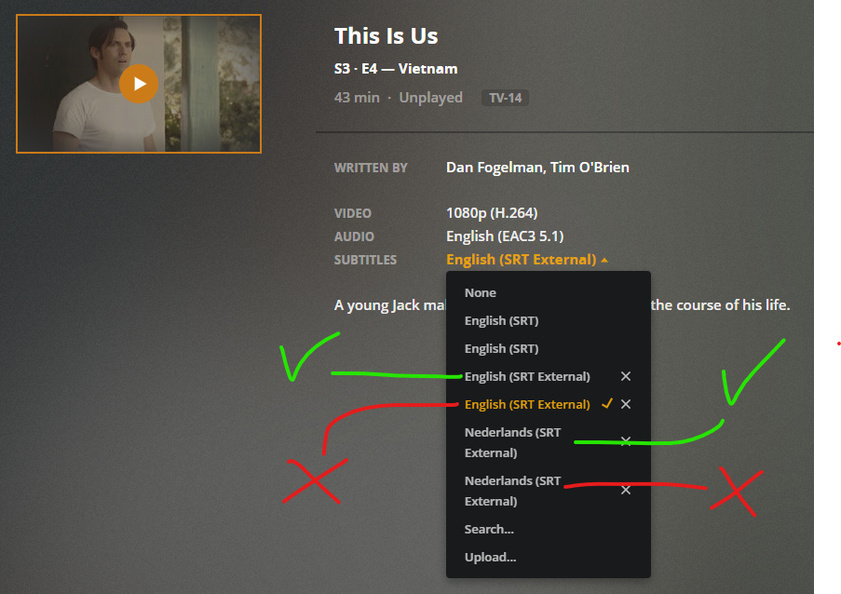
I renamed my tv shows folder from series to tvshows. Now I have a problem with most of my tv shows having the same subtitles twice: one located in the old /series/ root folder and the other in the new /tvshows/ root folder.
When I start playback at certain devices (Samsung Galaxy S10 or NVIDIA Shield) with the subs on the old location it returns an error immediately. When I start it on my PC through Plex Media Player it plays fine with subtitles.
I confirmed this was the problem through the console in Plex Web:
Couldn't find the file to stream: /data/series/This Is Us/Season 3/This.Is.Us.S03E04.WEBDL-1080p.x264.EAC3.KiNGS.en.srt
Error configuring transcoder: TPU: Failed to download sub-stream to temporary file
What I did:
I confirmed the presence of the files
I rescanned the library files
I refreshed the metadata
I cleaned the bundles
I emptied the trash
But no solution. Going through thousands of episodes manually is no option. Besides I wouldn’t be able to recognize the old subs anyway.
Since it’s just a database reference being at fault, is there any way to fix this?
A lot of my users (who aren’t tech savvy) have trouble playing most of the tv shows now because it usually defaults to a faulty subtitle file. Is there any other way to remove all subtitles located in the deleted root folder?
@OttoKerner You have any other suggestions perhaps?
I used to, but a while ago I removed the plug-in because I was using Bazarr. I have been using Bazarr now for quite some time while having SubZero disabled. Never got around on deleting the bundle folder untill a few weeks ago.
Do you have access to the plex database file?
For now, grab a copy under Settings - Server - Troubleshooting - Download Database
Then use whatever SQLite environment you are comfortable with.
I prefer https://sqlitebrowser.org/
Execute SQL SELECT * FROM media_streams WHERE url LIKE "%data/series%"
inspect the contents of the column url in the returned results and post a few example rows.
Additionally, the developers would like to look at some log files.
Could you please Refresh Matadata on 1 – 2 affected items, then wait 30 seconds and fetch server log files?
Weird idea:
go to Settings - Server - Agents - Movies
and drag one of the lines up and down. (it doesn’t matter which one, the point is to change anything in there)
Do this for all 3 movies agents.
Then try again to Refresh Metadata on an affected item.
Genius. This was the solution. In my case though I had to change the Shows > TheTVDB options around a bit, and put it back in order again! I would never think of this, so thank you very much!
I guess a database check or submitting logs won’t be necessary anymore?
I wonder what the thought process was here? What changed that caused a refresh metadata to delete the old subtitle records?
I think removing the SubZero bundle didn’t go cleanly, so the order of the agents had an invalid status.
Shuffling the lines around is like “kicking the tires” and causes the configuration to get re-written.