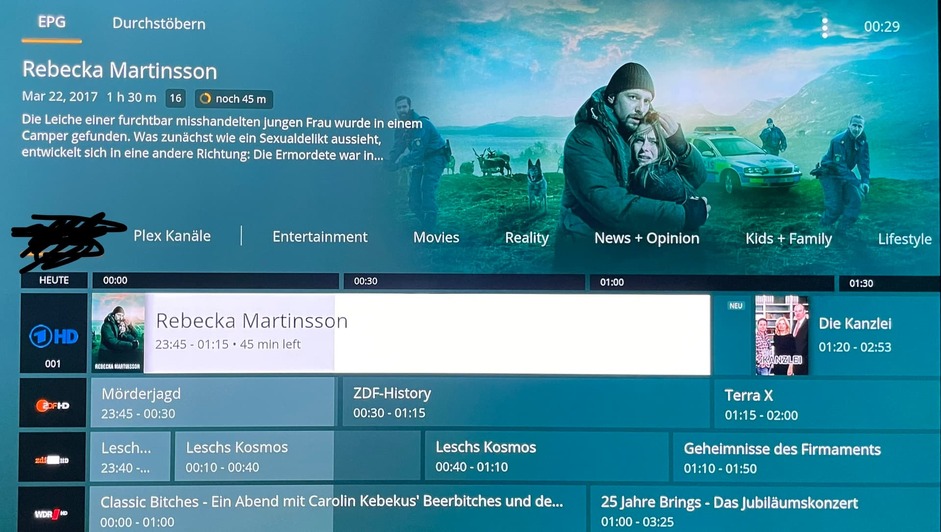
Almost like a slap in the face isn’t it.
Maybe this means the feature is on the way for the DVR side too. Double slap in the face if it just never shows up.
Almost like a slap in the face isn’t it.
Maybe this means the feature is on the way for the DVR side too. Double slap in the face if it just never shows up.
You can already make Live TV & DVR any order you want by using XMLTV.
Yes exactly, and guess what I received a second slap just today when I received an email from plex with the updates in the “new version” and they added a favorite function for plex live TV but nothing for the DVR… Again
HELLO PLEX I’VE BOUGHT A PLEX PASS FOR THE DVR FUNCTION, SO STOP MAKING FUNCTIONS FOR THE LIVE TV THAT’S FOR FREE.
Voted, make sure all you who are commenting +1 hit the vote button too!!
Absurd they have this for their own channels but not DVR.
If I didn’t have plex pass lifetime I definitely would have cancelled by now for lack of this feature after such a long time!
Really? Please share the info! I would love a nice logically ordered channel rundown and just now, I just…don’t  Any tips gratefully received
Use xTeVe.
yep keg, great piece of software, but plex still has work to do, categories would be nice
Cheers 
Adding my +1 This is something that emby and nearly every other DVR software I have used has had from day 1.
SORT IT OUT!
It seem that since they have removed all the “3rd party integration” requests I now have an extra vote I can officially apply to this.
Still hopeful that this will happen soon. I’d like to put my primary channels up top instead of having to scroll through dozens of channels that only get used occasionally.
I can’t believe this isn’t possible still.
Maybe signs of progress here…
In the latest Roku app preview, on the DVR guide view there is now a ‘my channels’ button. It doesn’t seem to do anything yet and I can’t see a way to customise the list, but could be they are starting to roll it out.
While you cannot rename channels, you can now customize the guide (=reordering, hiding channels).
as i see it right now this doesnt solve my problems at all. i want to customize (for all users) channel numbers, icons, genres, sections (tv,radio). the automated way doesnt work.
channels are on the wrong place, with icons i cant recognize and in genres that are more or less useless because they dont fit german cable.
that genres maybe fit the plex channels, but not me and my users. and that is the next problem. while i like the plex channels and watch them sometimes, my users dont. they dont want to see this plex channels! and it seems that they have to see them now in order to see my cable channels. not everybody is american?
i can understand why you do that and im sure for some people its great, but its not helping me
and im sorry, but this blogpost with this absurd memes is the worst i have seen from plex
That sounds like an entirely different suggestion then, doesn’t it?
You can always exclude the channels you don’t use from your list…
Reordering is definitely needed to be sure, but if your problem is scrolling through shopping channels, step one is to remove those shipping channels from the list altogether. Unless for some reason you WANT the shopping channels for some reason…
Dear bob, yes please.
Sort by channel name
Collapse by SD/HD (It’s the same channel!!)
+1 for this feature to finally show up after 5 years?
You can’t rename the channels, but you can reorder them now if you add them to your favourite channels. You hover over the channel in the EPG and click the little heart button to add it to your favourites, and then in the favourites tab hovering over the channel and clicking on the three dots gives a Reorder option to allow you to reorder your favourite channels. I use this to keep related channels together (e.g. all the BBC channels together, etc.)