I accidentally added volume 1 movies to a library of international films. I got distracted midway whilst adding a film. How can I reverse this?
- Open the library’s context menu
- Navigate to Manage Library > Edit…
- Open the Add Folder tab
- Remove the folder that doesn’t belong
https://support.plex.tv/articles/200289266-editing-libraries/
As a side note:
You should only have to add a library-level folder to your library… not the folders of individual movies.
Thank you SO much for replying so promptly. Perhaps I should clarify:
- I added the WHOLE of volume 1 - the entire volume of films - into the library.
- in the Add Folder tab there are only 15 entries visible
- I don’t understand the side note: to add a film I go to volume 1/media/international films/Amélie (for example) - is this wrong?
You don’t add movies individually.
You just point Plex to the folder where all your movies are stored within.
https://support.plex.tv/articles/categories/your-media/
Thank you for this.
I’ve had a look at the link but can’t see anything which tells you HOW to “point Plex to the folder where all your movies are stored within”
Of course this is a separate issue but I’m keen to learn!
Thanks again Otto. Unfortunately there’s no help on this link for removing recently added files en masse
It’s under “Editing Libraries”.
Ok got this.
Your link shows me a different way to ADD a file to my library, without having to go to the library link in the side panel. Thank you!
This way I avoid the “volume 1/media/international films/Amélie” pathway.
I can now avoid the accidental addition of the whole of volume 1 in future.
Are you able to help with reversing the addition of volume 1 into my library? I.e. removing it.
Thanks so much for your patience!
Simply remove the path to volume1 from your library. On the “Add Folder” tab.
But remember: you don’t add individual movies/series/albums to Plex. You merely point Plex at a folder with all movies at once.
If you wish your movies to be separated into 2 libraries, you need to separate your movie files into 2 separate folders.
Simply remove the path to volume1 from your library. On the “Add Folder” tab <
- firstly there are only a few films already listed on the Add Folder tab.
- secondly all the films I want to keep are also on volume 1
nightmare
The Add Folders tab must NOT list movies. It must only list folders which themselves can contain each several movies.
If this principle doesn’t translate to your current folder organization, I propose you better start over. Delete the library, reorganize your movie files, then create a new library.
What I meant to say was that the Add Folder menu show pathway to movie: e.g.
/volume1/Media/movies/BladeRunner (2007)Final Cut
Please show a screenshot.
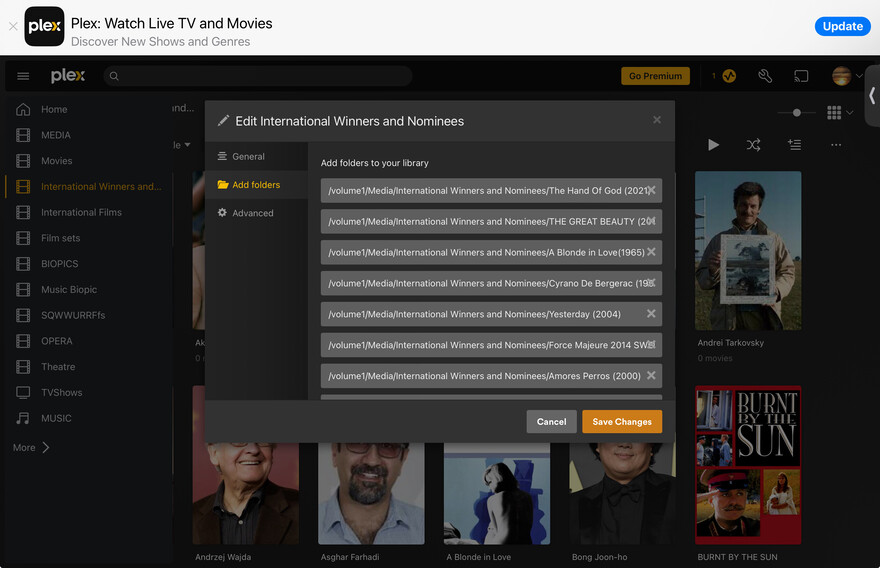
In this example, your library should point at
/volume 1/Media/International Winners and Nominees/
Not each of its individual child folders (movie folders).
A library can monitor many folders… you could e.g. add /volume 1/Media/Less Spectacular Movies/ to the same library. The folders added to a library should however not overlap (e.g. don’t add /volume 1/Media/ if the library already points at one of its child directories).

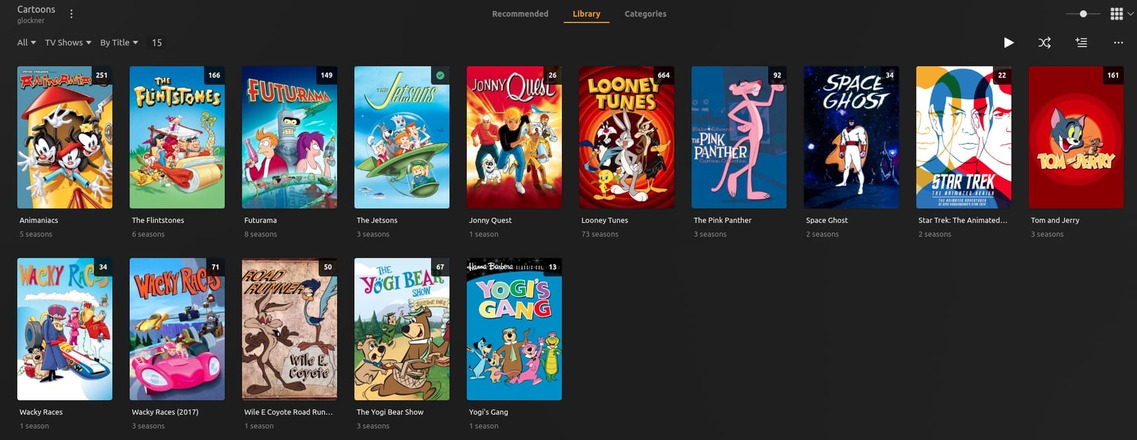
[chuck@glockner ~.2001]$ cd /vol/media/tv3
[chuck@glockner tv3.2002]$ ls
Animaniacs/    Looney Tunes (1929)/            The Jetsons/         Wacky Races/
Futurama/      Space Ghost/                    The Pink Panther/    Wacky Races (2017)/
Jonny Quest/   Star Trek The Animated Series/  The Yogi Bear Show/  Wile E. Coyote Road Runner (1949-2010)/
Looney Tunes/  The Flintstones/                Tom and Jerry/       Yogi's Gang/
[chuck@glockner tv3.2003]$
Not sure what this represents?
When I go to Add File, I get prompted to browse until I find the file. Hence I go to volume1, then media, then international movies and scroll through until I find the file I want to add.
Once I’ve added the file, it is added to the pathway which you can see in my screenshot.
I don’t know how to do it differently since I just follow the directions onscreen.
You don’t need to add individual files – just the directory corresponding to your library.
Plex expects a certain naming / structure inside a library directory – if you stick to that, every future scan of the library will pick up newly added movies. There’s no need to manually add every single movie.
It’s even worse… if you add every single file / movie folder, Plex will consider each of them as an own library-level folder associated with your library and look for the required naming schema/folder structure inside each of them – this is known to cause issues!!
Back to your example:
volume1
  Media
    International Winners and Nominees  <- THIS IS A LIBRARY FOLDER
      The Hand Of God (2021)     <- MOVIE FOLDER
        ...
      THE GREAT BEAUTY (2013)    <- MOVIE FOLDER
        ...
      A Blonde in Love (1965)    <- MOVIE FOLDER
        ...
      Cyrano De Bergerac (19xx)  <- MOVIE FOLDER
        ...
      Yesterday (2004)           <- MOVIE FOLDER
        ...
      Force Majeure 2014 SWS     <- POORLY NAMED MOVIE FOLDER
        ...
      Amores Perros (2000)       <- MOVIE FOLDER
        ...
      ...
If you take a closer look at the example posted by ChuckPa, you can see he’s added 1 single “library-level” folder to his library [screenshot #1]. That folder contains a set of tv-show folders [screenshot #2].
By scanning the library-level folder, Plex is picking up on the shows reflected by those tv-show folders [screenshot #3].
Really well explained - thank you. I understand not to manually add new films to the library and that plex will pick it up on a scan………I’ve seen this. Sometimes, however, a film inside my directory just doesn’t show up in plex. What then I wonder? I’m very consistent with naming now.
By the way I’ve fixed the initial problem - (adding volume 1 to my library!) - with a suggestion from someone on Reddit. Removed all media directories into a new folder, leaving only the affected library directory. Scanned remaining library files. All offending media disappeared.
However, library now has unwanted images which should be in Collections (Directors).
