At a certain point in the playback, it just stops, as if the stop button has been pressed, but it hasn’t. It happens at the same place every time, and only on certain files. This is all taking place locally on a LAN with minimal other traffic, and the files in question, while they do have high bitrates, are lower than others that work fine. These same files that cause an issue with the Roku app stream fine to other Plex clients such as the Chromecast Android TV app.
I have attached two anonymized logs of what happens on the titles at issue. log2.log (3.1 KB) log1.log (6.0 KB)
I’m not a Plex expert but from what I gather from these logs, the server believes that a ‘stop’ command has been issued- but in reality, it hasn’t.
Here is an excerpt of a few lines from the attached log:
Feb 17, 2021 13:34:20.704 [18392] DEBUG - Client [xxxxxx] reporting timeline state stopped, progress of 64000/5725761ms for guid=, playbackTime=64627ms ratingKey=94 url=, key=/library/metadata/94, containerKey=, metadataId=94, source=
Feb 17, 2021 13:34:20.704 [18392] DEBUG - Play progress on 94 ‘MOVIE’ - got played 64000 ms by account 1!
Feb 17, 2021 13:34:20.708 [18392] DEBUG - Streaming Resource: Terminated session 0x502a768:xxxxxx with reason Client stopped playback.
Feb 17, 2021 13:34:20.982 [5300] DEBUG - Failed to stream media, client probably disconnected after 270598144 bytes: 10054 - An existing connection was forcibly closed by the remote host
Any ideas what could be happening here? Would an extended or verbose log be useful? A video recording of what happens on the TV screen?
The same behavior is observed on the 6.7.11 and 6.7.12 versions of the preview channel
Some more technical info- this happens no matter what audio track is selected. It plays for a short time then you are dumped to the “Just Watched” screen.
One file has Atmos/DD 5.1/DD 2.0 (consistently stops about 1m05s into playback)
The other has DTSHD-MA / DTS 5.1/ DD 2.0. (consistently stops about 13s into playback)
I want to get invested in the Plex ecosystem but it’s frustrating when my main player doesn’t work.
This is still happening on about half of titles for me (dumps me out to “Just Played” screen shortly after starting). Comparing titles, the issue doesn’t appear to correlate to video bitrate or audio codec. Issue persists on latest release and preview channel apps.
Player is Roku TV 7225X running software 9.40 build 4200-38.
7000X models look to have comparable specs to other late models per this reference Roku
I just did a local and remote Roku app log capture starting 3/13/2021 13:40 EST (UTC-5). Username is same ZU476B72N4PC
I played three titles that dump to Just Played screen shortly after starting. I tried to interpret my local copy of the log and nothing jumps out, but here are some interesting lines:
Title 1
3/13/2021 13:40:37.085 [num:email:ID] INFO (PlaybackMgr) Current bandwidth reading: time=13:40 available=51.3 Mbps (51319 kbps)
3/13/2021 13:40:51.148 [num:email:ID] INFO (GeneralTask) [IdleManager] Info: lastKeyPress=31, lastRealKeyPress=37, screensaverTimeout=590, lockscreenTimeout=590, screensaverIsActive=false, lockscreenIsActive=false, isSuspended=false
3/13/2021 13:40:53.221 [num:email:ID] INFO (Navigation) Closing matching screen! screenName=VideoPlaybackScreen, screenId=Navigation28, activatePrevious=true
3/13/2021 13:40:53.224 [num:email:ID] INFO (PlaybackMgr) Stop requested with reason:
3/13/2021 13:40:53.226 [num:email:ID] WARN (PlaybackMgr) Player was already stopped; handle player state change manually.
3/13/2021 13:40:53.230 [num:email:ID] INFO (PlaybackMgr) Setting player control to ‘stop’. currentState=stopped, seekPosition=invalid
3/13/2021 13:40:53.231 [num:email:ID] INFO (PlaybackMgr) VideoPlaybackController::UpdateSubtitleSuppression: state=stopped trackName=mkv/off suppressCaptions=false
3/13/2021 13:40:53.231 [num:email:ID] INFO (PlaybackMgr) Player state changed to stopped (hasAd=false)
3/13/2021 13:40:53.239 [num:email:ID] INFO (PlaybackMgr) Disposing session
Title 2
3/13/2021 13:43:52.649 [num:email:ID] INFO (PlaybackMgr) VideoPlaybackController::UpdateSubtitleSuppression: state=finished trackName=mkv/off suppressCaptions=true
3/13/2021 13:43:52.654 [num:email:ID] INFO (PlaybackMgr) Player state changed to finished (hasAd=false)
3/13/2021 13:43:52.686 [num:email:ID] INFO (PlaybackMgr) Stop requested with reason:
3/13/2021 13:43:52.687 [num:email:ID] INFO (PlaybackMgr) Setting player control to ‘stop’. currentState=finished, seekPosition=invalid
Title 3
3/13/2021 13:42:18.557 [num:email:ID] INFO (PlaybackMgr) VideoPlaybackController::UpdateSubtitleSuppression: state=finished trackName=mkv/off suppressCaptions=true
3/13/2021 13:42:18.560 [num:email:ID] INFO (PlaybackMgr) Player state changed to finished (hasAd=false)
3/13/2021 13:42:18.585 [num:email:ID] INFO (PlaybackMgr) Stop requested with reason:
3/13/2021 13:42:18.585 [num:email:ID] INFO (PlaybackMgr) Setting player control to ‘stop’. currentState=finished, seekPosition=invalid
I don’t see any “remote” logs for that user, so I’ll go off of what you included here. From what I can tell, the Roku believes the video is finished, e.g. currentState=finished. This usually happens when there is a container issue. It may play in other clients OK, but the Roku OS is a bit picky here. I’d suggest running the file though mkclean and replace the file with the output.
I definitely ticked remote log, maybe it was recorded under my email address instead of username which was recently added. I can PM you the email address if that would be helpful.
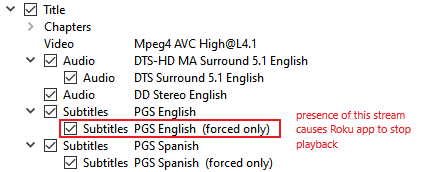
No luck with mkclean, same results. However, I did a lot of variations and testing with composing the .mkv files and I think I have narrowed down a potential cause: presence of an English “Forced” PGS subtitle stream.
Note that I have subtitles turned off for the title [Playback Settings/Streams/Subtitles/None]. The issue persists regardless of “Roku Captions Mode” setting and “Burn Subtitles” setting for the app. When I force subtitles on, they are burned in via transcode (expected behavior for PGS) and playback works.
I recreated the mkv files with many different combinations of audio and subtitle tracks, and when I removed the Forced PGS subtitle stream from the container, I no longer experience the issue.
So somewhere in the Roku player, it’s running into the “Forced” PGS subtitle stream in the mkv shortly after the title has started, and even with subtitles turned off it seizes up and stops playback. In this light, the above logs make a little more sense. The seize does not appear to have any correspondence to where actual forced subtitles would appear.
A couple notes. This now appears to be a bug with the Roku OS video player’s handling of MKV files where there is a gap in stream numbering.
Specifically, if subtitle tracks are numbered ID:5 and then ID:7, (perhaps because ID:6 has been removed as unwanted), the Roku player will abandon playback.
This was diagnosed by inspection with MediaInfo. The following title dies 13 seconds in, whereas other titles with totally sequential numbering play fine.
Text #1
ID                                       : 5
ID in the original source medium         : 4608 (0x1200)
Format                                   : PGS
Codec ID                                 : S_HDMV/PGS
Codec ID/Info                            : Picture based subtitle format used on BDs/HD-DVDs
Duration                                 : 1 h 33 min
Bit rate                                 : 55.1 kb/s
Count of elements                        : 3236
Stream size                              : 36.8 MiB (0%)
Language                                 : English
Default                                  : No
Forced                                   : No
Original source medium                   : Blu-ray

Text #2
ID                                       : 7
ID in the original source medium         : 4609 (0x1201)
Format                                   : PGS
Codec ID                                 : S_HDMV/PGS
Codec ID/Info                            : Picture based subtitle format used on BDs/HD-DVDs
Duration                                 : 1 h 28 min
Bit rate                                 : 46.2 kb/s
Count of elements                        : 2654
Stream size                              : 29.1 MiB (0%)
Language                                 : Spanish
Default                                  : No
Forced                                   : No
Original source medium                   : Blu-ray
Apparently non-sequential track numbering is totally fine in the Matroska standards yet Roku OS chokes up on it. mkclean does not renumber streams so that’s why it wasn’t helping with the problem. A full remux with MKVToolsNix does renumber the streams to consecutive so that can fix the file for Roku.
Is this something I can escalate to Roku directly as a consumer, or can issues like this only be raised by certified developers?