Server Version#: 1.18.5.2309
Player Version#: 9.2.0
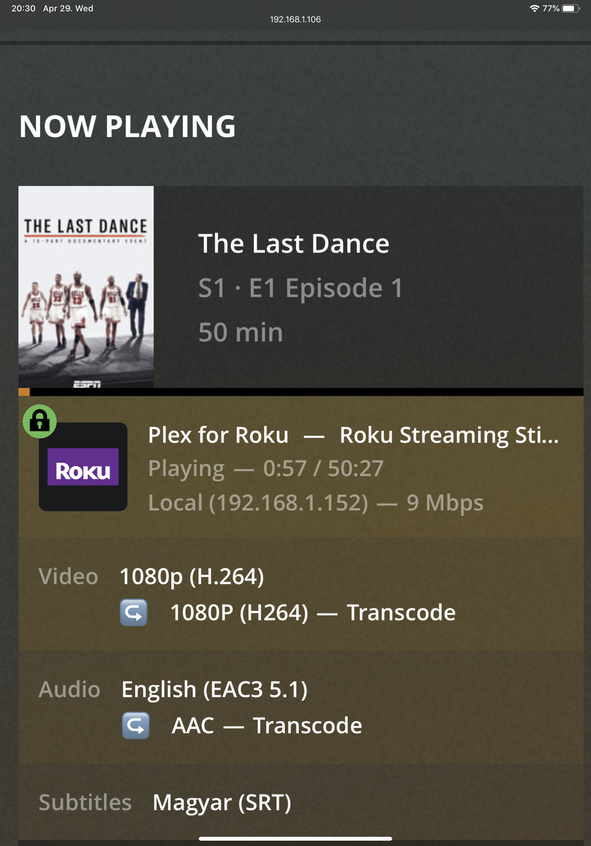
Hi, My Roku Ultra Stick+ Transcodes Audio all the time. I followed the instructions I found here
I set the Roku to Dolby Digital DTS and I can see on my Plex Dashboard that it no longer transcodes audio but Direct Plays- but audio disappears immediately for all my movies. Can this be due to my TV’s limitation that it cannot support Dolby DTS?
I could be wrong but I do not think there is any such device as a Roku Ultra Stick+.
You probably should post the exact model number. Also you might want to zip up you log files from a session where your server is transcoding to provide files to your Roku and attach them here.
Yes it can be and probably is your TV that cannot playback Dolby DTS. You may need to reencode the file to simple Dolby 2.0 to get playback of both audio and video.
Setting the Roku’s audio setting manually will just allow the audio to passthrough. The connected device will still have to support the audio format. It’s best to leave the audio settings set to Auto so the Roku can detect what’s supported. In some rare cases you may need to manually set it, but most times it’ll cause more issues.
Also I looked at my TV specs it’s a Samsung UE46ES6800 and it seems it does support Dolby DTS but as soon as I switch from Auto to DTS in Roku’s settings it starts to Direct Play but there’s no audio coming out.
Make sure the transcoder isn’t disabled:
server/settings/transcoder
If everyone thinks that audio stream should be transcoded - and the transcoder is off - it’ll be really quiet, 'cause there won’t be any audio.
If the transcoder is on and transcoding that audio - turning off the transcoder will, at least let you know when you’re passing through audio to the TV - if you can hear something. You’ll know then the TV is playing the natural audio - whatever it is.
This is probably the most annoying part of the setup.
It’s basically all trial and error.
If the developers understand it - they’re not letting us in on it - and if we get it working - it’s probably by accident.
It is not disabled just checked. Another thing, I got this Roku Streaming Stick+ and a Chrome Cast Ultra plugged into the same TV and if I play the same movie using Chrome Cast (DLNA) it direct plays audio…If I try with Roku it transcodes unless if I force it to Dolby DTS in Roku settings but then there is no sound…
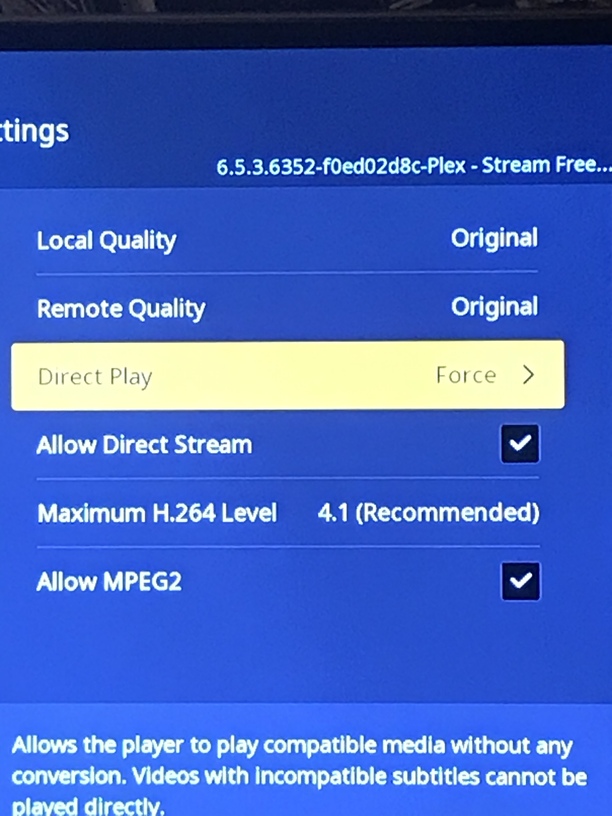
I just spent hours investigating the same thing. Turn on Direct Play->force, and it will not transcode audio anymore. Weird, but it worked for me. Just don’t turn on subtitles, otherwise it reverts to AAC stereo. Also weird.
Xmedia Recode can do an audio conversion in moments: https://www.xmedia-recode.de/en/index.php
while normalizing
and maintaining the original track in slot 2
and embedding the subs
and flaging your tracks with languages
and it’s got a cup holder.
Don’t know. Maybe? Subtitles were affecting my audio on Roku so anything is possible. On my android phone with the plex app I can stream AC3 5.1 sound to it, with subtitles inside the mp4 displaying (not burned) and the player transcodes instead of the server. Try the conversion to AC3 5.1 and report back please.
EAC3 is supported on the Roku, as long as your connected device supports EAC3.
Got pretty excited when saw your post but it still transcodes
two things are usually happening when Direct Play is forced and a transcode still occurs.
Subtitles are not compatible, and need to be burned in.
Server limitation is set (bandwidth) causing the client to transcode.
Both of these should not be the cause though because that subtitle should be compatible from the limited info I see there, and you are local, so no server limitation should come into play here. Is it possible you have the subtitle option in the settings set to Always Burn?
I’m more than happy to take a look at the logs to figure out the real reason though.
Open the Plex channel
Enable remote logging in the settings
Make sure Direct Play is set to auto
Start playback of the item
Wait until the playback starts, and stop it.
Disable remote logging
Report back with the time/timezone after test is complete.
Thanks for the help. In both cases where I use my Roku or ChromeCast/DLNA audio AAC Transcode is present. This makes me think that my TV doesnt support EAC? The only difference is with ChromeCast I still get zero video transcode…
I just checked and I have my subtitle options set to “Always Burn”. If I do “Auto” then video transcode goes away and its Direct but I see no subtitles displayed…
I enabled Remote logging, Direct Play auto and switched back subtitles to burn always. Started my content at 12:46PM (Central European Timezone - I think its 6 hours ahead of EST)
Did you make sure to set the Roku Captions Mode to On? This can be changed in the Plex settings or during playback pressing the * button (they renamed it to Closed captions: On always)